



It is a auto action to create a layer configuration that you always use with one touch.
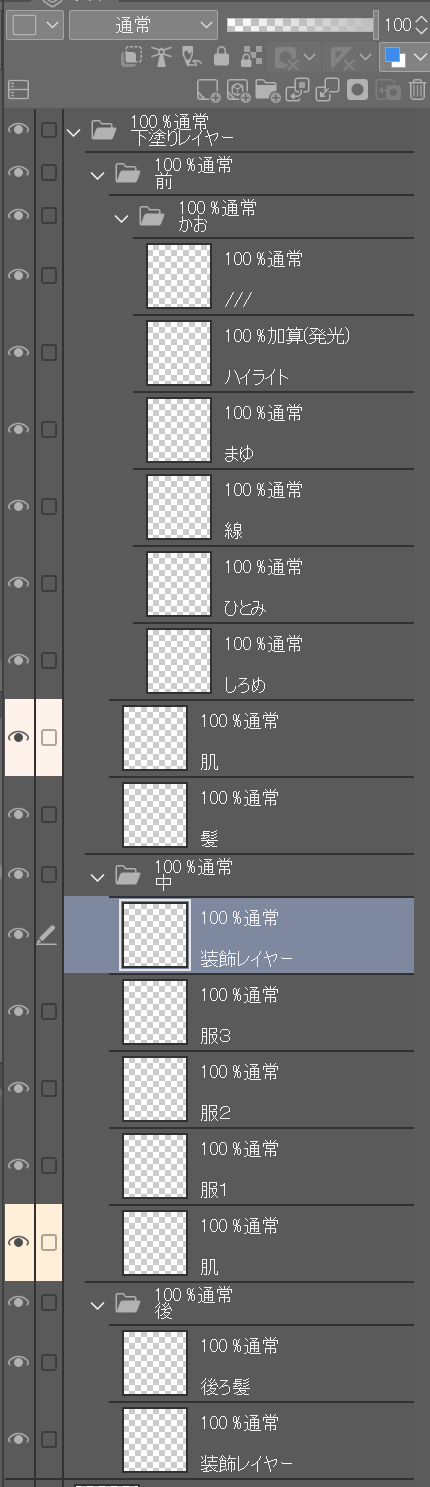
Running this auto action creates layer below configuration.
After downloading this, you can use it immediately by registering it as a auto action.
If you are a general user, please use "Draft Preparation Default".
Since I use a border for my line art, I use "Draft Preparation Use Border" with the border drawing set. Here, except for the layers in the "Kao" folder, the border 1px is set on the all layers.
(To use borders, you must be in a version that can use border effects.) CLIP STUDIO PAINT MAY NOT WORK WITH DEBUT)
いつも使用しているレイヤー構成をワンタッチで制作するオートアクションです。
このオートアクションを実行すると以下のレイヤー構成が作成されます。
こちらをダウンロードの後、オートアクションとして登録していただければすぐに使用可能です。
一般の方は「下書き準備 デフォルト」をご使用ください。
自分は線画に境界線を利用しているため、境界線の描画を設定した「下書き準備 境界線使用」を使用しています。こちらでは「かお」フォルダー内のレイヤーを除いて、すべてのレイヤーに境界線1pxが設定されます。
(境界線使用には境界線効果が使用できるバージョンである必要があります。CLIP STUDIO PAINT DEBUTでは動作しない可能性があります)


Popular “Auto Action” materials


New materials







Badges
-
 MVP ◆This user has contributed greatly to the management of the community, by posting many great responses to the questions asked. Once every three months, MVPs are determined based on the points earned during that period and will be recognized accordingly.
 -
 New Valuable Player (NVP) ◆These are the next-best contributors to the community after MVPs. This is awarded to users who have not yet won an MVP award, based on the number of points they have earned.
 -
 Official Expert ◆Chosen out of all MVP awardees, who are already proof of excellence, this is a testimony of outstanding correspondence in the community. After careful screening, they are appointed by CELSYS and assume their position.Note: Formally called “Evangelists”
 -
 Official Moderator of CELSYS ◆Moderators are official CELSYS staff members who are fluent in Japanese as well as various other languages. Moderators are not experts on the software or illustration, so they are not able to directly answer your questions. However, moderators provide communication and language support to ensure that everyone can smoothly communicate with each other.
 -
 CELSYS official accountThe Official Administrator Account