



I made it for myself because I wanted to see at a glance what kind of brush the downloaded brush is.
It's super simple, so I think it can be used in a variety of ways. Please use it if you like.
ダウンロードしたブラシがどんなブラシなのか、パッと一覧で見たくて自分用に作成しました。
超シンプルなので、いろいろ使えると思います。よかったらお使いください。
◼️ Examples of use
For example, if you make a list with CELSYS official materials, it looks like this.

・ It is fun to draw the same motif and compare the drawing of brushes.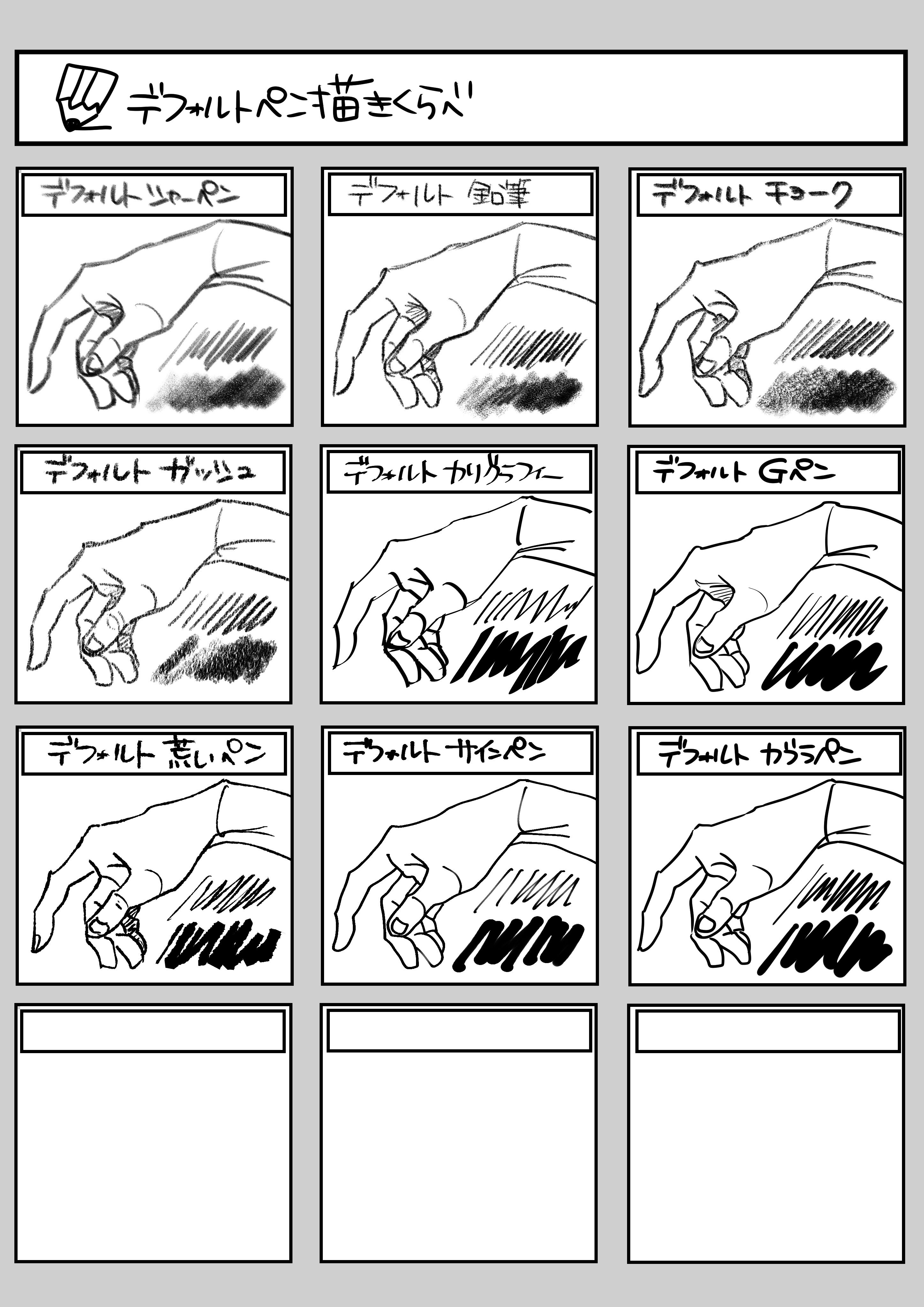
In addition,
・ List of downloaded decorative brushes
・ pattern brush, screentones, etc.
It is convenient to be able to see a list of brushes that you cannot imagine at a glance.
(Also recommended for those who draw manga)
I think it can be used in various ways.
◼️ How to use
Super easy to use! Just (^^) draw on the purple layer of the template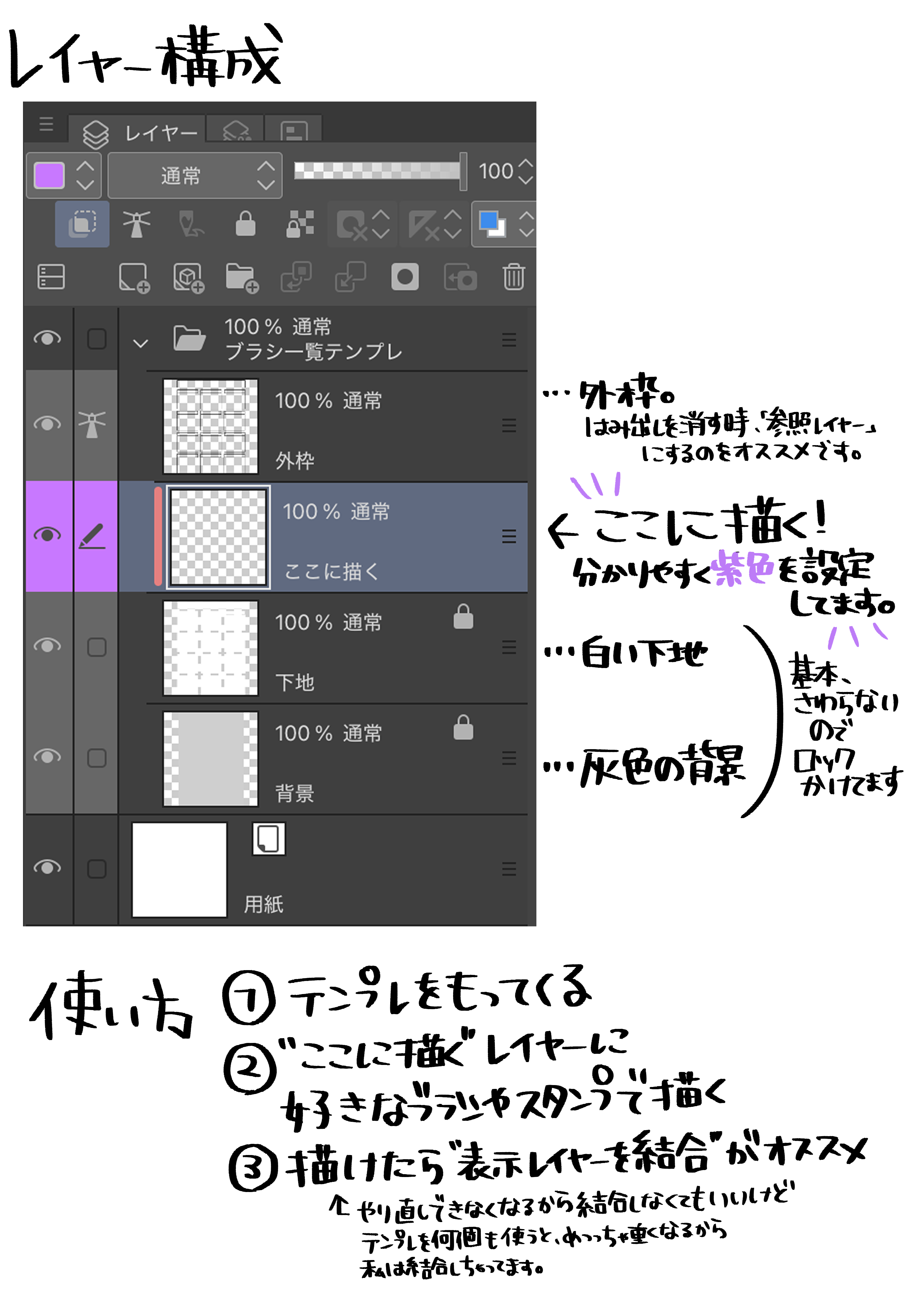
◼️ Highlights
To draw beautifully without sticking out,
(1) Remove the protrusion later, or
(2) Select the range to draw from the beginning.
Personally, I recommend auto select (2). Because it's easy.

◼️使用例
例えば、セルシス公式の素材で一覧を作るとこんな感じ。
・同じモチーフを描いて、ブラシの描きごこちを比較も楽しいです
他にも、
・ダウンロードした装飾ブラシの一覧
・パターンブラシやスクリーントーンなど、
ぱっと見でイメージつかないブラシも一覧で見れると便利です
(漫画を描く方にもおすすめ)
など色々使えると思います。
◼️使い方
使い方は超簡単!テンプレの紫のレイヤーに描き込むだけ(^^)
◼️ポイント
はみ出さずに綺麗に描くには、
①あとからはみ出しを消す か、
②最初から描く範囲を選択する です。
個人的には②の自動選択をおすすめします。楽なので。








Other materials by おま@oma_gency


Popular “Layer template” materials


New materials











Badges
-
 MVP ◆This user has contributed greatly to the management of the community, by posting many great responses to the questions asked. Once every three months, MVPs are determined based on the points earned during that period and will be recognized accordingly.
 -
 New Valuable Player (NVP) ◆These are the next-best contributors to the community after MVPs. This is awarded to users who have not yet won an MVP award, based on the number of points they have earned.
 -
 Official Expert ◆Chosen out of all MVP awardees, who are already proof of excellence, this is a testimony of outstanding correspondence in the community. After careful screening, they are appointed by CELSYS and assume their position.Note: Formally called “Evangelists”
 -
 Official Moderator of CELSYS ◆Moderators are official CELSYS staff members who are fluent in Japanese as well as various other languages. Moderators are not experts on the software or illustration, so they are not able to directly answer your questions. However, moderators provide communication and language support to ensure that everyone can smoothly communicate with each other.
 -
 CELSYS official accountThe Official Administrator Account