



Dejirumi Atsubetsu affiliation
My name is Maruto, the creator. I'm a beginner who has just touched Blender, but thank you.
でじるみ厚別所属
制作者の『まると』と申します。Blenderに触れてまだ間もない初心者ですがよろしくお願いします。
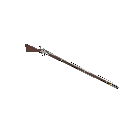
It is a musket with the motif of Brown Bess, the standard musket of the 18th century British Army.
Since the detailed materials were not prepared, there are many parts that were supplemented by imagination, so it is quite far from the real thing. Thank you for your understanding.
You can also land a bayonet by displaying it from the object list.
★Using★
〇object How to operate the list

〇 How to move the, fire lid, and trigger
1. From the object list, select either, trigger, or fire lid

2. Adjust the Z number of rotation of the alignment from the selected state.

3. By applying this to the remaining parts, you can create the state before and at the time of launch.
Recommended setting angle for each part
〇 Firing status
・ -60°
・Fire lid -60~-70°
・Trigger -15~-20°
〇 Before launch
・ 0° (If it is in full state, about 15 ~ 20° is good)
・Fire lid 0°
・Trigger 0°
★Preview★


18世紀イギリス陸軍の制式マスケット銃のブラウン・ベスをモチーフにしたマスケット銃です。
細部の資料が揃わなかった為、想像で補完した箇所が多いので実物とはかなりかけ離れております。ご了承ください。
また、オブジェクトリストから銃剣を表示することで着剣する事ができます。
★使い方★
〇オブジェクトリストの操作方法
〇コック、火蓋、トリガーの動かし方
1.オブジェクトリストから、コック、トリガー、火蓋のいずれかを選択します
2.選択した状態から配置の回転のZの数値を調整します。
3.これを残りのパーツにも適用することで発射前、発射時の状態を作ることができます。
各パーツのおすすめの設定角度
〇発射状態
・コック -60°
・火蓋 -60~-70°
・トリガー -15~-20°
〇発射前
・コック 0°(フルコック状態なら15~20°ぐらいがよろしいかと)
・火蓋 0°
・トリガー 0°
★プレビュー★
Material マテリアル


Other materials by でじるみ札幌厚別


Popular “3D object” materials


New materials







Badges
-
 MVP ◆This user has contributed greatly to the management of the community, by posting many great responses to the questions asked. Once every three months, MVPs are determined based on the points earned during that period and will be recognized accordingly.
 -
 New Valuable Player (NVP) ◆These are the next-best contributors to the community after MVPs. This is awarded to users who have not yet won an MVP award, based on the number of points they have earned.
 -
 Official Expert ◆Chosen out of all MVP awardees, who are already proof of excellence, this is a testimony of outstanding correspondence in the community. After careful screening, they are appointed by CELSYS and assume their position.Note: Formally called “Evangelists”
 -
 Official Moderator of CELSYS ◆Moderators are official CELSYS staff members who are fluent in Japanese as well as various other languages. Moderators are not experts on the software or illustration, so they are not able to directly answer your questions. However, moderators provide communication and language support to ensure that everyone can smoothly communicate with each other.
 -
 CELSYS official accountThe Official Administrator Account