




Create, show, and hide gray layers auto action
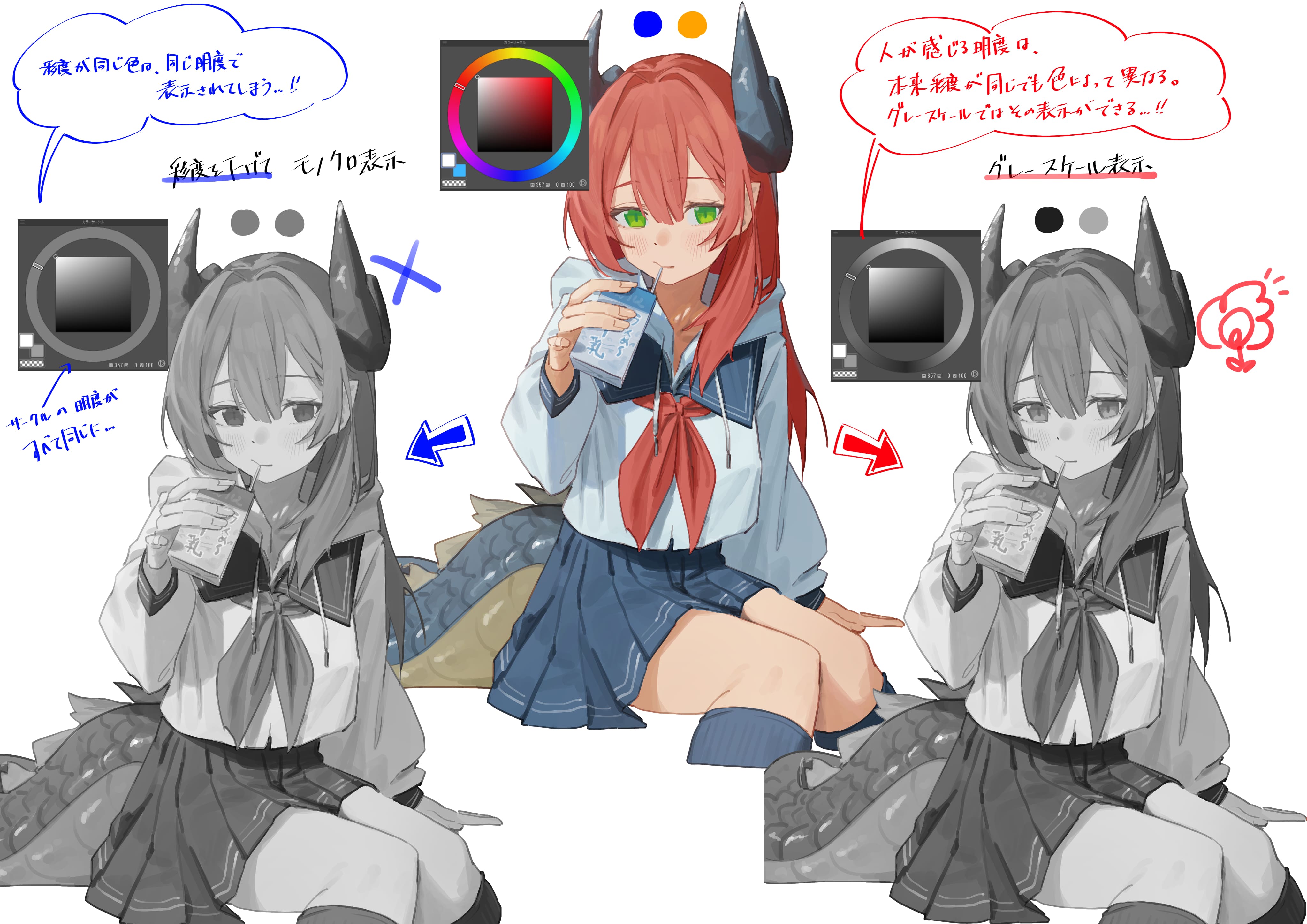
Originally, the brightness is different for each color, but the same saturation is the same for digital. When you want to check light and dark digitally, you cannot display the difference between human perception and light if you only reduce the saturation.
Therefore, the "gray" display of the layer property is convenient, but since the display can only be switched for each layer, we created a auto action to make fit to screen easier.
Following
Left figure - Reduced saturation
Right: View as gray
As you can see, gray can clearly express the difference in brightness due to color, so you can check the light and dark more accurately.
This auto action creates a layer so that it can be displayed "gray", and can be shown / hidden.
If you register each auto action to the shortcut, you can do it with just one click, which is convenient!
・ If you bring the created "gray" layer to the top, you can display the entire gray.
・ Please note that the target layer to be shown / hidden is "gray", so if you change the name after creating the layer, the auto action will not work.
* Due to the specifications of the auto action, it is not possible to display / hide in one shortcut, so it is separated.
✦ Added the auto action of [gray layer creation and locking].
This may be better because there is no accidental explosion.
グレースケールレイヤーの作成、表示/非表示のオートアクション
本来、色ごとに明度が違いますが、デジタルだと同じ彩度は同じ明度になっています。デジタルで明暗を確認したいとき、彩度を下げるだけだと人間の知覚的な明暗の差を表示することができません。
そこで便利なのがレイヤープロパティの「グレースケール」表示なのですが、レイヤー1枚ごとにしか表示切替ができないため、全体表示が簡単にできるようにオートアクションを作成しました。
以下、
左図 ― 彩度を下げて表示
右図 ― グレースケールで表示
ご覧いただければお分かりいただけると思いますが、グレースケールの方が色による明度の差もしっかりと表現できるため、より正確に明暗の確認ができます。
このオートアクションは「グレースケール」表示ができるようにレイヤーを作成し、表示/非表示ができるものです。
各オートアクションを、ショートカットに登録すれば、ワンクリックでできるので便利です!
・作成した「グレースケール」レイヤーは一番上に持ってくると、全体をグレースケール表示できます。
・表示/非表示の対象レイヤーが「グレースケール」となっているため、レイヤー作成後、名前を変えてしまうとオートアクションが機能しないので要注意です。
※オートアクションの仕様上、表示/非表示を一つのショートカットにできないため、分けています。
✦ 【グレースケールレイヤー作成、ロック】のオートアクションを追加しました。
こちらの方が誤爆がなくていいかもしれません。
Category 1 カテゴリ1








Other materials by lupinu5


Popular “Material catalog” materials


New materials










Badges
-
 MVP ◆This user has contributed greatly to the management of the community, by posting many great responses to the questions asked. Once every three months, MVPs are determined based on the points earned during that period and will be recognized accordingly.
 -
 New Valuable Player (NVP) ◆These are the next-best contributors to the community after MVPs. This is awarded to users who have not yet won an MVP award, based on the number of points they have earned.
 -
 Official Expert ◆Chosen out of all MVP awardees, who are already proof of excellence, this is a testimony of outstanding correspondence in the community. After careful screening, they are appointed by CELSYS and assume their position.Note: Formally called “Evangelists”
 -
 Official Moderator of CELSYS ◆Moderators are official CELSYS staff members who are fluent in Japanese as well as various other languages. Moderators are not experts on the software or illustration, so they are not able to directly answer your questions. However, moderators provide communication and language support to ensure that everyone can smoothly communicate with each other.
 -
 CELSYS official accountThe Official Administrator Account