


I´ve reworked my old elaborate layer template for webtoons after seeing how some things were confusing/ not working how I thought they would.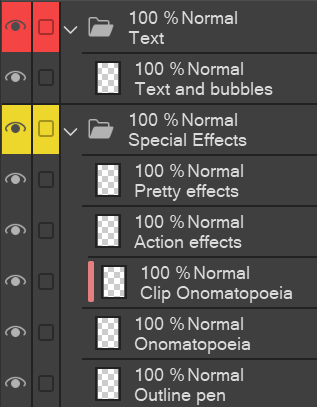
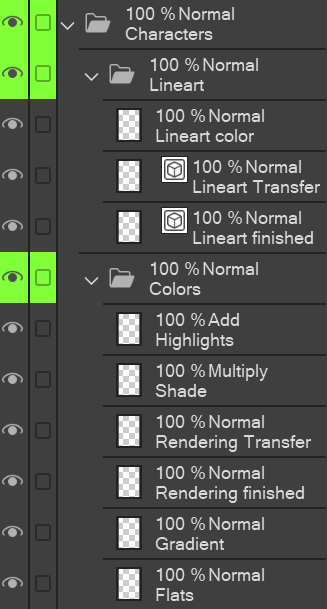

If you want a veeeery elaborate layer template, search for "Layer Template: Webtoon (very elaborate)" or go to the first post on my profile :)
How to use:
- Pull all your frame layers into the "Frames (3D in here)" folder. Use the Smart selection tool to draw inside the Frames (but on the other layers, so you don´t need to paste the template for every panel). Since 3D models can´t stay in the selected area, you have to pull those into the frame.
- In the "Sketch" folder, I like to first do the storyboard on the "very rough sketch" layer, and think the values through, before I move on to the more elaborate sketch.
- I work with a system of "X finished" and "X Transfer" (to be found in Sketch, Background, and Characters folders). I draw on the "Transfer" layer first, and once I´m satisfied, I use the "Transfer to lower layer" function (under "Layer") to transfer it onto the "finished" layer. This way, I can focus on drawing e.g. only the hair lineart first and not worry about erasing parts of the face lineart. [I prefer the "transfer" function to the "merge layers" function, because this way, I don´t need to create a new layer every time.
- Explanations to the Special Effects layers: "Outline pen" is for every effect I would use the outline pen for, e.g. chatter/ laughing, annoyed, movement lines, sound words like snicker etc. "Onomatopoeia" is for the big sound effects like BOOM! and the "clip" version is in case you want to do gradients or patterns inside.
- Canvas black is for those scenes where your canvas should be black but you can´t make the paper black because it´s not the entire page; just use the bucket tool.
- in Text, I merge all my texts and speech bubbles into one layer so it doesn´t get overwhelming; you can still move each part separately anyway.


Other materials by Arifryer

Popular “Layer template” materials


New materials


Badges
-
 MVP ◆This user has contributed greatly to the management of the community, by posting many great responses to the questions asked. Once every three months, MVPs are determined based on the points earned during that period and will be recognized accordingly.
 -
 New Valuable Player (NVP) ◆These are the next-best contributors to the community after MVPs. This is awarded to users who have not yet won an MVP award, based on the number of points they have earned.
 -
 Official Expert ◆Chosen out of all MVP awardees, who are already proof of excellence, this is a testimony of outstanding correspondence in the community. After careful screening, they are appointed by CELSYS and assume their position.Note: Formally called “Evangelists”
 -
 Official Moderator of CELSYS ◆Moderators are official CELSYS staff members who are fluent in Japanese as well as various other languages. Moderators are not experts on the software or illustration, so they are not able to directly answer your questions. However, moderators provide communication and language support to ensure that everyone can smoothly communicate with each other.
 -
 CELSYS official accountThe Official Administrator Account
