



This is a 3D model of a shower room.
There are four types of material patterns, and the default setting is (1). Switch according to your needs.
(1) Fully glazed
(2) Part of the door is glass
(3) Part of the door and the left and right walls are glass
(4) No glass
* The flat glass door "Frameless Glass Door" has been added in the update. If you're worried about unnecessary lines on the default all-glass doors, try switching from Layout to "Frameless Glass Door". If you want to change to a different pattern, change it back to the default layout before switching.
The door can be opened and closed with a movable slider. The movable slider is set to the default frame door and the additional "Frameless Glass Door", so please use the slider of the displayed door.
Small items, walls, ceilings, shower parts, etc. can all be moved or hidden individually.
(However, the hose does not follow the shower head, so if you want to move the shower head, please hide the hose part and add it.)
Please feel free to use it.
シャワールームの3Dモデルです。
マテリアルパターンは下記4種類で、初期設定では①になっています。必要に応じて切り替えてください。
①全面ガラス張り
②ドアの一部がガラス
③ドアの一部と左右の壁がガラス
④ガラスなし
※アップデートで平坦ガラスのドア「Frameless Glass Door」を追加しました。初期設定の全面ガラス張り扉の不要な線が気になる場合は、レイアウトから「Frameless Glass Door」に切り替えてみてください。他のパターンに変更する際は、初期レイアウトに戻してから切り替えてください。
扉は可動スライダーで開閉できます。可動スライダーは初期設定のフレームドアと、追加の「Frameless Glass Door」それぞれに設定していますので、表示しているほうのドアのスライダーをご利用ください。
小物類・壁・天井・各シャワーパーツなど、すべて個別に移動や非表示が可能です。
(ただしホースはシャワーヘッドに追従しませんので、シャワーヘッドを動かす場合は、ホース部分を非表示にして書き足すなどして頂ければと思います)
ご自由にお使いください。


Enlarged view at the bottom


下部拡大図
Material マテリアル
-
1. Full glass 1.全面ガラス
-
2. Door part glass 2.ドア一部ガラス
-
3. Door part and wall glass 3.ドア一部と壁ガラス
-
4. No glass 4.ガラスなし
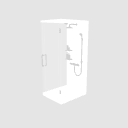


configuration 配置
-
default layout 初期レイアウト
-
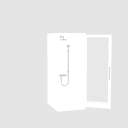
Frameless_Glass_Door Frameless_Glass_Door


pose parts 可動パーツ
-
Framed_Door (Default Door) Framed_Door(初期設定ドア)
-
Frameless_Glass_Door Frameless_Glass_Door

Update history
Doors were added. ドアの追加等を実施しました。
Old version





Other materials by hesperus


Popular “3D object” materials


New materials







-
 MVP ◆This user has contributed greatly to the management of the community, by posting many great responses to the questions asked. Once every three months, MVPs are determined based on the points earned during that period and will be recognized accordingly.
 -
 New Valuable Player (NVP) ◆These are the next-best contributors to the community after MVPs. This is awarded to users who have not yet won an MVP award, based on the number of points they have earned.
 -
 Official Expert ◆Chosen out of all MVP awardees, who are already proof of excellence, this is a testimony of outstanding correspondence in the community. After careful screening, they are appointed by CELSYS and assume their position.Note: Formally called “Evangelists”
 -
 Official Moderator of CELSYS ◆Moderators are official CELSYS staff members who are fluent in Japanese as well as various other languages. Moderators are not experts on the software or illustration, so they are not able to directly answer your questions. However, moderators provide communication and language support to ensure that everyone can smoothly communicate with each other.
 -
 CELSYS official accountThe Official Administrator Account