



This material is from the gradient map collection ("Nukegara Grade") that is being distributed for a fee.
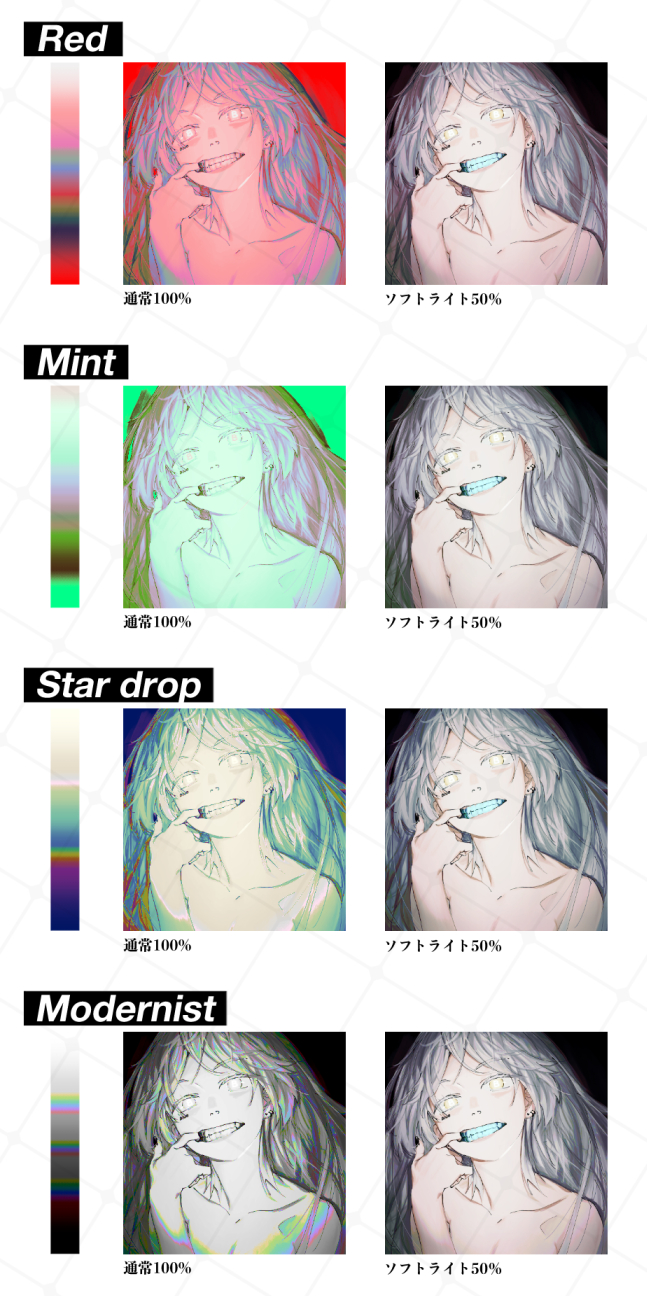




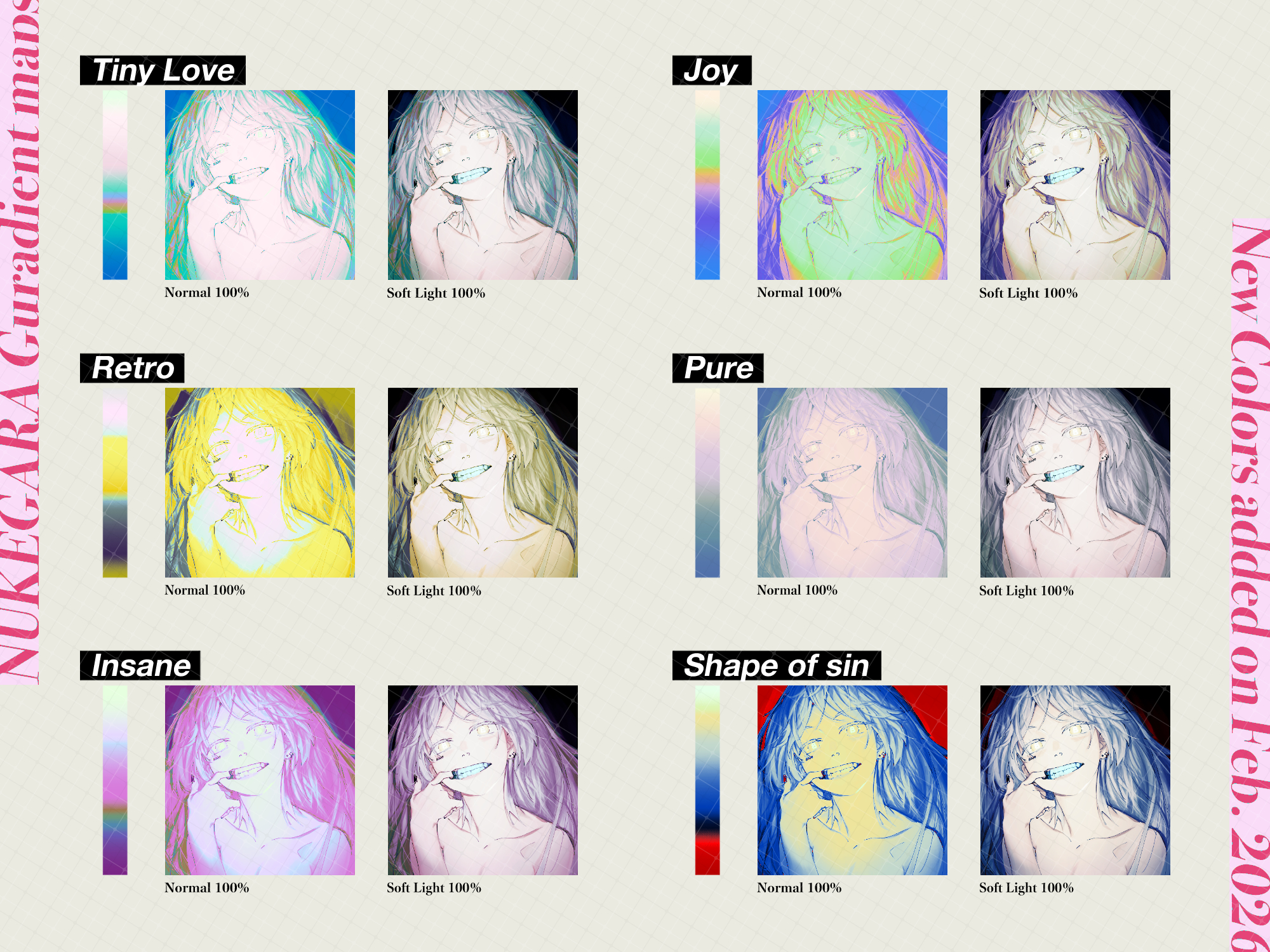
This is a free trial version that excerpts 4 types.
Not only does it add a strong color,
・ I want to adjust the overall tone
・ I want to change the air feeling and temperature just a little.
・ I want a "push" before finishing
It contains gradient map that are easy to use in such situations.
Than fancy changes
It is designed with an emphasis on bringing together the relationship between lines, gradations and colors without breaking them.
——————————
The following four types of gradient map are included.
① Red
The change in color is easy to understand,
It can be used in a wide range of ways, usually from 100% to soft light.
② Mint
For bass when you want to lightly summarize the whole thing.
Designed to be easy to adjust even at low opacity and hard light.
③ Star drop
An easy-to-use map when you want to change the mood and emotional tone.
④ Modernist
Without destroying the dark and achromatic screen,
A gradient that brings together a calm impression.
A wider range of tones and deeper color designs are included in the paid version.
Click here for the paid version material ↓
https://assets.clip-studio.com/ja-jp/detail?id=2221278
———————

↑ Mint is applied at hard light 60% to blend in the overall color unevenness and create a sense of unity while suppressing the color tone.
Mint is recommended when you want to adjust to a transparent and ephemeral skin tone.
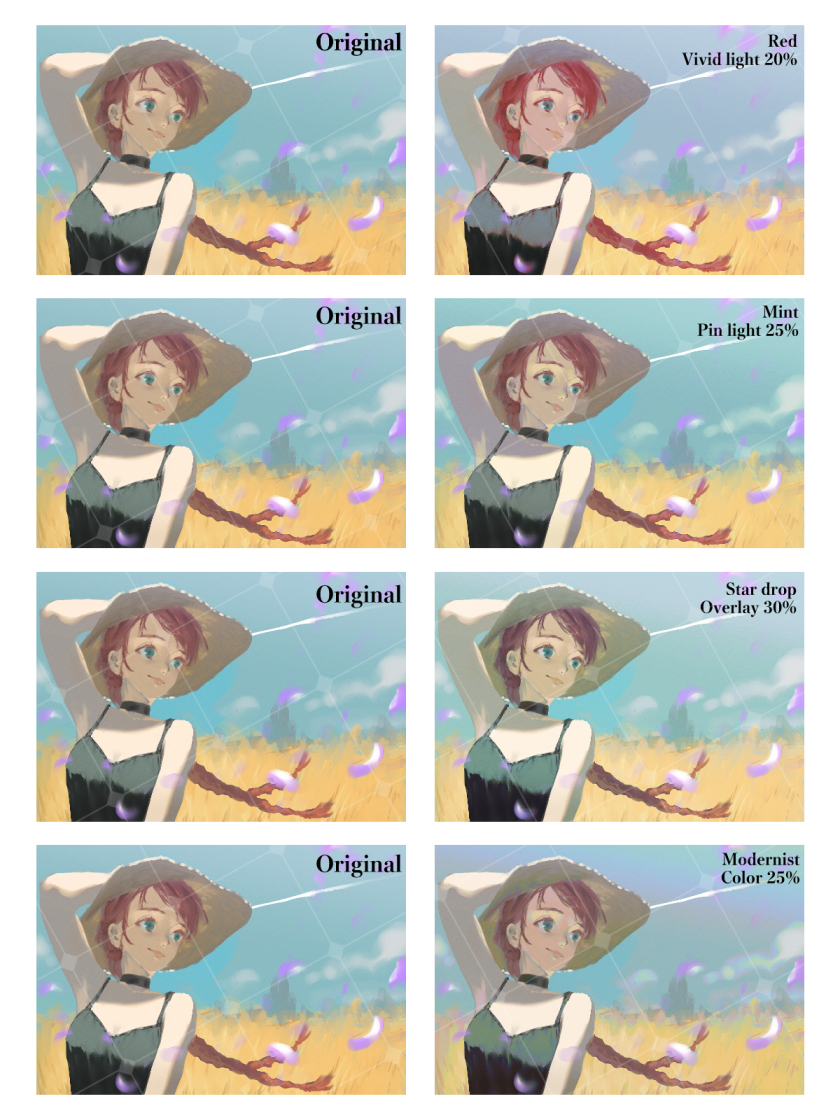
Example of use when the layer mode opacity is changed ↓
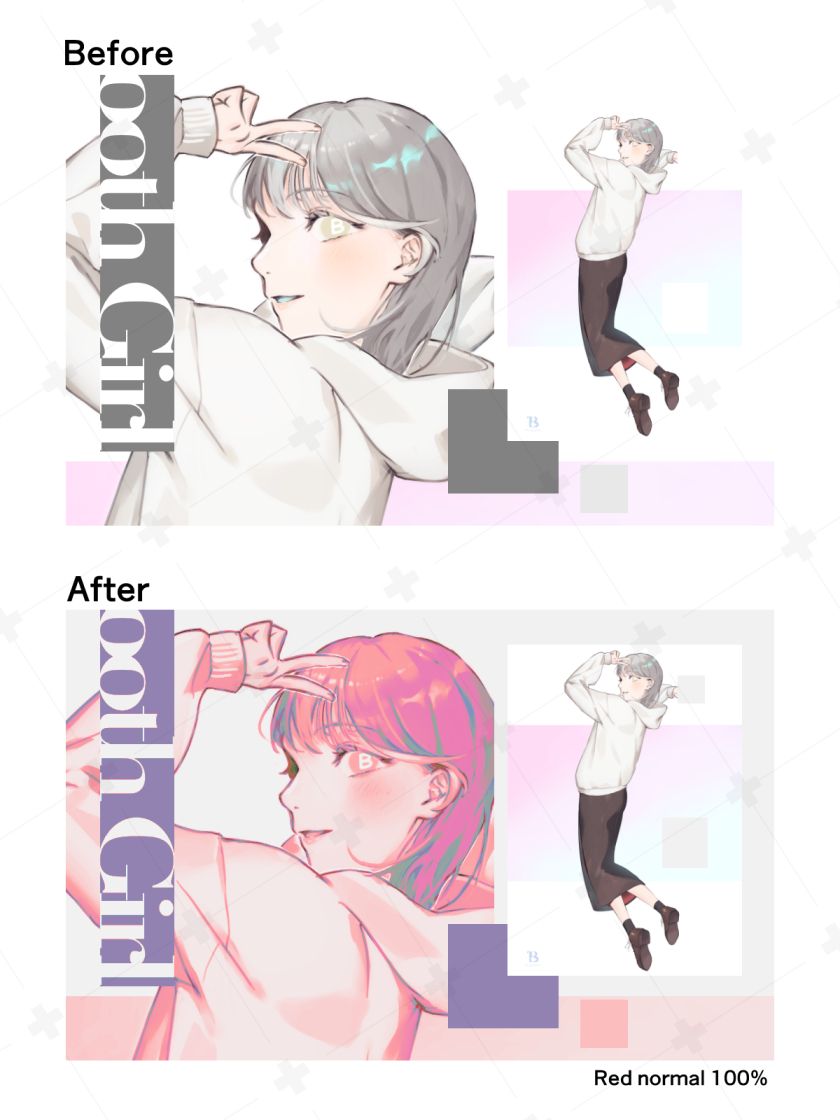
You can also use it to improve the design of the screen by applying it to the background at 100% ↓
——————————

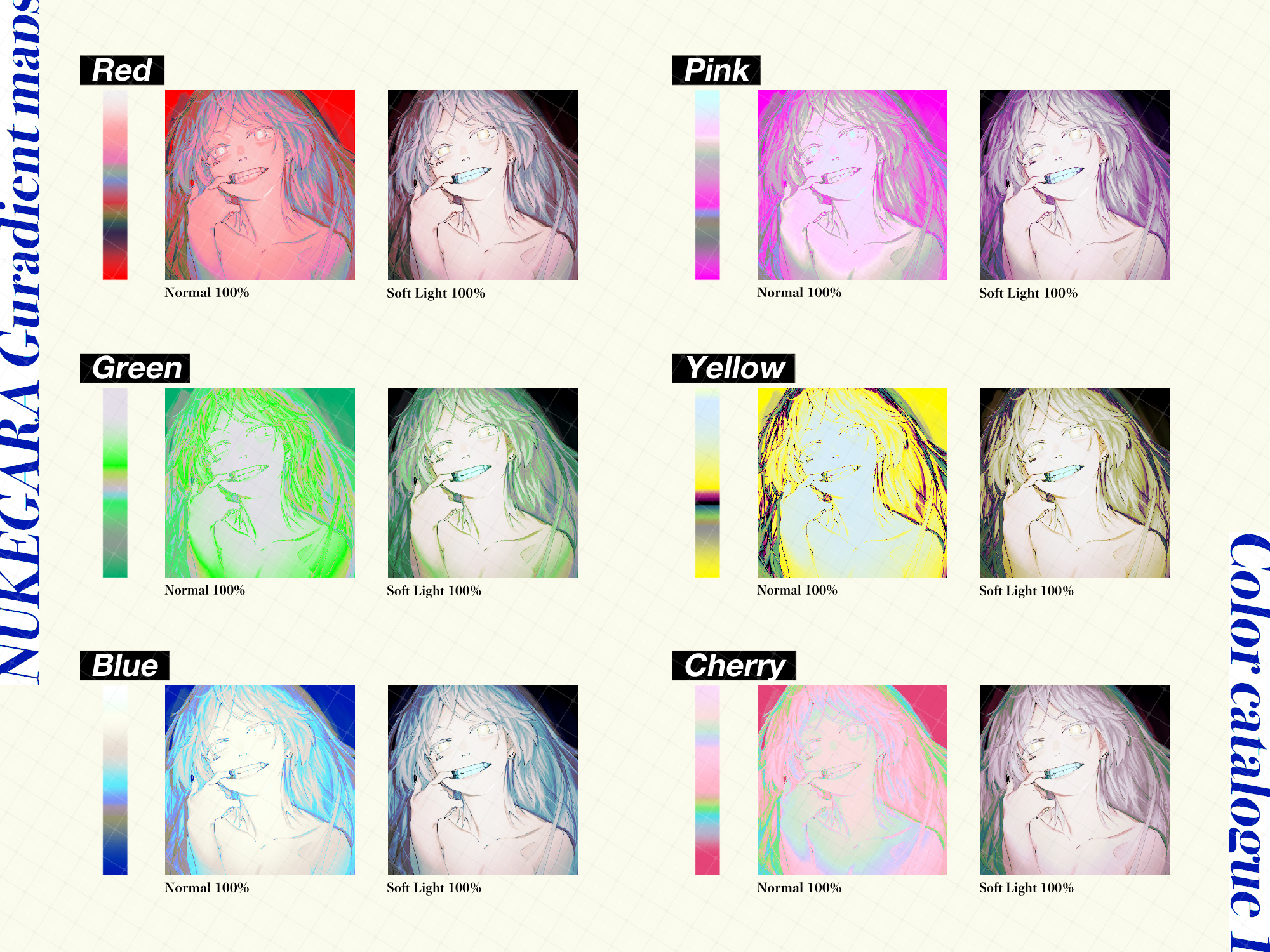
The paid version contains a total of 24 types of gradient map.
You can adjust the overall tone from the all-purpose map,
Maps, which can change the emotion temperature of the screen
Slightly pointed maps specialized in design, etc.
A wide range of color designs are included.
I hope you will take a look if you are interested!
Paid version material ↓
https://assets.clip-studio.com/ja-jp/detail?id=2221278
List of recorded maps↓


——————
2026/03/11 Added
The second gradient map of the series has been released.
The first is a vivid map,
The second part contains a dull and turbid tone adjustment map.
Click here for the second material link ↓
https://assets.clip-studio.com/ja-jp/detail?id=2250230
——————
That's all for this material.
I would be happy if everyone could use it ^^
本素材は有償配布中のグラデーションマップ集(「ぬけがらグラデ」)から
4種類を抜粋した無償お試し版です。
色味を強く乗せるだけでなく、
・全体のトーンを整えたい
・空気感や温度を少しだけ変えたい
・仕上げ前の“ひと押し“が欲しい
といった場面で使いやすいグラデーションマップを収録しています。
派手な変化よりも
線、階調、色の関係を壊さずにまとめることを重視した設計です。
——————————
<収録内容>
以下の4種類のグラデーションマップを収録しています。
① Red
色味の変化がわかりやすく、
通常100%〜ソフトライトなど幅広い使い方が可能。
② Mint
全体を軽くまとめたい時のベース向け。
低不透明度、ハードライト等でも調整しやすい設計。
③ Star drop
雰囲気や感情トーンを変えたい時に使いやすいマップ。
④ Modernist
暗部や無彩色寄りの画面を崩さず、
落ち着いた印象にまとめるグラデーション。
より幅広いトーン、深みのある色設計は有償版に収録しています。
有償版素材はこちら↓
https://assets.clip-studio.com/ja-jp/detail?id=2221278
———————
<使用例>
↑Mintをハードライト60%でかけて全体の色ムラをなじませ、色調を抑えつつ統一感を出しています。
透明感がある儚げな肌色に調整したいときにMintがおすすめです。
レイヤーモード・不透明度を変更した場合の使用例↓
背景に通常100%でかけて、画面のデザイン性を高めるという使い方もできます↓
——————————
<有償版の収録素材のご紹介>
有償版では全24種のグラデーションマップを収録しています。
全体のトーンを調整できる万能よりマップから、
画面の感情の温度を変えられるマップ、
デザイン性に特化したやや尖ったマップなど、
幅広い色設計のものを収録しています。
ご興味があればご覧いただければ嬉しいです!
有償版素材↓
https://assets.clip-studio.com/ja-jp/detail?id=2221278
収録マップ一覧↓
——————
2026/03/11 追記
同シリーズのグラデーションマップ第二弾をリリースしました。
第一弾は鮮やかな映えるマップですが、
第二弾はくすみ・濁り系のトーン調整マップを収録しています。
第二弾の素材リンクはこちら↓
https://assets.clip-studio.com/ja-jp/detail?id=2250230
——————
今回の素材は以上です。
皆様に使っていただけたら嬉しいです^^







Other materials by ぬけがら|nukegara


Popular “Gradient set” materials


New materials





Badges
-
 MVP ◆This user has contributed greatly to the management of the community, by posting many great responses to the questions asked. Once every three months, MVPs are determined based on the points earned during that period and will be recognized accordingly.
 -
 New Valuable Player (NVP) ◆These are the next-best contributors to the community after MVPs. This is awarded to users who have not yet won an MVP award, based on the number of points they have earned.
 -
 Official Expert ◆Chosen out of all MVP awardees, who are already proof of excellence, this is a testimony of outstanding correspondence in the community. After careful screening, they are appointed by CELSYS and assume their position.Note: Formally called “Evangelists”
 -
 Official Moderator of CELSYS ◆Moderators are official CELSYS staff members who are fluent in Japanese as well as various other languages. Moderators are not experts on the software or illustration, so they are not able to directly answer your questions. However, moderators provide communication and language support to ensure that everyone can smoothly communicate with each other.
 -
 CELSYS official accountThe Official Administrator Account