



This is an auto-action that creates a folder to help you organize your layers. 레이어 정리에 유용하도록 폴더를 생성하는 오토액션입니다.
Createable folders
Hotkey Settings-> Auto Action-> [Layer Cleanup Auto Action]
Click the [>] table to expand it.
You can set shortcuts for each folder to make it easier to use.

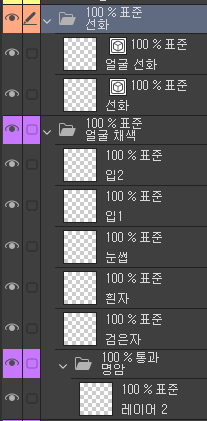
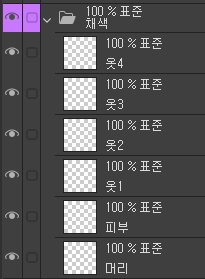

In-folder details
- Contrast and correction folders to facilitate effect application
It was written as a passing layer.
(Folders other than the folders in the image are empty folders.)
생성 가능한 폴더
단축키 설정-> 오토액션-> [레이어 정리 오토액션]의
[>] 표를 눌러 펼쳐보기 하신 뒤
각 폴더 별 단축키를 설정해두면, 더 쉽게 사용할 수 있습니다.
폴더 내 세부사항
-명암과 보정 폴더는 효과 적용에 용이하도록
통과 레이어로 작성되었습니다.
(이미지 내의 폴더 외 폴더들은 빈 폴더입니다.)




Other materials by 박하뮹


Popular “Auto Action” materials


New materials


Badges
-
 MVP ◆This user has contributed greatly to the management of the community, by posting many great responses to the questions asked. Once every three months, MVPs are determined based on the points earned during that period and will be recognized accordingly.
 -
 New Valuable Player (NVP) ◆These are the next-best contributors to the community after MVPs. This is awarded to users who have not yet won an MVP award, based on the number of points they have earned.
 -
 Official Expert ◆Chosen out of all MVP awardees, who are already proof of excellence, this is a testimony of outstanding correspondence in the community. After careful screening, they are appointed by CELSYS and assume their position.Note: Formally called “Evangelists”
 -
 Official Moderator of CELSYS ◆Moderators are official CELSYS staff members who are fluent in Japanese as well as various other languages. Moderators are not experts on the software or illustration, so they are not able to directly answer your questions. However, moderators provide communication and language support to ensure that everyone can smoothly communicate with each other.
 -
 CELSYS official accountThe Official Administrator Account