




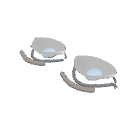
一款專為使用 Clip Studio Paint 的藝術家設計的 3D 動漫眼睛參考。 A 3D anime eye reference designed for artists using Clip Studio Paint.
將 3D 模型匯入 Clip Studio Paint,並放置到畫布上。你也可以把它儲存到材質面板,方便日後存取。
2. 旋轉眼睛使用物件工具旋轉模型並從不同角度觀看眼睛。這有助於你理解它的形狀,以及它在視角上如何改變。
3. 將其作為繪圖參考從不同角度畫動漫眼睛時,請以模型作為參考。觀察眼瞼、眼形、眉毛位置與深度,讓你的畫作更準確且自然。
4. 調整視圖旋轉並重新定位模型,直到找到所需的角度。你可以用它作為正視、側面和三分之四視角的參考。
目的: 此材質旨在透過在 Clip Studio Paint 內直接提供可旋轉的 3D 參考,讓從不同角度繪製動畫眼睛變得更容易。
Import the 3D model into Clip Studio Paint and place it on your canvas. You can also save it to your Material palette for easier access later.
2. Rotating the EyeUse the Object tool to rotate the model and view the eye from different angles. This helps you understand its shape and how it changes in perspective.
3. Using It as a Drawing ReferenceUse the model as a guide when drawing anime eyes from different angles. Observe the eyelids, eye shape, eyebrow placement, and depth to make your drawings more accurate and natural-looking.
4. Adjusting the ViewRotate and reposition the model until you find the angle you need. You can use it as a reference for front, side, and three-quarter views.
Purpose: This material is intended to make drawing anime eyes from different perspectives easier by providing a rotatable 3D reference directly inside Clip Studio Paint.
材質 Material

 檢舉問題素材

 取得完成。
 了解素材保存位置
 了解讀取方法


公開日期 : 27 minutes ago
更新日期 : 27 minutes ago








-
 MVP ◆針對問題投稿了眾多適切的回答,對社群有顯著貢獻的用戶。每3個月一次,會依據期間內獲得的點數選出MVP用戶,並進行表揚。
-
 NVP(New Valuable Player) ◆繼MVP後,對社群營運做出良好貢獻的用戶。將從不曾獲選為MVP的用戶中,依據獲得的點數進行評選、表揚。
-
 官方推廣大使 ◆從被證明為優良回答用戶的MVP獲獎者中選出社群中最優異的回答者。並經審查後由本社委託就任。※舊名稱為「Evangelist」
-
 CELSYS公認Moderator ◆Moderator為會使用日文及其他語言的CELSYS公認工作人員。由於並非軟體或創作的專業人士,Moderator無法直接為用戶解決疑問,但能在語言、交流方面提供支援,幫助用戶們順利地進行溝通。
-
 CELSYS官方為與營運相關的官方帳號。