



是用高鍵值校正圖片的自動動作! It is the auto action that corrects the picture with high key value!
如何使用:
選擇頂層,然後運行此自動操作


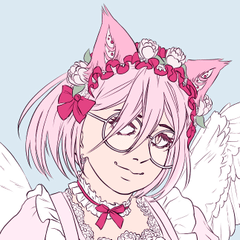
推薦 用於全陰影、高對比度、暗淡色彩的畫作,如上例
柔和著色比卡通著色效果更好
您可以在第 3 層中 更改漸變貼圖和混合模式 以獲得更多選項
如果結果過於飽和,請增加亮度並降低第 2 層的對比度

How to use:
Select the top layer then run this auto action
Recommend for the paintings with full shading, high contrast, dull color like the example above
Works better with soft shading than cel shading
You can change gradient map and blendmode in the 3rd layer for more options
If the result is too saturated, increase brightness and reduce contrast in the 2nd layer
過去版本


「DuoLyly」的其他素材


「自動動作」的人氣素材



最新素材


徽章
-
 MVP ◆針對問題投稿了眾多適切的回答,對社群有顯著貢獻的用戶。每3個月一次,會依據期間內獲得的點數選出MVP用戶,並進行表揚。
 -
 NVP(New Valuable Player) ◆繼MVP後,對社群營運做出良好貢獻的用戶。將從不曾獲選為MVP的用戶中,依據獲得的點數進行評選、表揚。
 -
 官方推廣大使 ◆從被證明為優良回答用戶的MVP獲獎者中選出社群中最優異的回答者。並經審查後由本社委託就任。※舊名稱為「Evangelist」
 -
 CELSYS公認Moderator ◆Moderator為會使用日文及其他語言的CELSYS公認工作人員。由於並非軟體或創作的專業人士,Moderator無法直接為用戶解決疑問,但能在語言、交流方面提供支援,幫助用戶們順利地進行溝通。
 -
 CELSYS官方為與營運相關的官方帳號。