



動畫工作區和熱鍵設置,由 2D 動畫師 Li Cree 用於優化動畫繪圖。不包括照片中的畫筆和自動操作。 Animation workspace and hotkeys settigns used by 2D animator Li Cree for optimized animationd drawing. Brushes and auto actions in photos are not included.
2D 動畫師 Li Cree 使用的動畫工作區。以下佈局旨在實現更優化的動畫效果(請注意,插圖照片中的畫筆和自動動作不包括在內)。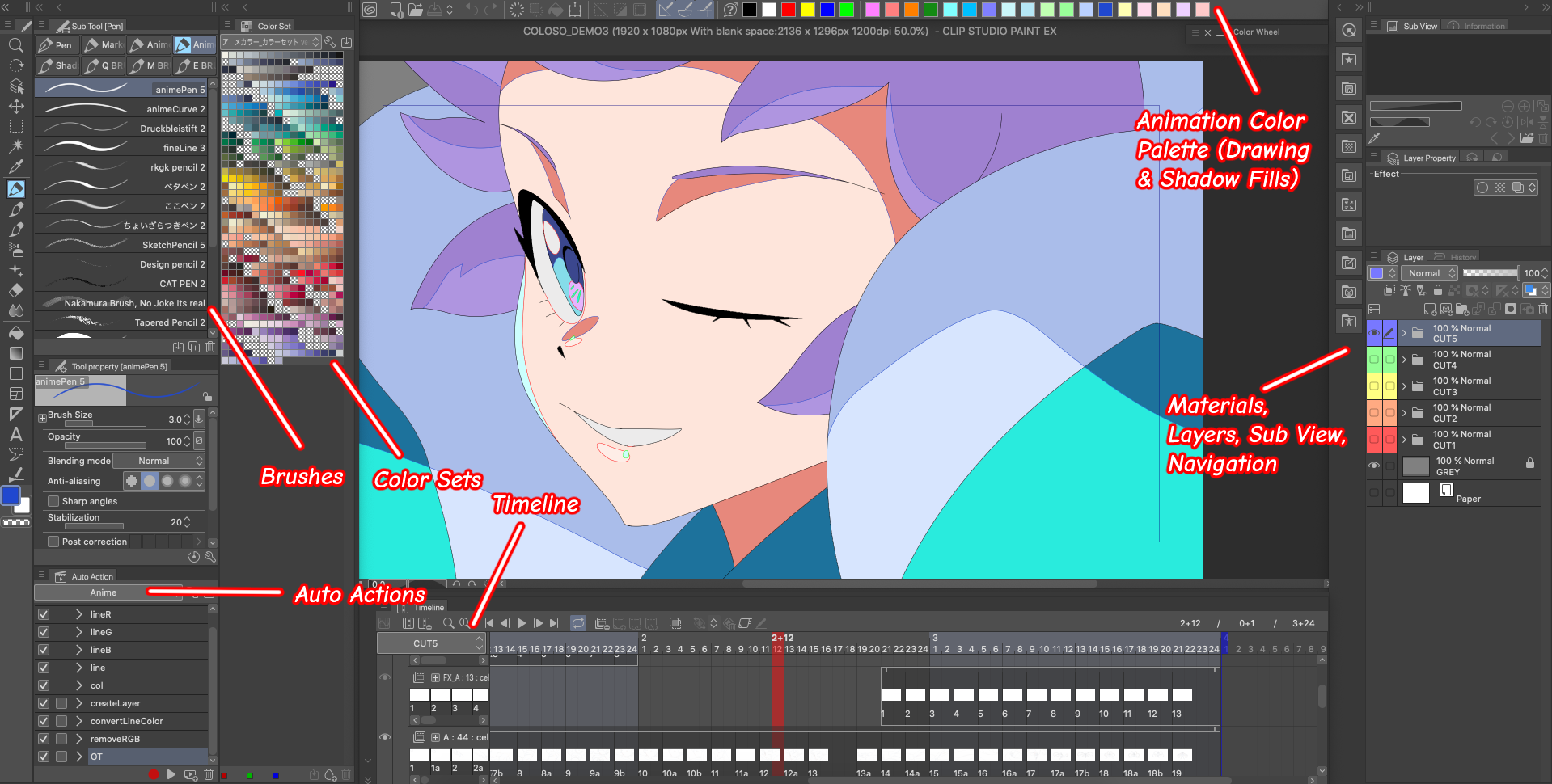
如果使用者選擇同時匯入 Li Cree 的熱鍵命令,以下是最重要的變化:
Q >筆
' > 水平翻轉(檢視)
Alt/Opt+D >水平翻轉(變換)
Alt/Opt+A > 新層次(柵格)
Alt/Opt+Z >新建動畫資料夾
Alt/Opt+X >新的 Camer 資料夾
X > 新框架
1 >上一幀
2 >下一幀
C >減小畫筆大小
V > 增加畫筆尺寸
Alt/Opt+S >銳化
Alt/Opt+F >模糊
Alt/Opt+W > 查看洋蔥皮
Ctrl/Cmd+E >向下合併
Alt/Opt+E > 複製層次
Alt/OPT+3 >轉換為柵格圖層
Animation workspace used by 2D animator Li Cree. The following layout is meant for more optimized animating (please note that brushes and auto actions in the exmaple photo are not included).
If users choose to also import Li Cree’s hot key commands, the following are the most significant changes:
Q > Pen
` > Flip Horizontal (View)
Alt/Opt+D > Flip Horizontal (Transform)
Alt/Opt+A > New Layer (Raster)
Alt/Opt+Z > New Animation Folder
Alt/Opt+X > New Camer Folder
X > New Frame
1 > Previous Frame
2 > Next Frame
C > Decrease Brush Size
V > Increase Brush Size
Alt/Opt+S > Sharpen
Alt/Opt+F > Blur
Alt/Opt+W > View Onion Skin
Ctrl/Cmd+E > Merge Down
Alt/Opt+E > Duplicate Layer
Alt/Opt+3 > Convert to Raster Layer











「工作區」的人氣素材




最新素材


徽章
-
 MVP ◆針對問題投稿了眾多適切的回答,對社群有顯著貢獻的用戶。每3個月一次,會依據期間內獲得的點數選出MVP用戶,並進行表揚。
 -
 NVP(New Valuable Player) ◆繼MVP後,對社群營運做出良好貢獻的用戶。將從不曾獲選為MVP的用戶中,依據獲得的點數進行評選、表揚。
 -
 官方推廣大使 ◆從被證明為優良回答用戶的MVP獲獎者中選出社群中最優異的回答者。並經審查後由本社委託就任。※舊名稱為「Evangelist」
 -
 CELSYS公認Moderator ◆Moderator為會使用日文及其他語言的CELSYS公認工作人員。由於並非軟體或創作的專業人士,Moderator無法直接為用戶解決疑問,但能在語言、交流方面提供支援,幫助用戶們順利地進行溝通。
 -
 CELSYS官方為與營運相關的官方帳號。