



兩個雷霆刷子,創造閃電擊中你需要! Two Thunder brushes to create lightning struck you need!
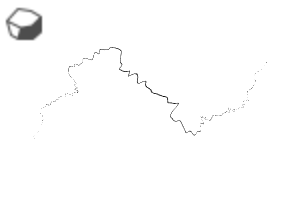
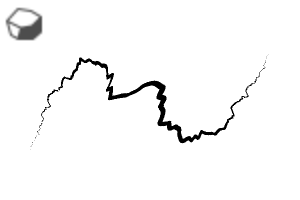
刷子產生彎曲的雷靂,即使你把它畫直。這有點古怪。
用迅雷畫筆 繪製雷霆「主體」。創建另一層,用迅雷刷繪製 較小的毛刺。

複製「主體」圖層。使用高斯模糊,複製 並堆疊 模糊圖層幾次 ,直到您對亮度感到滿意。

使用 軟噴槍在雲 上添加效果,並在霹靂發源處繪製雲彩。

The brush produces crooked thunderbolt even if you draw it straight. It's a bit quirky.
Draw the thunder "Main Body" with Thunderbolt Brush. Create another layer, draw the smaller brances with ThunderBranch brush.
Copy the "Main Body" layer. Use Gaussian Blur, copy and stack the blurred layer a few times until you're satisfied with the brightness.
Add effects on the cloud with Soft Airbrush and paint the cloud where the thunderbolt originates.
類別 1 Category 1




「Cheishiru」的其他素材


「素材集」的人氣素材


最新素材




徽章
-
 MVP ◆針對問題投稿了眾多適切的回答,對社群有顯著貢獻的用戶。每3個月一次,會依據期間內獲得的點數選出MVP用戶,並進行表揚。
 -
 NVP(New Valuable Player) ◆繼MVP後,對社群營運做出良好貢獻的用戶。將從不曾獲選為MVP的用戶中,依據獲得的點數進行評選、表揚。
 -
 官方推廣大使 ◆從被證明為優良回答用戶的MVP獲獎者中選出社群中最優異的回答者。並經審查後由本社委託就任。※舊名稱為「Evangelist」
 -
 CELSYS公認Moderator ◆Moderator為會使用日文及其他語言的CELSYS公認工作人員。由於並非軟體或創作的專業人士,Moderator無法直接為用戶解決疑問,但能在語言、交流方面提供支援,幫助用戶們順利地進行溝通。
 -
 CELSYS官方為與營運相關的官方帳號。