


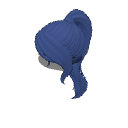
ハイポニーテール3Dヘア(前髪付き) (High Ponytail 3D Hair with Bangs) High Ponytail 3D Hair with Bangs


Blenderで髪の素材のサイズを慎重に調整し、頭にぴったりフィットするように何度も微調整しました。すぐに使える状態なので、すべてが最適なフィット感に調整されていると安心して楽しめます!
髪は3つのパーツに分かれています。ポニーテールや前髪はオンオフ切り替えたり、動か したりできます
ただし、髪は一つのメッシュでポーズはできません。😔
この髪型は「3Dドローイングフィギュア-Ver.2(女性)」モデルにフィットしています。ヘッドを大きくまたは小さい方に合わせてスケールを調整してください。

素材を頭に固定するのを忘れないでください!
ステップ1: 3Dフィギュアをキャンバスにインポートします。
(まずこれを必ずやってください。3Dフィギュアのポーズを決めた後に行うと、髪の毛がポーズに正しく合わなかったり、合ったりしません。)
ステップ2: 3Dフィギュアが選択された状態で(同じレイヤー上)、ヘアマテリアルをインポートします。素材がフィギュアから遠く離れた場所で出現しても心配はいりません。次のステップに進みましょう。

ステップ3: レンチアイコンをクリックしてサブツール詳細パレットを開き、オブジェクトリストタブに移動します。

ステップ4: リスト内の3Dフィギュアにヘアマテリアルをドラッグ&ドロップして子レイヤーにします。

ステップ5: 下の添付ポイントメニューを展開し、「ヘッド」を選択します。

髪は自動的に頭と揃います。
髪がフィギュアに付いているので、どんなポーズをしても頭に沿ってシームレスについてきます。
I carefully adjusted the hair material’s size in Blender and made numerous fine-tunings to ensure it fits perfectly when attached to the head. It’s ready to use, so you can enjoy it with confidence knowing everything has been fine-tuned for the best fit!
The hair comes in 3 separate parts. You can toggle the ponytail and bangs on or off, or move them
however, the hair is a single mesh and is not poseable. 😔
This hair is fitted for the "3D drawing figure-Ver.2 (Female)" model. Please adjust the scale for larger or smaller heads.
Don’t forget to attach the material to the head!
Step 1: Import your 3D figure onto the canvas.
(Make sure to do this first. If you do it after posing the 3D figure, the hair will not fit or align correctly with the pose.)
Step 2: With your 3D figure selected (on the same layer), import your hair material. Don't worry if the material spawns far away from the figure; just proceed to the next step.
Step 3: Click the wrench icon to open the Sub Tool Detail palette and navigate to the Object list tab.
Step 4: Drag and drop the hair material onto the 3D figure in the list to make it a child layer.
Step 5: Expand the Attachment point menu directly below and select Head.
The hair will automatically align with the head.
Since the hair is now attached to the figure, it will follow the head seamlessly no matter what pose you apply.
素材 Material

 問題ある素材の報告
CLIP STUDIOアカウントをお持ちでない場合
以下を記載の上、メールでお問い合わせください。
- 製品・サービス名
- 詳しいお問い合わせ内容

使用できるソフトウェア
-
 CLIP STUDIO PAINT PRO/EX
-
CLIP STUDIO PAINT DEBUT
 再ダウンロード
「年額・月額利用プラン」で認証していない端末でも使う場合は、GOLDかCLIPPYで購入してください。

価格
10

保有残高
 取得する
 購入が完了しました。
 素材の保存場所を見る










バッジ
-
 MVP ◆質問に対して適切な回答を数多く投稿し、コミュニティの運営に大きく貢献したユーザーです。MVPは3ヶ月に一度、その間に獲得したポイントを元に決定し、表彰を行っています。
-
 NVP (New Valuable Player) ◆MVPに次いでコミュニティの運営に貢献したユーザーです。これまでMVPの受賞経験のない方から、獲得したポイントを元に決定し、表彰を行なっています。
-
 公式エキスパート ◆優れた回答者の証であるMVP受賞者の中からさらに選ばれた、コミュニティで最も優良な回答者の証です。審査を経て当社から依頼し就任いただいています。※旧名称「エバンジェリスト」
-
 セルシス公認モデレーター ◆モデレーターは、日本語とその他の言語が話せるセルシス公認のスタッフです。ソフトウェアや創作のエキスパートではないので、直接疑問を解決することはできませんが、みなさんがスムーズにコミュニケーションできるように、言葉やコミュニケーションの側面からサポートします。
-
 セルシス公式運営に関連した公式アカウントです。