



追記: ズーム時にブラシサイズを固定する[画面でサイズを指定する]設定を削除してください。
ブラシ調整に必要なすべての重要な設定はツール設定パネルに表示されます。
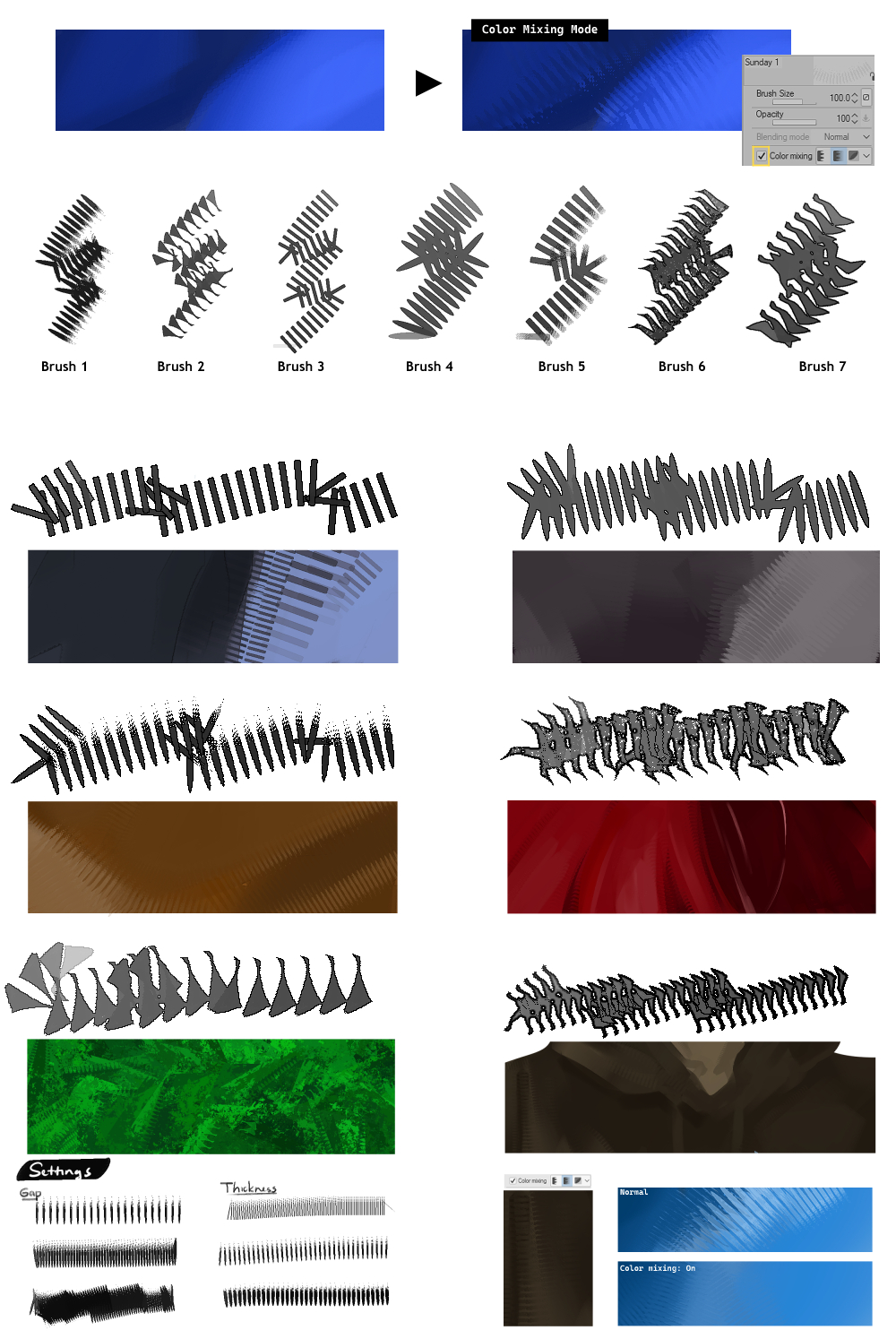
ブラシ調整に必要なすべての重要な設定はツール設定パネルに表示されます。
ギャップ: ストローク間の間隔を調整します
厚さ: ブラシの太さを調整します
フリップ: 筆の方向を変える
カラーミキシングモード: 有効にすると、ブラシはブレンディングツールのように機能します。塗装された部分に直接使用することを想定して設計されており、色を選べません。
厚さ: ブラシの太さを調整します
フリップ: 筆の方向を変える
カラーミキシングモード: 有効にすると、ブラシはブレンディングツールのように機能します。塗装された部分に直接使用することを想定して設計されており、色を選べません。
Update Note: Remove [Specify by size on screen] setting to keep the brush size fixed when zooming.
All essential settings for adjusting the brushes are displayed in the Tool Settings panel.
All essential settings for adjusting the brushes are displayed in the Tool Settings panel.
Gap: Adjusts the spacing between strokes
Thickness: Adjusts the brush thickness
Flip: Changes the brush direction
Color Mixing Mode: When enabled, the brush works like a blending tool. It is designed to be used directly on painted areas and cannot pick colors.
Thickness: Adjusts the brush thickness
Flip: Changes the brush direction
Color Mixing Mode: When enabled, the brush works like a blending tool. It is designed to be used directly on painted areas and cannot pick colors.
カテゴリー1 Category 1







旧バージョン



"II2"さんの別の素材


"素材集"の人気素材


新着素材





バッジ
-
 MVP ◆質問に対して適切な回答を数多く投稿し、コミュニティの運営に大きく貢献したユーザーです。MVPは3ヶ月に一度、その間に獲得したポイントを元に決定し、表彰を行っています。
 -
 NVP (New Valuable Player) ◆MVPに次いでコミュニティの運営に貢献したユーザーです。これまでMVPの受賞経験のない方から、獲得したポイントを元に決定し、表彰を行なっています。
 -
 公式エキスパート ◆優れた回答者の証であるMVP受賞者の中からさらに選ばれた、コミュニティで最も優良な回答者の証です。審査を経て当社から依頼し就任いただいています。※旧名称「エバンジェリスト」
 -
 セルシス公認モデレーター ◆モデレーターは、日本語とその他の言語が話せるセルシス公認のスタッフです。ソフトウェアや創作のエキスパートではないので、直接疑問を解決することはできませんが、みなさんがスムーズにコミュニケーションできるように、言葉やコミュニケーションの側面からサポートします。
 -
 セルシス公式運営に関連した公式アカウントです。