



埋め戻し不足のプロセスを加速させます。 speeds up the underfill process.
テクスチャのあるブラシでも使えますが、シンプルな丸ブラシが一番合うかもしれません。
- ラスタ層のみ。
- どんな色でも使えます
用途:
- 線に隙間がない閉じた図形を描く
- オートアクションボタンを押せ

線画はメインの描画色で作成し、ベースカラーの塗りつぶしはお好みのSub描画色で作成します。 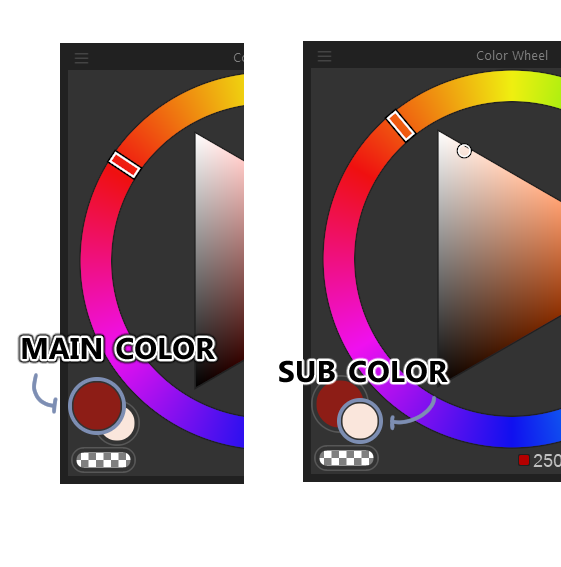

レイヤーの順序を調整してアンダーフィル効果を作り出します。
ヒント:自動アクションは使うたびに名前が繰り返されるので、混乱を避けるためにレイヤー名を適切に変更してください。
It works with brushes that have texture, but a simple round brush might work best.
- Raster layers Only.
- Any color can be used
Use:
- Draw a closed figure (no gaps in the linework)
- Press the auto action button
Linework should be created using the Main drawing color; the base color fill will be created using the Sub drawing color of your choosing.
Adjust the layer order to create the underfill effect.
Tip: Since the auto-action repeats names each time its used, rename the layers accordingly to avoid confusion.


"オートアクション"の人気素材




新着素材


バッジ
-
 MVP ◆質問に対して適切な回答を数多く投稿し、コミュニティの運営に大きく貢献したユーザーです。MVPは3ヶ月に一度、その間に獲得したポイントを元に決定し、表彰を行っています。
 -
 NVP (New Valuable Player) ◆MVPに次いでコミュニティの運営に貢献したユーザーです。これまでMVPの受賞経験のない方から、獲得したポイントを元に決定し、表彰を行なっています。
 -
 公式エキスパート ◆優れた回答者の証であるMVP受賞者の中からさらに選ばれた、コミュニティで最も優良な回答者の証です。審査を経て当社から依頼し就任いただいています。※旧名称「エバンジェリスト」
 -
 セルシス公認モデレーター ◆モデレーターは、日本語とその他の言語が話せるセルシス公認のスタッフです。ソフトウェアや創作のエキスパートではないので、直接疑問を解決することはできませんが、みなさんがスムーズにコミュニケーションできるように、言葉やコミュニケーションの側面からサポートします。
 -
 セルシス公式運営に関連した公式アカウントです。