



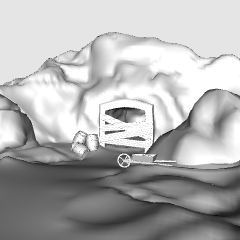
鉱山と洞窟の入口を再現した多用途な3Dモデルで、漫画、ウェブトゥーン、イラストにぴったりです。最大限の柔軟性をもって設計されており、すべての人工構造物や小道具はClip Studioで簡単に隠したり表示したりできます。これにより、純粋な自然の洞窟、活気ある鉱山、あるいは不気味な廃墟の入口など、物語の文脈に合わせて資産を即座にカスタマイズできます。 A versatile 3D model of a mine and cave entrance perfect for manga, webtoons, and illustrations. Designed with maximum flexibility, all man-made structures and props can be easily hidden or shown in Clip Studio. This allows you to instantly customize the asset to fit your story's context—whether you need a pure natural cave, an active bustling mine, or a spooky abandoned entrance.


背景 Background


"Janlibell"さんの別の素材


"素材集"の人気素材


新着素材


-
 MVP ◆質問に対して適切な回答を数多く投稿し、コミュニティの運営に大きく貢献したユーザーです。MVPは3ヶ月に一度、その間に獲得したポイントを元に決定し、表彰を行っています。
 -
 NVP (New Valuable Player) ◆MVPに次いでコミュニティの運営に貢献したユーザーです。これまでMVPの受賞経験のない方から、獲得したポイントを元に決定し、表彰を行なっています。
 -
 公式エキスパート ◆優れた回答者の証であるMVP受賞者の中からさらに選ばれた、コミュニティで最も優良な回答者の証です。審査を経て当社から依頼し就任いただいています。※旧名称「エバンジェリスト」
 -
 セルシス公認モデレーター ◆モデレーターは、日本語とその他の言語が話せるセルシス公認のスタッフです。ソフトウェアや創作のエキスパートではないので、直接疑問を解決することはできませんが、みなさんがスムーズにコミュニケーションできるように、言葉やコミュニケーションの側面からサポートします。
 -
 セルシス公式運営に関連した公式アカウントです。