




Clip Studio初心者向けのミニマリスティックなワークスペースで、LiquifyやTransform、Switchツールなどの素早いジェスチャーをキャンバスから目を離すことなく行えるよう設計されています。この作業スペースは「クイックアクセス」設定に大きく依存しています。 minimalistic workspace for ipad users new to clip studio, designed for user to be able to do quick gestures (such as liquify, transform or switch tools) without having to stop to look away from canvas. This workspace heavily relies on “Quick Access” settings.
注意:このワークスペースは「クイックアクセス」設定に大きく依存しており、「ツール」や「サブツール」(および他の設定)ウィンドウが「クイックアクセスバー」に隠されており、キャンバスの表示サイズを拡大しています。ダウンロード後はこれらの機能をカスタマイズしてください。ありがとうございます。
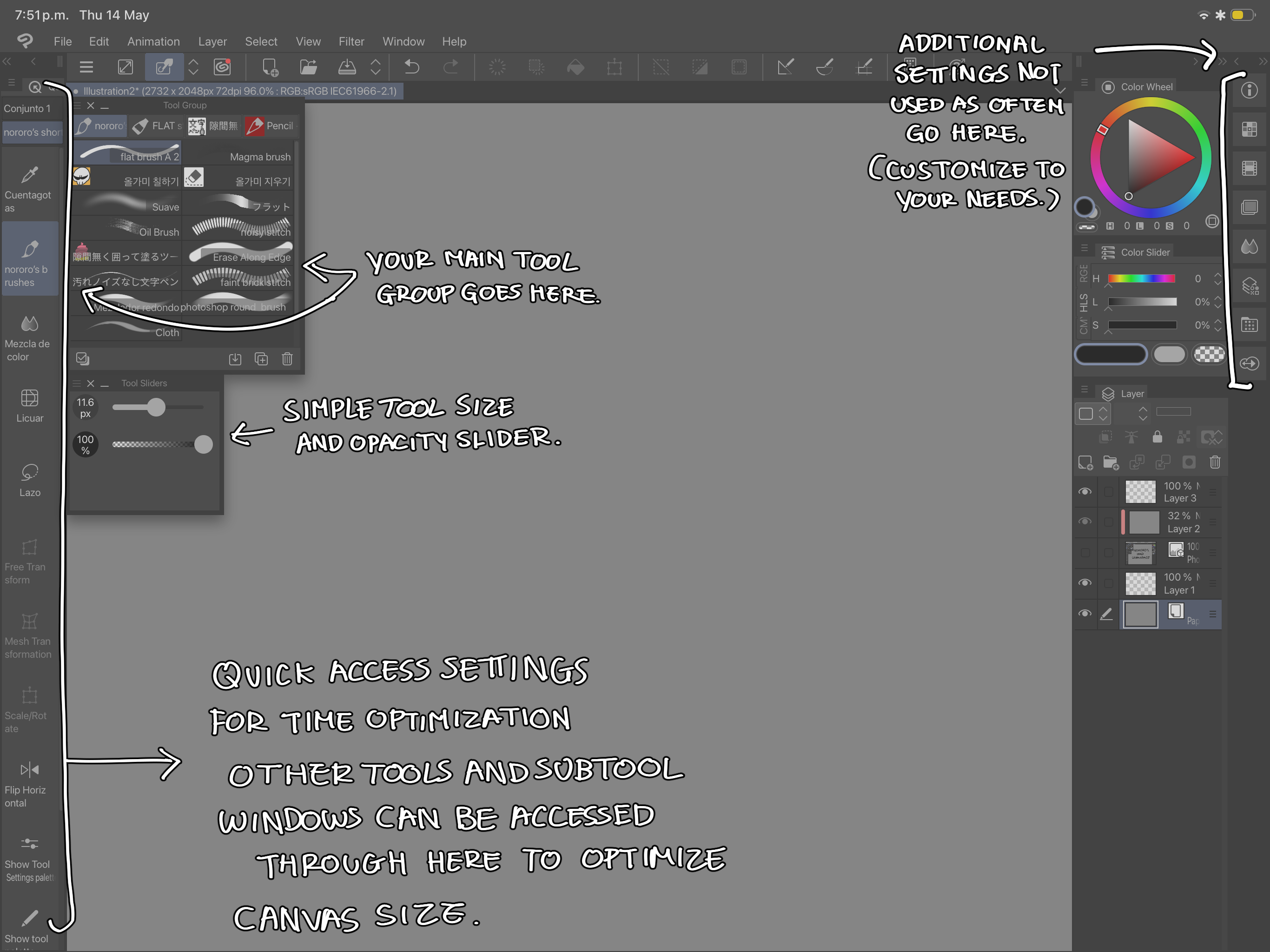
追加の提案:ワークフロー中に便利なので、すべてのツールをクイックアクセスバーにアップロードして非表示にすることをおすすめします。クイックアクセスバーにliquify、transform、invertなどのツールを入れると、よりスムーズなワークフローができます。
NOTE: This workspace relies heavily on “quick access” settings, as the “tool” and “subtools” (as well as other settings) windows are hidden in the “quick access bar” to increase canvas display size, please, customize these features once you have downloaded this workspace, thank you.
ADDITIONAL SUGGESTION: I recommend to upload all your tools to the quick access bar to hide them as it is convenient during your workflow. I recommend for you to put tools such as liquify, transform and invert in the quick access bar for a quicker workflow.


"ワークスペース"の人気素材





新着素材


バッジ
-
 MVP ◆質問に対して適切な回答を数多く投稿し、コミュニティの運営に大きく貢献したユーザーです。MVPは3ヶ月に一度、その間に獲得したポイントを元に決定し、表彰を行っています。
 -
 NVP (New Valuable Player) ◆MVPに次いでコミュニティの運営に貢献したユーザーです。これまでMVPの受賞経験のない方から、獲得したポイントを元に決定し、表彰を行なっています。
 -
 公式エキスパート ◆優れた回答者の証であるMVP受賞者の中からさらに選ばれた、コミュニティで最も優良な回答者の証です。審査を経て当社から依頼し就任いただいています。※旧名称「エバンジェリスト」
 -
 セルシス公認モデレーター ◆モデレーターは、日本語とその他の言語が話せるセルシス公認のスタッフです。ソフトウェアや創作のエキスパートではないので、直接疑問を解決することはできませんが、みなさんがスムーズにコミュニケーションできるように、言葉やコミュニケーションの側面からサポートします。
 -
 セルシス公式運営に関連した公式アカウントです。