AI撹乱勾配 (AI Disturbance Gradient) AI Disturbance Gradient

コンテンツID:2250089

  • 339
  • 無料
この素材集は CLIP STUDIO PAINT Ver. 2.3.0 以上で利用できます。 ( Ver.2.3.0 を入手する )
この素材集はスタジオモードでご利用いただける素材が含まれています。(スタジオモードとは?

最近はInstagramやTikTokに自分のアートを投稿することに不安を感じていますが、画像のオーバーレイを探したり、ナス科の植物をダウンロードしたり、自分で実物画像を作るのが面倒だったので、代わりにグラデーションを作っていました。

イビスペイントやオンラインのアーティストたちのやり方を見て、少しインスピレーションを得ました。
I've been feeling more anxious about posting my art online to instagram or tiktok nowadays, but I was always too lazy to try to find a image overlay, download nightshade, or make a material image myself, so I made a gradient instead.

I saw how ibis paint and artists online did it so I took some inspiration from them.

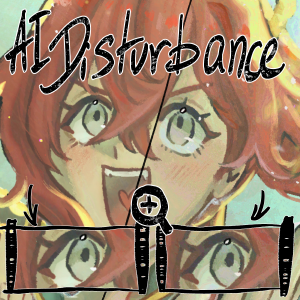
サムネイルでは違いがないように見えますが、この画像をズームインすると、わずかな色分け(約5~10%の不透明度)が見られます

妨害                                                              なし                                                          5%の不透明度乱れいくつかの変化は見られますが、その変化はそれほど大きくありません:) 

こちらは約10%の不透明度(サムネイルで使ったもの)での乱れです。

妨害                                                          なし                                                              10%不透明度の乱れ

また、他のグラデーションも作っていて、ダウンロード時に単なるグラデーションではなくなりました。

「Disturbance」「Warm Disturbance」「Cool Disturbance」「TV Stereo」です。最初に使うときはちょっと怖い感じがするけど...
個人的には5%の方が10%より見栄えが良いと思います。できるだけ見えなくしたいからですが、10%は実際に見える状態を示すために表示しました。

違いはズームインしてみると本当にわかります(ズームしても構いません) 
ここで本当の問題 は 、これが私のアドバイス通りに機能するかどうかです。なぜなら、これはマテリアル画像ではなくグラデーションにしたからです...実際に機能するかどうかは分かりません(AIのトレーニング方法が分からないので)が、強化方法を教えてみせます^^

1) liquidfy ->


私が見たAIの妨害フィルターはすべて画像だったので、絵に完璧に合ったグラデーションがどれほどうまく機能するか分からなかったので...もし気が向いたら、Liquidfyを使ってまったくユニークな色の混沌を作ることもできます。画像をインポートするよりも簡単だと感じています... --;;

2) 上に何かを描いてからグラデーションを加え、見えるものをすべて新しいレイヤーに統合する ->


(特にグラデーションの影響を受けていないエリアに効果的です。)
これは何にでもできる。自分で描くことも、適当な落書きもできるし、数日前に私が作ったようなデザインでもいい...


(10%)

コンテンツID:2246101


テキストを使うこともできます。とてもクールな効果が出て^^見ている人にとってイースターエッグのようになるかもしれません ->
(ちなみにここでは5%の不透明度を使いました)

...

最終的にうまくいかなければ、柔らかい光に色を増やして少しカラフルで見やすくするという方法^o^うまくいくと思います

お役に立てれば幸いです...
On the thumbnail, it looks like there's no difference, but if you zoom in to this image, you can see there's a small amount of colorization (at about 5~10% opacity)

No Disturbance                                                                                                                        5% Opacity DisturbanceYou can see there's some changes, but the changes aren't very big :) 

Here is the disturbance at about 10% opacity (what I used on the thumbnail)

No Disturbance                                                                                                                        10% Opacity Disturbance

I've also made other gradients for fun (so that when you download this it isn't just a singular gradient)

It's "Disturbance", "Warm Disturbance", "Cool Disturbance", and "TV Stereo" respectively. It kind of look scary when you first use it...
I personally think 5% looks better than 10% since I want it to be as invisible as possible, but I showed 10% just to show how it actually looks when it's more visible.

You only really see the difference when you zoom in really close (feel free to zoom in) 
Now the real question  is whether this works as I advised, since I made this a gradient instead of a material image... I can't speak on whether it actually works or not (because I don't know how to train AI), but I can give you ways to enhance it ^^

1) Using liquidfy ->


Because all the AI Disturbance filters I saw were images, I didn't know how well a gradient that's perfectly aligned to the drawing would work, so... if you felt up for it, you could use liquidfy to make a completely unique mess of colors. I also feel like it's easier to do than importing an image... --;;

2) Drawing something on top before adding the gradient, then merging all visible to new layer ->


(It works especially well when you have an area that looks really unaffected by the gradient.)
You can do this with anything, you could draw it yourself, make random scribbles, or it could be a design, like what I made a few days ago...


(10%)

Content ID: 2246101


You can also use text, it gives a pretty cool effect ^^ it could act like an easter egg for anyone who's looking at it as well ->
(I used 5% opacity here btw)

...

In the end, if it doesn't work, you could just treat this as like a color enhancer that you put on soft light so that it's a bit more colorful or more interesting to look at ^o^ I think it should work though

I hope I helped...

勾配 Gradient

コンテンツID:2250089

公開日 : 16時間前

更新日 : 16時間前

Danabochiさんのプロフィール ...もっと詳しく