



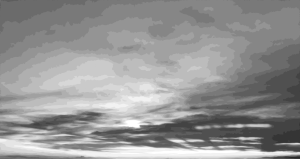
これは私が撮影し編集した写真です。自分のニーズに合わせてトリミングやサイズ調整も可能です。


へ
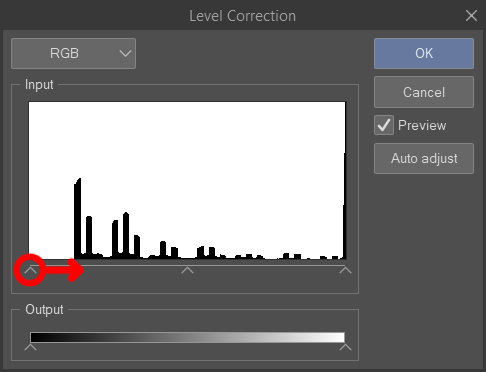
トーン付きの例のB+W画像を作成し、「レベル補正」機能(編集>を使いました
トーン補正>レベル補正)で、写真の黒い部分を作っています
よりしっかりした印象を与えます。
次に「レイヤー」を使いました
「プロパティ」機能でトーンを適用します(DOT設定=菱形)。必要なら、こちらの良いガイドがあります
ヘルプ: https://tips.clip-studio.com/en-us/articles/8344
左側は元の画像です。右側は調整後の画像です。
This is a photograph I took & edited. You can crop/resize it to fit your needs.
To
create the example B+W image with tone, I used the "level correction" function (Edit >
Tonal Correction > Level Correction) to make the black areas of the photo
appear more solid.
Then I used the "layer
property" function to apply tone (dot settings = lozenge). Here is a good guide if you need
help: https://tips.clip-studio.com/en-us/articles/8344
The left side shows the original image. The right side shows the image after adjustments.
カテゴリー1 Category 1





"caleana"さんの別の素材


"素材集"の人気素材


新着素材


バッジ
-
 MVP ◆質問に対して適切な回答を数多く投稿し、コミュニティの運営に大きく貢献したユーザーです。MVPは3ヶ月に一度、その間に獲得したポイントを元に決定し、表彰を行っています。
 -
 NVP (New Valuable Player) ◆MVPに次いでコミュニティの運営に貢献したユーザーです。これまでMVPの受賞経験のない方から、獲得したポイントを元に決定し、表彰を行なっています。
 -
 公式エキスパート ◆優れた回答者の証であるMVP受賞者の中からさらに選ばれた、コミュニティで最も優良な回答者の証です。審査を経て当社から依頼し就任いただいています。※旧名称「エバンジェリスト」
 -
 セルシス公認モデレーター ◆モデレーターは、日本語とその他の言語が話せるセルシス公認のスタッフです。ソフトウェアや創作のエキスパートではないので、直接疑問を解決することはできませんが、みなさんがスムーズにコミュニケーションできるように、言葉やコミュニケーションの側面からサポートします。
 -
 セルシス公式運営に関連した公式アカウントです。