



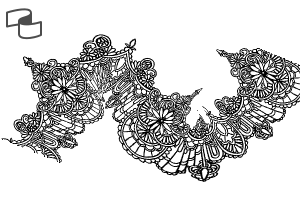
このブラシセットには、Clip Studio Paint用の4種類のレースリボンブラシが含まれています。これらのブラシは、服やアクセサリー、背景装飾により効率的に花柄やバラのディテールを加える手助けをするよう設計されています。
このセットに含まれるもの:
- フローラルレースボーダー
- ドレープド・フローラルレース
- ローズメッシュレース
- ローズドレイプドレース
This brush set contains 4 types of lace ribbon brushes for Clip Studio Paint. These brushes are designed to help you add floral and rose details to clothing, accessories, or background decorations more efficiently.
Included in this set:
- Floral Lace Border
- Draped Floral Lace
- Rose Mesh Lace
- Rose Draped Lace


レースボーダー Lace Border


"Oos"さんの別の素材


"素材集"の人気素材


新着素材




-
 MVP ◆質問に対して適切な回答を数多く投稿し、コミュニティの運営に大きく貢献したユーザーです。MVPは3ヶ月に一度、その間に獲得したポイントを元に決定し、表彰を行っています。
 -
 NVP (New Valuable Player) ◆MVPに次いでコミュニティの運営に貢献したユーザーです。これまでMVPの受賞経験のない方から、獲得したポイントを元に決定し、表彰を行なっています。
 -
 公式エキスパート ◆優れた回答者の証であるMVP受賞者の中からさらに選ばれた、コミュニティで最も優良な回答者の証です。審査を経て当社から依頼し就任いただいています。※旧名称「エバンジェリスト」
 -
 セルシス公認モデレーター ◆モデレーターは、日本語とその他の言語が話せるセルシス公認のスタッフです。ソフトウェアや創作のエキスパートではないので、直接疑問を解決することはできませんが、みなさんがスムーズにコミュニケーションできるように、言葉やコミュニケーションの側面からサポートします。
 -
 セルシス公式運営に関連した公式アカウントです。