



私が長年にわたって作ってきたカスタムアイコンの品揃え。 An assortment of custom icons I've made over the years.
ツール用の独自のカスタムアイコンを作成できることをご存知ですか? 正方形のキャンバスに描画し、.png画像としてエクスポートし、サブツールを「右クリック」してアイコンを変更するだけです。


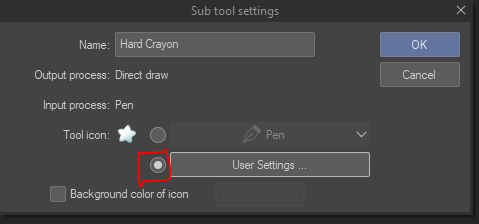
この方法で、ツールに個別のアイコンを持つことができます。 ENITREツールを右クリックすると、1つと複数を切り替えることができます。
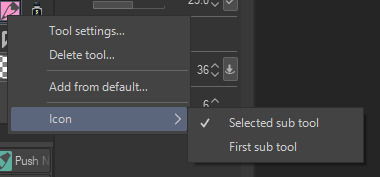


(例えば「鉛筆」ツールを右クリックする)
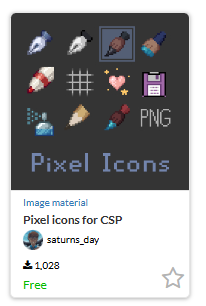
これらは私が長年にわたって作成したアイコンの束です。 ツール用、保存用(最愛のフロッピーディスク)用、レイヤーの記録やクリアなどのアクション用もあります。 よりまとまりのあるセットが必要な場合は、代わりにこれを使用できます。
検索ID:そのセットの2177522。 これらはお好みに合わせて自由に変更してください-それらは単なるアイコンであり、自由に色を変えたり、再描画したりしてください。:)
次に、アイコンとそれらの使用方法に関するチュートリアルを示します。
20px - このアイコンサイズはピクセルアートに最適です。

40px(描画・縮小しやすい)

ファイルをキャンバスにドラッグすると、2つのレイヤーとして表示されます。 一番下のレイヤーは市松模様のグリッドです:これは選択できるガイドであり、完璧な正方形の測定値を提供します。

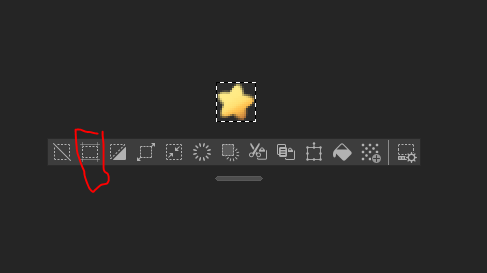
黄色の星を選択しました。 次に、トリミングします。
ツールバーの「切り抜き」ショートカットを使用します。
次に、画像が透明であることを確認し、PNGとしてエクスポートします。

次に、サブツールを右クリックして新しいアイコンに置き換えますが、もちろんあなたの言語で。
Did you know you could make your own custom icons for your tools? Just draw on a square canvas, export it as a .png image, & "right click" the subtool to change the icon.
You can have individual icons for your tools this way. Right click on the ENITRE tool and you can switch between one & multiple.
(For example, this is right clicking the "pencil" tool)
These are a bunch of icons I've made over the years. Some are for tools, some are for saving (the beloved floppy disc), and some are for actions like recording & clearing a layer. If you want a more cohesive set, you can use this one instead.
Search id: 2177522 for that set. Feel free to modify these to your liking - they're just icons, feel free to recolor or redraw them. :)
Now here are the icons, plus a tutorial on how to use them.
20px - this icon size is great for pixel art.
40px (easier to draw & shrink)
When you drag the file onto a canvas, it will appear as 2 layers. The bottom layer is a checkered grid: this is a guide you can select & it will give you the perfect square measurements.
I selected the yellow star. Now, I crop it:
I use the "crop" shortcut on the toolbar.
Then, make sure your image is transparent, & export it as a PNG.
And then right click your subtool & replace it with your new icon, but in your language, of course.
正方形のアイコン square icons




"saturns_day"さんの別の素材


"素材集"の人気素材


新着素材


バッジ
-
 MVP ◆質問に対して適切な回答を数多く投稿し、コミュニティの運営に大きく貢献したユーザーです。MVPは3ヶ月に一度、その間に獲得したポイントを元に決定し、表彰を行っています。
 -
 NVP (New Valuable Player) ◆MVPに次いでコミュニティの運営に貢献したユーザーです。これまでMVPの受賞経験のない方から、獲得したポイントを元に決定し、表彰を行なっています。
 -
 公式エキスパート ◆優れた回答者の証であるMVP受賞者の中からさらに選ばれた、コミュニティで最も優良な回答者の証です。審査を経て当社から依頼し就任いただいています。※旧名称「エバンジェリスト」
 -
 セルシス公認モデレーター ◆モデレーターは、日本語とその他の言語が話せるセルシス公認のスタッフです。ソフトウェアや創作のエキスパートではないので、直接疑問を解決することはできませんが、みなさんがスムーズにコミュニケーションできるように、言葉やコミュニケーションの側面からサポートします。
 -
 セルシス公式運営に関連した公式アカウントです。