



シンプルなインカーのセット A simple set of inkers
シンプルなパックですが、サターンズデイのガムロードにもっと高級なペンも置いていて、自然な筆やハッチングブラシが必要なら参考にしてください。 :0
各ペンは滑らかで基本的なペンで、ほとんどのスタイルに快適で使いやすいように作られています。 私が調整をおすすめする主な点は以下の通りです:
- 角度 - 左利きなら、書く方向に合わせて角度や太さを変えてください。 私は右利きなので、自分の好みに合わせて調整してください。
- 密度/不透明度圧力 - 細くて薄い線が好きなら密度/不透明度圧力をかけてください。
- スタビライゼーション - 私のデフォルトは速度がオンで0から10の間くらいなので、お好みの設定に変更してください。
- チルト&回転 - 私のタブレットは傾きはサポートしていますが、回転には対応していません。 傾きが嫌いだったり、タブレットの角度を変える場合は調整するかオフにしてください。 ペンが回転に対応しているなら、気に入ったらオンにしてください。:)
すべてのペンは色を変えることができ、モノクロでも使えます。 ペンの感触は説明が難しいので、感触を示すためにいくつかの異なる種類のストロークを試しました。 ペンを試すときは、よく描く形(髪、花、目、鼻、カール、猫など)を描いてみてください。 など)。

(自動翻訳を使っている方は、上から下へ :)
1. 涙滴書道
2. 書道の呪文
3. シャープスライスペン
4. ナチュラルラウンドパーティクルペン
5. フラットブラシインク

1. ヘックスペン(六角形ペン)
2. リボンインカー
3. 羽根ペンプルインク
4. 噴水ペン先
5. クラシックなトライアングルフェルトチップ

1. シャープトライアングル
2. イージーコーナー
3. トライアングルカッター
4. シャインポイント(髪や物に光沢を加えるのに最適です)
5. 通常のラウンドペン(私の好みで手抜きのデフォルト設定)

1. スピードペン、ラウンド
2. スピードペン、書道
3. スピードペン、長方形(正方形の厚さ調整)
4. スピードペン、平行四辺形
5. スピードペン、△
私はスピードペンが好きです。実生活 で使っているものに近いので。気に入らなければ使わなくても構いません。:)
また、エリアを「埋める」ためのペンを4種類用意しました。 大きな黒い部分があれば、これらを使って埋めることができます。

大きな黒の部分をシェーディングする際に、多様で動的な線を作るマーカーの見た目を模倣しています。また、塗りつぶしツールで黒い部分を塗りつぶし、それを使ってハッチングで切り替えを図ることもできます。下のものは抽象的な背景の形にも最適です。
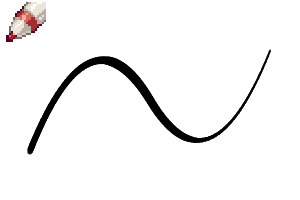
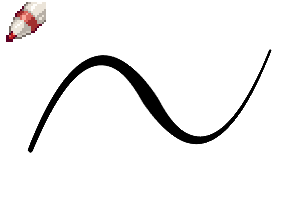
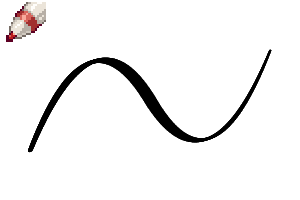
これが私が作ったテストラインです。 速く作ったので一貫性がありませんが、まあ仕方ありません。 これで筆ごとにどれだけ違うか少しでも伝わればと思います。


This is a simple pack, but I also have some fancier pens on my gumroad at saturnsday if you need some natural looking brushes or hatching brushes. :0
Each pen is a smooth, basic pen, made to be comfortable and easy to use for most styles. The main things I suggest you adjust are:
- Angle - If you are left handed, change the angle or thickness to point the way you write. I'm right handed, so adjust to your liking.
- Density/Opacity Pressure - if you like thin, wispy lines, apply density/opacity pressure.
- Stabilization - My default has speed on & somewhere between 0 and 10, go ahead change it to your preferred setting.
- Tilt & Rotation - My tablet supports tilt, but doesn't support rotation. If you hate tilt or hold your tablet at a different angle, adjust it or turn it off. If your pen supports rotation, turn it on if you like it. :)
All pens can change color, and can be used in monochrome as well. I did several different types of strokes to try and demonstrate how they feel since pen feel is harder to explain. When you test a pen, try to draw shapes you draw a lot (like hair, flowers, eyes, noses, curls, cats, etc.).
(For those using the auto-translate, top to bottom:)
1. Teardrop Calligraphy
2. Calligraphy Hex
3. Sharp Slice Pen
4. Natural Round Particle Pen
5. Flat Brush Ink
1. Hex Pen (Hexagon Pen)
2. Ribbon Inker
3. Quill Pull Ink
4. Fountain Nib
5. Classic Triangle Felt Tip
1. Sharp Triangle
2. Easy Corners
3. Triangle Cutter
4. Shine Point (great for adding shine to hair or objects)
5. Regular Round Pen (my preferred lazy default settings)
1. Speed Pen, Round
2. Speed Pen, Calligraphy
3. Speed Pen, Rectangle (adjust thickness for a square)
4. Speed Pen, Parallelogram
5. Speed Pen, Triangle
I'm a fan of speed pens myself since they're close to what I use in real life. If you don't like them, feel free not to use them. :)
I also included 4 different pens for "filling" an area. If you have a big segment of solid black, you can use these to fill it in.
They mimic the look of markers that can make varied, dynamic lines when shading big sections of solid black. You can also fill in a solid black area with the fill tool, then use these to add hatching for shading transition. The bottom one is great for abstract background shapes as well.
Here's some test lines I did. I did them fast, so they have no consistency, oh well. Hopefully it shows a bit of how different each brush is.
ベーシック Basic
-
シャインポイント Shine Point
-
レギュラーラウンドペン Regular Round Pen
-
トライアングルカッター Triangle Cutter
-
イージーコーナーズ Easy Corners
-
シャープ・トライアングル Sharp Triangle
-
クラシックトライアングルフェルトチップ Classic Triangle Felt Tip
-
ファウンテンニブ Fountain Nib
-
羽根ペンプルインク Quill Pull Ink
-
リボンインカー Ribbon Inker
-
ヘックスポイント Hex Point
-
フラットブラシインク Flat Brush Ink
-
ナチュラルラウンドパーティクルペン Natural Round Particle Pen
-
シャープスライスペン Sharp Slice Pen
-
書道の六角形 Calligraphy Hex
-
涙滴の書道 Teardrop Calligraphy


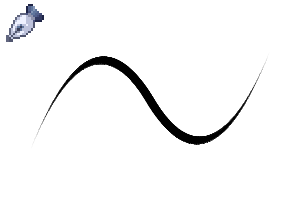
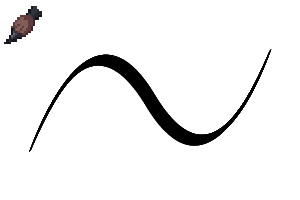


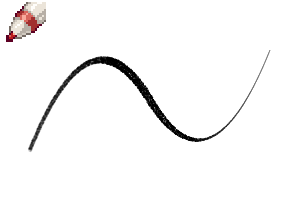

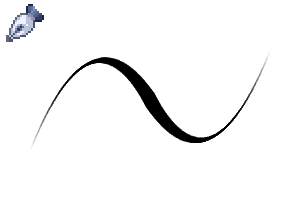

速度 Speed


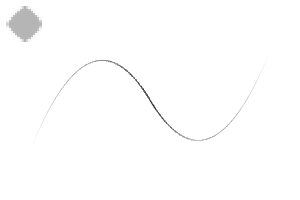
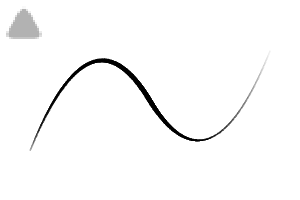
ソリッドフィル Solid Fill






"saturns_day"さんの別の素材


"素材集"の人気素材


新着素材




バッジ
-
 MVP ◆質問に対して適切な回答を数多く投稿し、コミュニティの運営に大きく貢献したユーザーです。MVPは3ヶ月に一度、その間に獲得したポイントを元に決定し、表彰を行っています。
 -
 NVP (New Valuable Player) ◆MVPに次いでコミュニティの運営に貢献したユーザーです。これまでMVPの受賞経験のない方から、獲得したポイントを元に決定し、表彰を行なっています。
 -
 公式エキスパート ◆優れた回答者の証であるMVP受賞者の中からさらに選ばれた、コミュニティで最も優良な回答者の証です。審査を経て当社から依頼し就任いただいています。※旧名称「エバンジェリスト」
 -
 セルシス公認モデレーター ◆モデレーターは、日本語とその他の言語が話せるセルシス公認のスタッフです。ソフトウェアや創作のエキスパートではないので、直接疑問を解決することはできませんが、みなさんがスムーズにコミュニケーションできるように、言葉やコミュニケーションの側面からサポートします。
 -
 セルシス公式運営に関連した公式アカウントです。