



これはオートアクションで、高いキーの解像度で映像を補正する機能です! It is the auto action that corrects the picture with high key value!
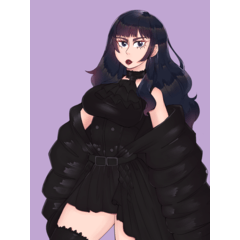
以下のキャラクターとアートワークはすべて私のものです
使い方:
トップレイヤーを選択し、この自動アクションを実行します


上記の例のように、完全な陰影でコントラストが高く、鈍い色合いの絵画におすすめ です
セルシェーディングよりもソフトシェーディングの方がうまく機能します
3層目でグラデーションマップやブレンドモード を変更すれば、より多くのオプションが使 えます
結果が彩度が高すぎる場合は、2層目で明るさを上げてコントラストを下げてください

All characters and artworks below are mine
How to use:
Select the top layer then run this auto action
Recommend for the paintings with full shading, high contrast, dull color like the example above
Works better with soft shading than cel shading
You can change gradient map and blendmode in the 3rd layer for more options
If the result is too saturated, increase brightness and reduce contrast in the 2nd layer
旧バージョン





"DuoLyly"さんの別の素材


"オートアクション"の人気素材


新着素材




バッジ
-
 MVP ◆質問に対して適切な回答を数多く投稿し、コミュニティの運営に大きく貢献したユーザーです。MVPは3ヶ月に一度、その間に獲得したポイントを元に決定し、表彰を行っています。
 -
 NVP (New Valuable Player) ◆MVPに次いでコミュニティの運営に貢献したユーザーです。これまでMVPの受賞経験のない方から、獲得したポイントを元に決定し、表彰を行なっています。
 -
 公式エキスパート ◆優れた回答者の証であるMVP受賞者の中からさらに選ばれた、コミュニティで最も優良な回答者の証です。審査を経て当社から依頼し就任いただいています。※旧名称「エバンジェリスト」
 -
 セルシス公認モデレーター ◆モデレーターは、日本語とその他の言語が話せるセルシス公認のスタッフです。ソフトウェアや創作のエキスパートではないので、直接疑問を解決することはできませんが、みなさんがスムーズにコミュニケーションできるように、言葉やコミュニケーションの側面からサポートします。
 -
 セルシス公式運営に関連した公式アカウントです。