


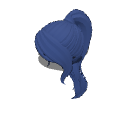
Pelo 3D con coleta alta y flequillo (High Ponytail 3D Hair with Bangs) High Ponytail 3D Hair with Bangs


Ajusté cuidadosamente la talla del material del pelo en Blender e hice numerosos ajustes finos para asegurarme de que quede perfectamente unido al cabezal. Está listo para usar, así que puedes disfrutarlo con confianza sabiendo que todo ha sido afinado para lograr el mejor ajuste.
El pelo viene en 3 partes separadas. Puedes activar o desactivar la coleta y los golpes, o moverlos
sin embargo, el pelo es de una sola malla y no es posable. 😔
Este cabello está ajustado para el modelo "figura de dibujo 3D - Ver.2 (Femenina)". Por favor, ajuste la escala para cabezales más grandes o pequeños.

¡No olvides fijar el material a la cabeza!
Paso 1: Importa tu figura 3D al lienzo.
(Asegúrate de hacer esto primero. Si lo haces después de posar la figura 3D, el pelo no encajará ni se alineará correctamente con la pose.)
Paso 2: Con tu figura 3D seleccionada (en la misma capa), importa el material de tu pelo. No te preocupes si el material aparece lejos de la figura; Simplemente pasa al siguiente paso.

Paso 3: Haz clic en el icono de la llave inglesa para abrir la paleta de detalles de la subherramienta y navega hasta la pestaña Lista de objetos.

Paso 4: Arrastra y suelta el material del pelo sobre la figura 3D de la lista para convertirla en una capa hija.

Paso 5: Expande el menú Punto de fijación justo debajo y selecciona Cabeza.

El cabello se alineará automáticamente con la cabeza.
Como el cabello ahora está unido a la figura, seguirá la cabeza sin problemas sin importar la pose que apliques.
I carefully adjusted the hair material’s size in Blender and made numerous fine-tunings to ensure it fits perfectly when attached to the head. It’s ready to use, so you can enjoy it with confidence knowing everything has been fine-tuned for the best fit!
The hair comes in 3 separate parts. You can toggle the ponytail and bangs on or off, or move them
however, the hair is a single mesh and is not poseable. 😔
This hair is fitted for the "3D drawing figure-Ver.2 (Female)" model. Please adjust the scale for larger or smaller heads.
Don’t forget to attach the material to the head!
Step 1: Import your 3D figure onto the canvas.
(Make sure to do this first. If you do it after posing the 3D figure, the hair will not fit or align correctly with the pose.)
Step 2: With your 3D figure selected (on the same layer), import your hair material. Don't worry if the material spawns far away from the figure; just proceed to the next step.
Step 3: Click the wrench icon to open the Sub Tool Detail palette and navigate to the Object list tab.
Step 4: Drag and drop the hair material onto the 3D figure in the list to make it a child layer.
Step 5: Expand the Attachment point menu directly below and select Head.
The hair will automatically align with the head.
Since the hair is now attached to the figure, it will follow the head seamlessly no matter what pose you apply.
Material Material

 Denunciar material problemático
Para informar de un problema es necesario Iniciar sesión.
Tras iniciar sesión, actualiza la página e inténtalo de nuevo.
Tras iniciar sesión, actualiza la página e inténtalo de nuevo.
Si no tiene cuenta de CLIP STUDIO
Contacta con nosotros vía correo electrónico incluyendo la siguiente información.
- Nombre del producto o del software
- Más información al respecto

Software
-
 CLIP STUDIO PAINT PRO/EX
-
CLIP STUDIO PAINT DEBUT
 Volver a descargar
Por favor, realiza la compra con Gold o Clippy si tienes pensado utilizar un dispositivo que no esté verificado con tu plan anual o mensual.

Precio
10

Saldo actual
 Adquirir
 Compra realizada con éxito.
 Ver ubicación de guardado para materiales


10
CLIPPY
Tipo
Objetos 3D
Etiquetas

Content ID:
2323416

Publicados : 1 hour ago
Última actualización: : 1 hour ago







Insignias
-
 MVP ◆Estos usuarios han contribuido en gran medida a la gestión de la comunidad, al publicar multitud de útiles respuestas a las preguntas planteadas. Una vez cada tres meses, los MVP son seleccionados en base a los puntos obtenidos durante ese período y, en consecuencia, son reconocidos por su esfuerzo.
-
 New Valuable Player (NVP) ◆Son las personas que más han contribuido a la comunidad después de los MVP. Este galardón se otorga según los puntos conseguidos a los usuarios que aún no han obtenido ningún premio MVP.
-
 Especialista oficial ◆Elegidos de entre todos los MVP, quienes ya han demostrado ser de inestimable ayuda, esto es un testimonio de su excepcional apoyo para con la comunidad. Tras un minucioso escrutinio, son nombrados por Celsys para ocupar dicho cargo.Nota: Anteriormente denominados "evangelistas".
-
 Moderador oficial de Celsys ◆Los moderadores son miembros del personal de Celsys que pueden comunicarse en japonés y otros idiomas. No son expertos en software o ilustración, por lo que no pueden responder directamente a las preguntas. Sin embargo, tratarán de asegurarse de que la comunicación entre usuarios de distintas lenguas sea tan fluida y comprensible como sea posible.
-
 Cuenta oficial de CelsysCuenta oficial del administrador