


【48Hfree】Pack de poses femeninas para los bust up (【48Hfree】Female Bust Up Poses Pack) 【48Hfree】Female Bust Up Poses Pack
Content ID:2306448
-
485


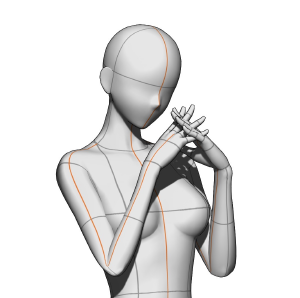
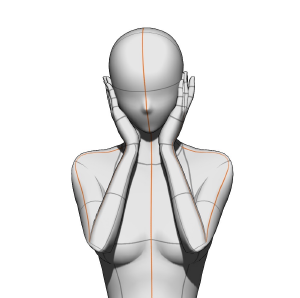
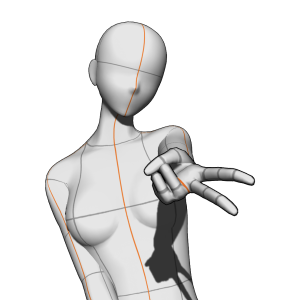
¡3 poses en total! 3 poses total!

Este es un material de imagen 3D: tras importarlo, el material se cargará con el mismo ángulo de cámara que la imagen anterior. Sin embargo, aún puedes cambiar completamente la vista de la cámara, ajustar la pose y reemplazar el modelo 3D por el que prefieras.
Instrucciones

Cómo importar
Paso 1: Por favor, abre la ventana de la paleta de materiales y localiza el material deseado.
Paso 2: Selecciona el material.
Paso 3: ¡Pulsa este botón para pegarlo en el lienzo! También puedes arrastrar y soltar el material sobre el lienzo, pero el modelo estará posicionado de forma diferente según dónde lo dejes caer.
Nota de la autora: Para evitar choques con los diferentes ángulos de cámara, lo mejor es importar cada pose a una capa aparte. Si los importas todos en una sola capa, las poses tendrán ángulos diferentes a los que se muestran en la miniatura.
Tamaño recomendado de lienzo
4000x4000 px o más (¡mejor si el lienzo es cuadrado)! Sin embargo, no hay problemas si el lienzo es horizontal o vertical.
Tutorial para un lienzo más pequeño


Sobre la postura GAL


Cómo importar
Paso 1: Por favor, abre la configuración avanzada de herramientas y haz clic en la opción "Cámara".
Paso 2: Desactiva el icono de bloqueo en la cámara actual.
Paso 3: Haz clic en este botón para cambiar a proyección paralela* y ¡listo!
*Con proyección paralela, la mano no aparecerá en perspectiva (parecerá más pequeña), pero podrás mover el modelo sin que cambie el ángulo.
This is a 3D image material: after importing it, the material will load with the same camera angle as the image above. However, you can still completely change the camera view, tweak the pose, and replace the 3D model with your preferred one!
Instructions
How to import
Step 1: Please open the material palette window and locate the desired material.
Step 2: Select the material.
Step 3: Tap this button to paste it on the canvas! You can also drag and drop the material onto the canvas, but the model will be positioned differently based on where you drop it.
A/N: To avoid clashing with the different camera angles, it’s best to import each pose onto a separate layer. If you import them all on a single layer, the poses will have different angles from those shown in the thumbnail.
Recommended canvas size
4000x4000 px or larger (best if the canvas is square)! Nevertheless, there are no problems if the canvas is horizontal or vertical.
Tutorial for a smaller canvas
About the GAL pose
How to import
Step 1: Please open the advanced tool settings and click on the “Camera” option.
Step 2: Toggle off the lock icon on the current camera.
Step 3: Click on this button to switch to parallel projection* and you’re done!
*with parallel projection, the hand will not appear in perspective (it will appear smaller), but you’ll be able to move the model without the angle changing.
Posturas de Bust Up Bust Up Poses








Más materiales de mengli


Materiales populares de Catálogos de materiales


Nuevos materiales


Insignias
-
 MVP ◆Estos usuarios han contribuido en gran medida a la gestión de la comunidad, al publicar multitud de útiles respuestas a las preguntas planteadas. Una vez cada tres meses, los MVP son seleccionados en base a los puntos obtenidos durante ese período y, en consecuencia, son reconocidos por su esfuerzo.
 -
 New Valuable Player (NVP) ◆Son las personas que más han contribuido a la comunidad después de los MVP. Este galardón se otorga según los puntos conseguidos a los usuarios que aún no han obtenido ningún premio MVP.
 -
 Especialista oficial ◆Elegidos de entre todos los MVP, quienes ya han demostrado ser de inestimable ayuda, esto es un testimonio de su excepcional apoyo para con la comunidad. Tras un minucioso escrutinio, son nombrados por Celsys para ocupar dicho cargo.Nota: Anteriormente denominados "evangelistas".
 -
 Moderador oficial de Celsys ◆Los moderadores son miembros del personal de Celsys que pueden comunicarse en japonés y otros idiomas. No son expertos en software o ilustración, por lo que no pueden responder directamente a las preguntas. Sin embargo, tratarán de asegurarse de que la comunicación entre usuarios de distintas lenguas sea tan fluida y comprensible como sea posible.
 -
 Cuenta oficial de CelsysCuenta oficial del administrador