


【48Hfree】Weibliche Bruch-Pose-Packung 2.0 (【48Hfree】Female Bust Up Pose Pack 2.0) 【48Hfree】Female Bust Up Pose Pack 2.0
Content ID:2306727
-
335


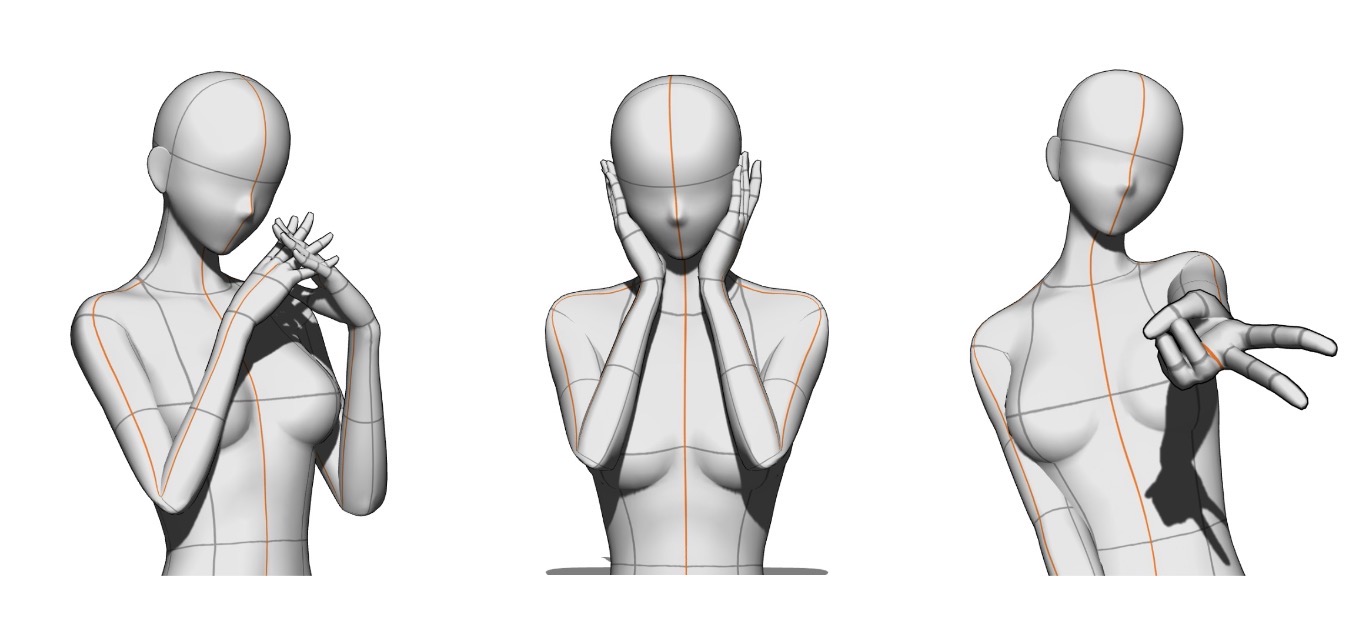
Insgesamt 3 Posen! 3 poses total!
Ein Set aus drei Bust-up-Posen, um hübsche Charaktere zu zeichnen. Ich habe dieses Paket gemacht , weil ich Schwierigkeiten hatte, niedliche Posen zu finden, die nur für Bust-up-Illustrationen optimiert sind, also habe ich selbst welche gemacht, bitte viel Spaß!
Haftungsausschluss: Die Modelle wurden posiert, indem man auf die Leinwand hineinzoomte und sich auf den Oberkörper konzentrierte. Daher wurde der Unterkörper beim Posieren nicht berücksichtigt. Am besten zoomt man in die Kameraansicht heran und konzentriert sich nur auf den Oberkörper.
Über die GAL-Pose
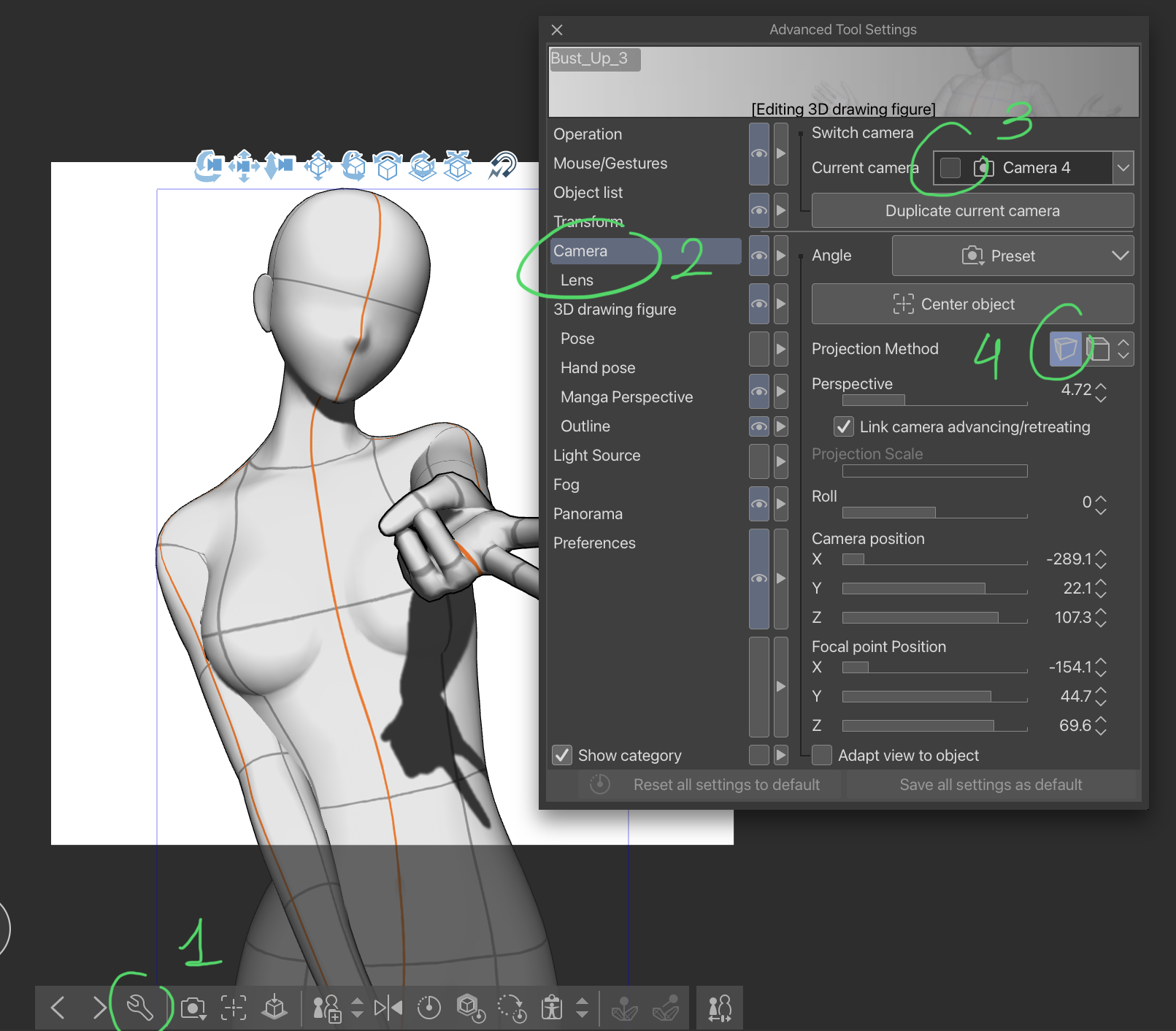
Wenn das Modell mit einer kleineren Hand erscheint (derjenigen, die das umgedrehte Friedenszeichen macht), Sie es aber wie im obigen Bild vergrößern möchten, folgen Sie diesem einfachen Tutorial, um es zu beheben:
SCHRITT 1: Tippen Sie auf das Schraubenschlüssel-Symbol, um das Fenster "Erweiterte Werkzeugeinstellungen" zu öffnen.
SCHRITT 2: Klicken Sie auf das Menü "Kamera".
SCHRITT 3: Stellen Sie sicher, dass Ihre aktuelle Kamera nicht gesperrt ist, falls doch, schalten Sie sie bitte aus.
SCHRITT 4: Tippen Sie auf dieses Symbol, um zur Perspektivprojektion zu wechseln, und fertig!
A/N: Ich habe die Materialien aktualisiert, da ich gebeten wurde, auf Posenmaterialien statt auf 3D-Bildmaterialien umzusteigen. Es war nicht möglich, den vorherigen Materialkatalog zu aktualisieren, daher musste ich einen neuen veröffentlichen, ich entschuldige mich für die Unannehmlichkeiten.
A set of 3 bust-up poses for drawing pretty characters. I made this pack because I struggled to find cute poses that are optimized for bust-up only illustrations, so I made some myself, please enjoy!
Disclaimer: The models were posed by zooming in on the canvas and focusing on the upper body. Therefore, the lower body was not taken into account while posing. It is best to zoom in on the camera view and focus on the upper body only.
About the GAL pose
If the model appears with a smaller hand (the one making the upside-down peace sign) but you’d prefer it to be enlarged just like in the image shown above, do follow this simple tutorial to fix it:
STEP 1: Tap on the wrench icon to open the “Advanced Tool Settings” window.
STEP 2: Click on the “Camera” menu.
STEP 3: Ensure that your current camera is not locked, if it is, please turn it off.
STEP 4: Tap on this icon to switch to perspective projection, and you’re done!
A/N: Updated the materials as I was requested to switch to pose materials instead of 3D image materials. It was not possible to update the previous material catalog, therefore I had to publish a new one, I apologize for the inconvenience.
Bust-up-Posen Bust Up Poses






Weitere Materialien von mengli


Beliebte Materialien zu „Materialkatalog“


Neue Materialien






Abzeichen
-
 MVP ◆Dieser Nutzer hat einen großen Beitrag zur Verwaltung der Community geleistet, indem er viele großartige Antworten auf die gestellten Fragen veröffentlicht hat. Alle drei Monate werden die MVPs auf der Grundlage der in diesem Zeitraum erworbenen Punkte ermittelt und entsprechend anerkannt.
 -
 New Valuable Player (NVP) ◆Die NVP-Auszeichnung geht an die Nutzer, die nach den MVP den größten Beitrag zur Community geleistet haben. Sie werden basierend auf den gesammelten Punkten unter denjenigen ausgewählt, die bisher noch nicht als MVP ausgezeichnet wurden.
 -
 Offizielle Experten ◆Ausgewählt aus allen MVP-Preisträgern, die bereits ein Zeichen für Exzellenz sind, zeugt diese Auszeichnung von herausragender Korrespondenz in der Community. Nach sorgfältiger Prüfung werden sie von CELSYS ernannt und übernehmen ihre Position.* Vorherige Bezichnung: Evangelist
 -
 Offizieller Moderator von CELSYS ◆Moderatoren sind offizielle CELSYS-Mitarbeiter, die fließend Japanisch und verschiedene andere Sprachen sprechen. Moderatoren sind keine Experten der Software oder Illustrationen und können daher nicht direkt auf Ihre Fragen antworten. Aber Moderatoren bieten Unterstützung in Kommunikation und Sprache, um sicherzustellen, dass alle reibungslos miteinander kommunizieren können.
 -
 Offizieller Account von CELSYSDer offizielle Administrator-Account