


【48Hfree】Weibliche Split-Up-Posen-Pack (【48Hfree】Female Bust Up Poses Pack) 【48Hfree】Female Bust Up Poses Pack
Content ID:2306448
-
353


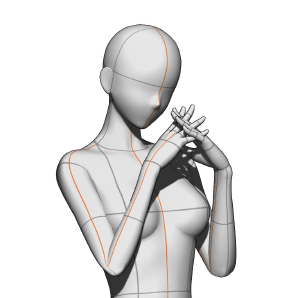
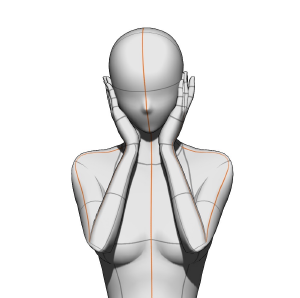
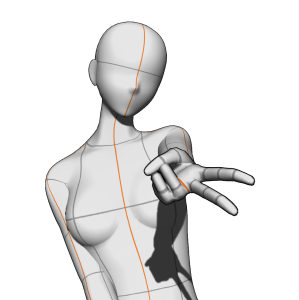
Insgesamt 3 Posen! 3 poses total!

Dies ist ein 3D-Bildmaterial: Nach dem Import wird das Material mit demselben Kamerawinkel wie das obige Bild geladen. Du kannst aber trotzdem die Kameraansicht komplett ändern, die Pose anpassen und das 3D-Modell durch dein bevorzugtes ersetzen!
Anleitung

Wie man importiert
Schritt 1: Bitte öffnen Sie das Materialpalettenfenster und finden Sie das gewünschte Material.
Schritt 2: Wählen Sie das Material aus.
Schritt 3: Tippen Sie auf diesen Button, um es auf die Leinwand einzufügen! Du kannst das Material auch per Drag & Drop auf die Leinwand ziehen, aber das Modell wird je nach Platzierung unterschiedlich positioniert.
A/N: Um Kollisionen mit den verschiedenen Kamerawinkeln zu vermeiden, ist es am besten, jede Pose auf eine separate Ebene zu importieren. Wenn du sie alle auf eine einzige Ebene importierst, haben die Posen andere Winkel als die im Thumbnail gezeigten.
Empfohlene Leinwandgröße
4000x4000 px oder größer (am besten, wenn die Leinwand quadratisch ist)! Dennoch gibt es keine Probleme, wenn die Leinwand horizontal oder vertikal ist.
Tutorial für eine kleinere Leinwand


Über die GAL-Pose


Wie man importiert
Schritt 1: Bitte öffnen Sie die erweiterten Werkzeugeinstellungen und klicken Sie auf die Option "Kamera".
Schritt 2: Schalte das Schlosssymbol der aktuellen Kamera aus.
Schritt 3: Klicken Sie auf diesen Button, um auf parallele Projektion umzuschalten* und Sie sind fertig!
*Bei paralleler Projektion erscheint die Hand nicht in der Perspektive (sie wirkt kleiner), aber du kannst das Modell bewegen, ohne dass sich der Winkel ändert.
This is a 3D image material: after importing it, the material will load with the same camera angle as the image above. However, you can still completely change the camera view, tweak the pose, and replace the 3D model with your preferred one!
Instructions
How to import
Step 1: Please open the material palette window and locate the desired material.
Step 2: Select the material.
Step 3: Tap this button to paste it on the canvas! You can also drag and drop the material onto the canvas, but the model will be positioned differently based on where you drop it.
A/N: To avoid clashing with the different camera angles, it’s best to import each pose onto a separate layer. If you import them all on a single layer, the poses will have different angles from those shown in the thumbnail.
Recommended canvas size
4000x4000 px or larger (best if the canvas is square)! Nevertheless, there are no problems if the canvas is horizontal or vertical.
Tutorial for a smaller canvas
About the GAL pose
How to import
Step 1: Please open the advanced tool settings and click on the “Camera” option.
Step 2: Toggle off the lock icon on the current camera.
Step 3: Click on this button to switch to parallel projection* and you’re done!
*with parallel projection, the hand will not appear in perspective (it will appear smaller), but you’ll be able to move the model without the angle changing.
Bust-up-Posen Bust Up Poses








Weitere Materialien von mengli


Beliebte Materialien zu „Materialkatalog“


Neue Materialien




Abzeichen
-
 MVP ◆Dieser Nutzer hat einen großen Beitrag zur Verwaltung der Community geleistet, indem er viele großartige Antworten auf die gestellten Fragen veröffentlicht hat. Alle drei Monate werden die MVPs auf der Grundlage der in diesem Zeitraum erworbenen Punkte ermittelt und entsprechend anerkannt.
 -
 New Valuable Player (NVP) ◆Die NVP-Auszeichnung geht an die Nutzer, die nach den MVP den größten Beitrag zur Community geleistet haben. Sie werden basierend auf den gesammelten Punkten unter denjenigen ausgewählt, die bisher noch nicht als MVP ausgezeichnet wurden.
 -
 Offizielle Experten ◆Ausgewählt aus allen MVP-Preisträgern, die bereits ein Zeichen für Exzellenz sind, zeugt diese Auszeichnung von herausragender Korrespondenz in der Community. Nach sorgfältiger Prüfung werden sie von CELSYS ernannt und übernehmen ihre Position.* Vorherige Bezichnung: Evangelist
 -
 Offizieller Moderator von CELSYS ◆Moderatoren sind offizielle CELSYS-Mitarbeiter, die fließend Japanisch und verschiedene andere Sprachen sprechen. Moderatoren sind keine Experten der Software oder Illustrationen und können daher nicht direkt auf Ihre Fragen antworten. Aber Moderatoren bieten Unterstützung in Kommunikation und Sprache, um sicherzustellen, dass alle reibungslos miteinander kommunizieren können.
 -
 Offizieller Account von CELSYSDer offizielle Administrator-Account