



Layer-Vorlage und ergänzende Auto-Action für Illustration und Comicseite layers template and complementary auto-action for illustration and comic's page
Das ist eine farbcodierte Schichtvorlage , die ich für mich selbst erstellt habe, weil ich meine Schichten lieber mit Farben habe , da es für mich leichter ist, den Überblick zu behalten , ohne mich zu sehr zu verlaufen.
"PROGRESS", "eye_strain_prevention" und "SKETCH" sind auf "Draft Layer" gesetzt , was bedeutet, dass sie beim Export deiner Arbeit nicht angezeigt werden , selbst wenn sie aktiviert sind , aber trotzdem auf deiner Startseite angezeigt werden .
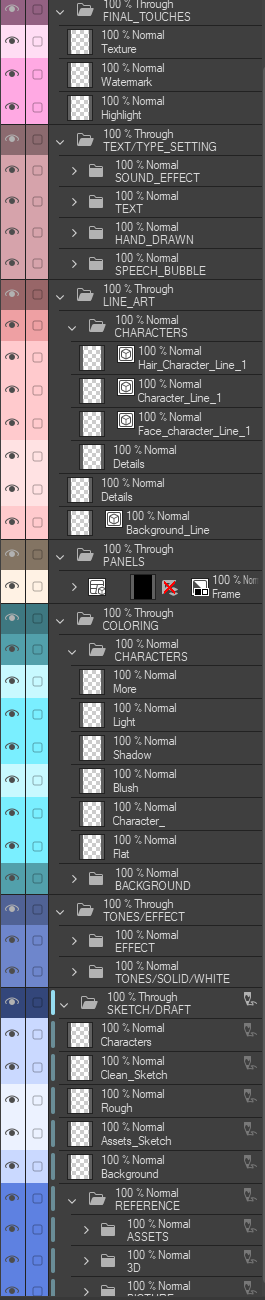
Und hier ist es mit allen ordnern offen:
Zögern Sie nicht, nach Belieben hinzuzufügen und zu entfernen !
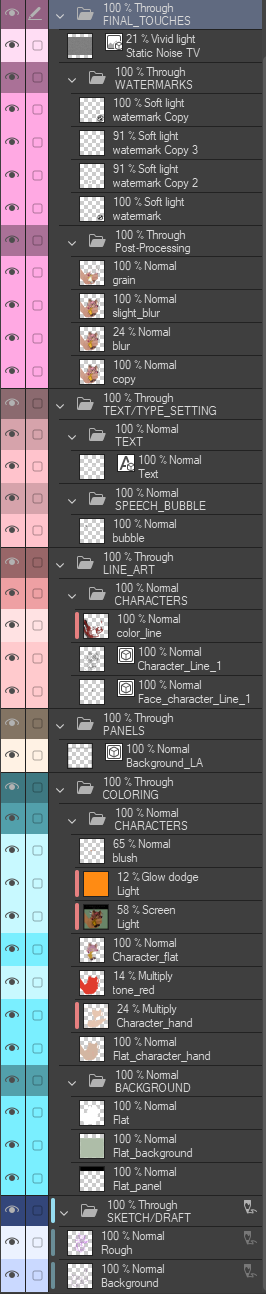
So sieht mein Raum für meine Ansoll-Illustration aus;

WAS BEWIRKT DIESES MATERIAL?
Diese Vorlage fügt Ihrer Illustration mehrere benannte Ordner, Unterordner und Ebenen hinzu
Die Auto-Action erleichtert das Umfärben und Erstellen von Ebenen
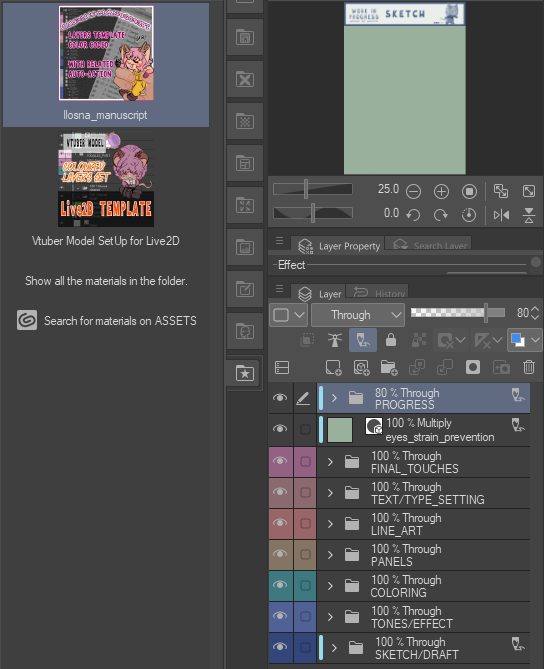
Die Vorlage hat acht Hauptkategorien ;
- FORTSCHRITT | Dies ist ein Ordner mit Bildmaterial, das Ihnen hilft, sich mit einem einfachen Blick daran zu erinnern, in welchem Zustand Sie die Illustration hinterlassen haben.
- LETZTE SCHLIFFE | Rötliche Magenta
- TEXT-/TYPSETZUNG | Rosa-Rot
- LINIENZEICHNUNG | Kupferrose
- PANELS | Bräunlich-grau
- FÄRBUNG | Verblasster Jade
- TÖNE/EFFEKT | Dunkelblau
- SKIZZE/ENTWURF | Blue Jay
Eine Eye Strain Prevention-Ebene wurde auf die Hauptordner gelegt.
"PROGRESS", "eye_strain_prevention" und "SKETCH" sind auf "Draft Layer" gesetzt , was bedeutet, dass sie beim Export deiner Arbeit nicht angezeigt werden , selbst wenn sie aktiviert sind , aber trotzdem auf deiner Startseite angezeigt werden .
(˶ˆ꒳ˆ˵)
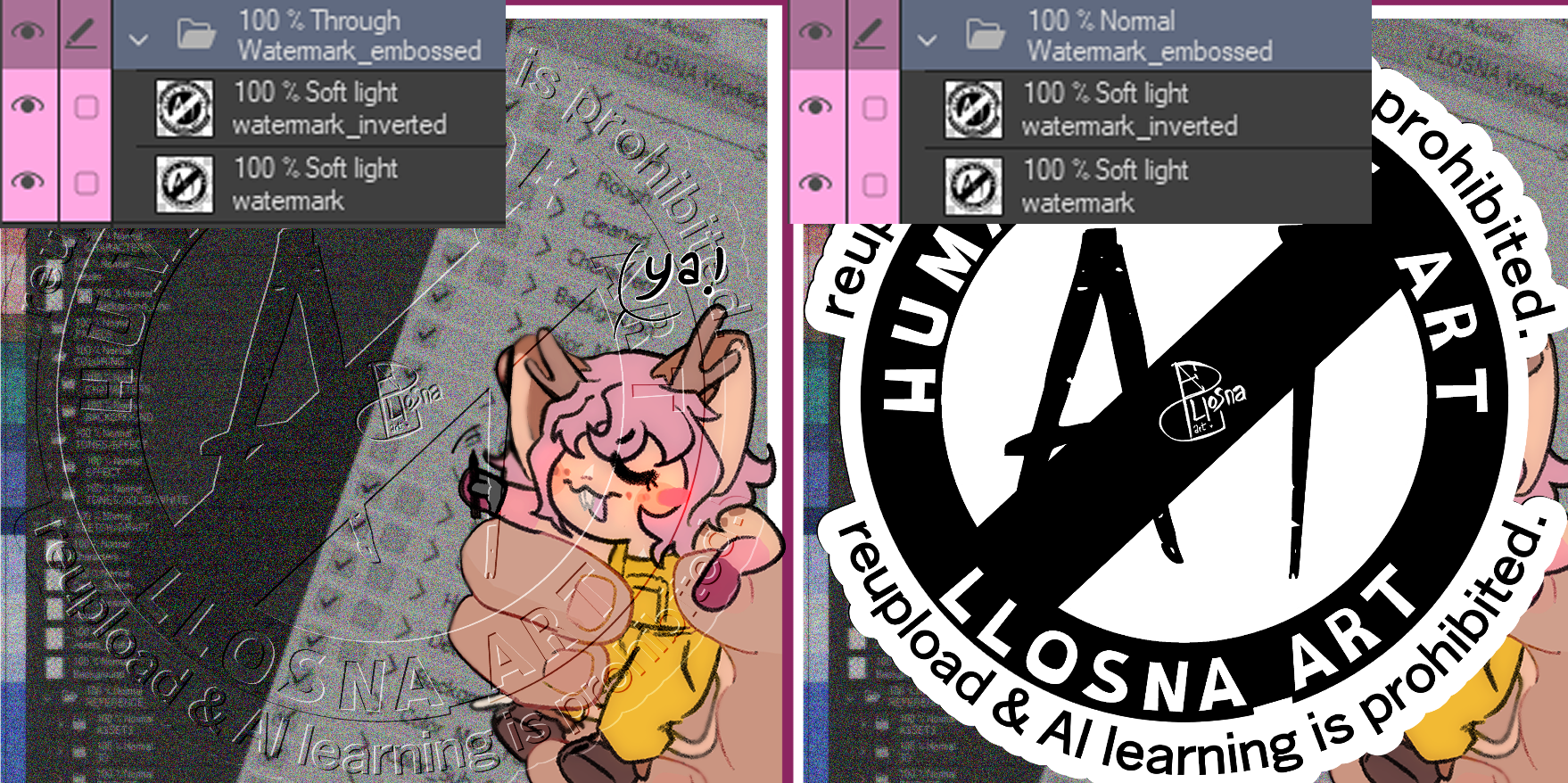
Alle Ordner sind auf "Durch" gesetzt;
Es erlaubt es, dass die einzelnen Blending-Modi dieser Ebenen im Ordner zu den unterliegenden Ebenen übergehen.
Ohne "Durch" schalten die Blending-Modi standardmäßig auf den Blend-Modus des Ordners selbst.
Hier ist ein Bildbeispiel: Mit Einstellung auf "Durch" und Einstellung auf "Normal"
ദ്ദി ˉ͈̀꒳ˉ͈́ )✧
Fortschrittsordner:
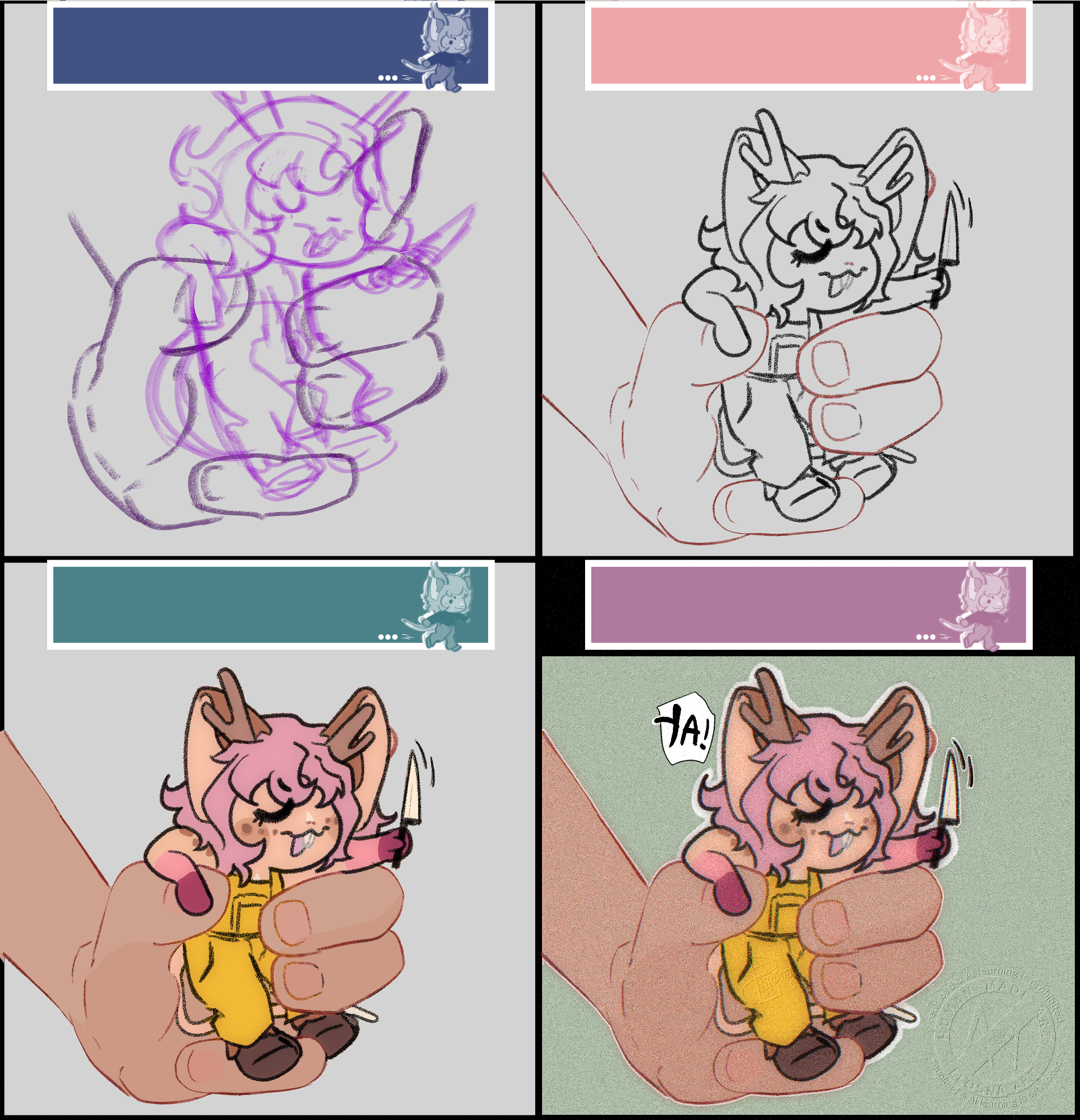
Du kannst es dort platzieren , wo du es auf der Seite möchtest, und es passt zu deiner Leinwand , wenn es hinzugefügt wird; es gibt acht Varianten, die mit dem Farbton des entsprechenden Hauptordners koloriert sind.
So sieht es aus;
So sieht es aus;
WIE RICHTET MAN ES EIN?
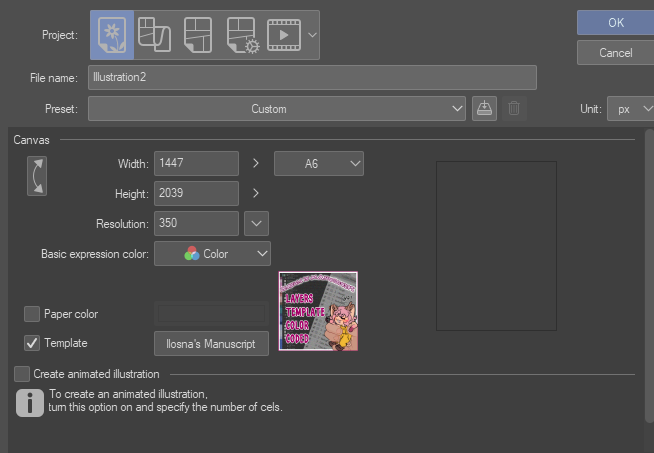
Du kannst es zuerst hinzufügen , indem du auf g auf die Schaltfläche "Vorlage" klickstund es über "heruntergeladenes Material" durchsuchst oder in der Suchfunktion "LLOSNA" schreibst
Oder indem man es von den Materialien auf die Schichten zieht .
Dieses Bild zeigt auch , wie die Vorlage aussieht, wenn sie hinzugefügt wird !
Und hier ist es mit allen ordnern offen:
Ich habe versucht , es so einfach wie möglich zu halten
Und das alles, während sie relativ viel Bedarf haben .Zögern Sie nicht, nach Belieben hinzuzufügen und zu entfernen !
So sieht mein Raum für meine Ansoll-Illustration aus;
Ich habe die Ordner und Ebenen, die ich nicht brauchte, gelöscht und je nach Bedarf eigene hinzugefügt :3
﹌﹌﹌﹌﹌﹌﹌﹌﹌﹌﹌﹌﹌﹌﹌﹌
Damit habe ich eine Auto-Action erstellt , die benannte und farbige Ebenen hinzufügt und einfach die Farbe der Ebenen wechselt !
So muss ich nicht alles manuell machen.
Auch hier ist es nur das absolute Minimum, besonders beim Erstellen von Ebenen mit Namen, ich nutze meistens die Farbaktion , um meine Ebenen einfach neu zu färben .
ദ്ദി◝ ⩊ ◜.ᐟ
Sie werden mit leerer Auto-Action getrennt , um möglichst gut lesbar zu sein

Und das war's für mich! Einen schönen Tag noch, und danke , dass du dich für meine Arbeit interessierst (es hat so lange gedauert, haha).
૮₍ ´ ꒳ `₎ა
* kämpfe um mein Leben und verstehe, wie man einen Materialkatalog aktualisiert, also habe ich einfach einen neu erstellt, den Text aus dem Fortschrittsordner entfernt, und die Schriftart in den Vorschaubildern geändert
This is a colour coded layers template I made for myself, because I prefer to have my layers with colours, as it is easier for me to keep track of everything without getting too lost.
The "PROGRESS", "eye_strain_prevention" and "SKETCH" are set on "Draft Layer", wich mean they will not show when you export your work even if they are turned on, but they will still be shown on your homepage.
And here it is with all folder open :
Here's how my space looks for my Ansoll illustration ;
WHAT DOES THIS MATERIAL DO ?
This template add to your illustration, multiple nammed folders, subfolders and layers
The auto-action make it easier to recolor and create layers
The Template has eight main categories ;
- PROGRESS | This is a folder with Image material to help you remember in what state you left the illustration at in one simple look.
- FINAL TOUCHES | Reddish Magenta
- TEXT/TYPE SETTING | Pinkish Red
- LINE ART | Copper Rose
- PANELS | Brownish Grey
- COLORING | Faded Jade
- TONES/EFFECT | Dusky Blue
- SKETCH/DRAFT | Blue Jay
One Eye Strain Prevention layer was added on top of the main folders.
The "PROGRESS", "eye_strain_prevention" and "SKETCH" are set on "Draft Layer", wich mean they will not show when you export your work even if they are turned on, but they will still be shown on your homepage.
(˶ˆ꒳ˆ˵)
All folders are set on "Through";
It allows the individual blending modes of those layers in the folder to pass through to the layers below the folder.
Without "Through", the blending modes will default to the blend mode of the folder itself.
Here's a picture exemple : With set on "Through" and set on "Normal"
ദ്ദി ˉ͈̀꒳ˉ͈́ )✧
Progress Folder :
You can Place it where you want on the page, and it fit your canvas when added, there is eight variant, colored with their corresponding's main folder's shade.
Here how it looks ;
Here how it looks ;
HOW TO SET UP ?
You can add it first by clicking on the "template" button and searching it from "downloaded material"or writing "LLOSNA" in the search option
Or by dragging it to your layers, from your materials.
This picture also show how the template looks when added !
And here it is with all folder open :
I tried to keep it as basic as possible, all while having relatively what is needed.
Do not hesitate to add and remove as you wish !
Do not hesitate to add and remove as you wish !
Here's how my space looks for my Ansoll illustration ;
I erased the folders and layers I didn't need, and added my owns, depending of my needs :3
﹌﹌﹌﹌﹌﹌﹌﹌﹌﹌﹌﹌﹌﹌﹌﹌
Now with that, I created an auto-action that add nammed and colored layers, as well as just switch the color of the layers !
So I don't have to do everything manually.
Again, it's just the strict minimum, especially for creating ones with names, I mostly use the color action to easily recolor my layers.
ദ്ദി◝ ⩊ ◜.ᐟ
They are separated with empty auto-action to be as easily readable as possible
And that's all for me ! Have a nice day, and thanks for being interested in my work (it took me so long lmao)
૮₍ ´ ꒳ `₎ა
* fighting for my life understanding how to uptate material catalogue, so I just recreated one, edit to remove the text in the image from the progress folder and change the font in the thumbnails
Pop-up-Schichten-Vorlage Pop-Up Layers Template

Komplementäre automatische Aktion Complementary Auto Action



Weitere Materialien von Llsona

Beliebte Materialien zu „Materialkatalog“


Neue Materialien


Abzeichen
-
 MVP ◆Dieser Nutzer hat einen großen Beitrag zur Verwaltung der Community geleistet, indem er viele großartige Antworten auf die gestellten Fragen veröffentlicht hat. Alle drei Monate werden die MVPs auf der Grundlage der in diesem Zeitraum erworbenen Punkte ermittelt und entsprechend anerkannt.
 -
 New Valuable Player (NVP) ◆Die NVP-Auszeichnung geht an die Nutzer, die nach den MVP den größten Beitrag zur Community geleistet haben. Sie werden basierend auf den gesammelten Punkten unter denjenigen ausgewählt, die bisher noch nicht als MVP ausgezeichnet wurden.
 -
 Offizielle Experten ◆Ausgewählt aus allen MVP-Preisträgern, die bereits ein Zeichen für Exzellenz sind, zeugt diese Auszeichnung von herausragender Korrespondenz in der Community. Nach sorgfältiger Prüfung werden sie von CELSYS ernannt und übernehmen ihre Position.* Vorherige Bezichnung: Evangelist
 -
 Offizieller Moderator von CELSYS ◆Moderatoren sind offizielle CELSYS-Mitarbeiter, die fließend Japanisch und verschiedene andere Sprachen sprechen. Moderatoren sind keine Experten der Software oder Illustrationen und können daher nicht direkt auf Ihre Fragen antworten. Aber Moderatoren bieten Unterstützung in Kommunikation und Sprache, um sicherzustellen, dass alle reibungslos miteinander kommunizieren können.
 -
 Offizieller Account von CELSYSDer offizielle Administrator-Account