


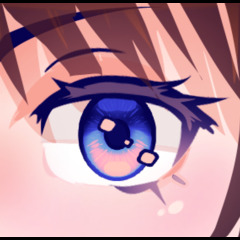


一把能用你想要的顏色畫出完美閃亮眼睛的畫筆! A brush that draws perfect shiny eyes in any set of colors you want!
【 如何使用 】
(1) - 選擇主色和次要色。
⤷ 我建議主色比次色更淡但飽和度較低。
(2) - 選擇你想要的刷子大小和粗細。
⤷ 如果角色的頭部轉向,外眼可能會變薄且略小。
⤷ 你可以讓眼睛變大更大,讓角色看起來更像孩子。
(3) - 將眼睛畫到你想要的位置。
⤷ 如果形狀看起來不是你想要的樣子,你可以輕鬆地變形或液化成你想要的形狀。
(4) - 用眼部挑染刷讓眼睛看起來閃亮。
⤷ 你可以自訂高光的形狀和位置,因為它和眼刷是分開的。
這些都是你需要完成的步驟,但如果你想要更多客製化,請考慮以下的額外步驟:
(5) - 使用梯度圖。
⤷ 為了獲得最佳效果(漸層圖中最多顏色),畫眼睛時以黑色為主色,白色作為次要色。
⤷ 你可以使用 CSP 內建的漸層地圖,自行嘗試,或使用從資產下載的地圖。
[!]如果你最後用漸層貼圖,我建議之後再加高光。這讓你能更精確地控制高光和輪廓的顏色,因為有時你可能希望它們和眼睛顏色不同。
(6) - 在新圖層上噴霧刷過眼睛,並使用混合模式。
⤷ 發 光 可以用來讓眼睛看起來像在發光。
⤷ 乘 法 可用來遮蔽眼睛。
⤷ 疊加 效果可以用來讓眼睛看起來更加鮮豔。

這是另一個例子,在同一張 Sunrise(紫色)漸層圖上,但原本的主色和次要色分別是黑和白,而不是像上面第二個例子那樣的海軍藍和青色。如你所見,顏色看起來更加鮮豔。

以下是縮圖中的範例。每隻眼睛的主色與次要色為黑白,並配有不同的陰鬱色調漸層圖(包含於CSP)。中間色調會用噴筆噴灑在眼睛上方的層次,然後設定為疊加。

【 How to use 】
(1) - Pick a main color and a secondary color.
⤷ I recommend making the main color less saturated but darker than the secondary color.
(2) - Choose the brush size and thickness you want.
⤷ If the character's head is turned, the outer eye may be thinner and slightly smaller.
⤷ You can make the eyes wider and bigger to make the character look more childlike.
(3) - Draw the eyes where you want them to be.
⤷ If the shape doesn't look the way you want, you can easily transform or liquify it to the shape you want.
(4) - Use the eye highlights brush to make the eyes look shiny.
⤷ You can customize the shape and location of the highlights to however you like since it's separate from the eye brush.
These are all the steps you need to do, but if you want more customization, consider the additional steps below:
(5) - Use a gradient map.
⤷ For the best results (most amount of colors in gradient map present), use black as a main color and white as a secondary color when drawing the eye.
⤷ You can use the gradient maps already included in CSP, experiment with your own, or use ones downloaded from assets.
[!] If you end up using a gradient map, I recommend adding highlights afterwards. This allows you to have more control over the color of the highlights and outline, since sometimes you may want them to be different from the eye color.
(6) - Airbrush over the eye in a new layer and use blending modes.
⤷ Glow can be used to make the eyes look like they are glowing.
⤷ Multiply can be used to shade the eyes.
⤷ Overlay can be used to make the eye look even more vibrant.
Here's another example on the same Sunrise (purple) gradient map, but with the original main and secondary colors being black and white respectively instead of navy and cyan like in the second example above. As you can see, the colors look much more vibrant.
Here are the examples from the thumbnail. Each eye's main color and secondary colors are black and white, with different Somber Shade gradient maps (included in CSP). The mid tone color is airbrushed over the the eyes in a layer above and set to overlay.
更新歷史記錄


「素材集」的人氣素材


最新素材




徽章
-
 MVP ◆針對問題投稿了眾多適切的回答,對社群有顯著貢獻的用戶。每3個月一次,會依據期間內獲得的點數選出MVP用戶,並進行表揚。
 -
 NVP(New Valuable Player) ◆繼MVP後,對社群營運做出良好貢獻的用戶。將從不曾獲選為MVP的用戶中,依據獲得的點數進行評選、表揚。
 -
 官方推廣大使 ◆從被證明為優良回答用戶的MVP獲獎者中選出社群中最優異的回答者。並經審查後由本社委託就任。※舊名稱為「Evangelist」
 -
 CELSYS公認Moderator ◆Moderator為會使用日文及其他語言的CELSYS公認工作人員。由於並非軟體或創作的專業人士,Moderator無法直接為用戶解決疑問,但能在語言、交流方面提供支援,幫助用戶們順利地進行溝通。
 -
 CELSYS官方為與營運相關的官方帳號。