


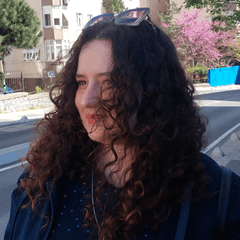

我在 Blender 裡仔細調整了頭髮材質的尺寸,並做了許多微調,確保它貼在頭上時能完美貼合。它已經準備好使用,讓你放心享用,因為一切都經過細緻調校,達到最佳合身度!

別忘了把材料固定在頭部上!
步驟一: 將你的3D人物匯入到畫布上。
步驟二: 選擇 3D 人偶(在同一圖層)後,匯入你的頭髮材質。如果素材生成在離人偶很遠的地方也不用擔心;直接進入下一步。

步驟三: 點擊扳手圖示開啟子工具詳細調色盤,並導向物件清單標籤。

步驟四: 把頭髮材質拖放到清單裡的 3D 人偶上,讓它變成子圖層。

步驟五: 展開下方的附屬點選單,選擇頭部。

頭髮會自動與頭部對齊。
由於頭髮已經附著在人物身上,無論你擺什麼姿勢,頭髮都能無縫地跟隨頭部。
I carefully adjusted the hair material’s size in Blender and made numerous fine-tunings to ensure it fits perfectly when attached to the head. It’s ready to use, so you can enjoy it with confidence knowing everything has been fine-tuned for the best fit!
Don’t forget to attach the material to the head!
Step 1: Import your 3D figure onto the canvas.
Step 2: With your 3D figure selected (on the same layer), import your hair material. Don't worry if the material spawns far away from the figure; just proceed to the next step.
Step 3: Click the wrench icon to open the Sub Tool Detail palette and navigate to the Object list tab.
Step 4: Drag and drop the hair material onto the 3D figure in the list to make it a child layer.
Step 5: Expand the Attachment point menu directly below and select Head.
The hair will automatically align with the head.
Since the hair is now attached to the figure, it will follow the head seamlessly no matter what pose you apply.
材料 Material



「suna.art」的其他素材


「3D物件」的人氣素材





最新素材


徽章
-
 MVP ◆針對問題投稿了眾多適切的回答,對社群有顯著貢獻的用戶。每3個月一次,會依據期間內獲得的點數選出MVP用戶,並進行表揚。
 -
 NVP(New Valuable Player) ◆繼MVP後,對社群營運做出良好貢獻的用戶。將從不曾獲選為MVP的用戶中,依據獲得的點數進行評選、表揚。
 -
 官方推廣大使 ◆從被證明為優良回答用戶的MVP獲獎者中選出社群中最優異的回答者。並經審查後由本社委託就任。※舊名稱為「Evangelist」
 -
 CELSYS公認Moderator ◆Moderator為會使用日文及其他語言的CELSYS公認工作人員。由於並非軟體或創作的專業人士,Moderator無法直接為用戶解決疑問,但能在語言、交流方面提供支援,幫助用戶們順利地進行溝通。
 -
 CELSYS官方為與營運相關的官方帳號。