


【48Hfree】女性裸露姿勢 包 (【48Hfree】Female Bust Up Poses Pack) 【48Hfree】Female Bust Up Poses Pack
素材ID:2306448
-
139


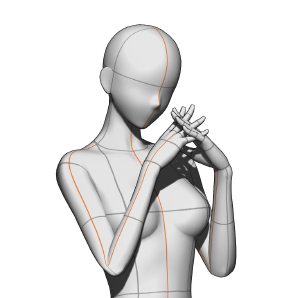
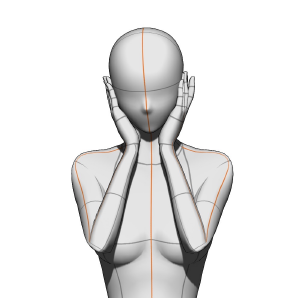
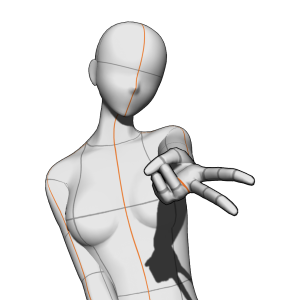
總共三個姿勢! 3 poses total!

這是一個 3D 影像材質:匯入後,材質會以與上面圖片相同的攝影機角度載入。不過,你仍然可以完全改變攝影機視角、調整姿勢,甚至用你偏好的 3D 模型替換!
說明

如何匯入
步驟1:請打開材質面板視窗並找到所需的材質。
步驟二:選擇教材。
步驟三:點擊這個按鈕,將它貼到畫布上!你也可以拖放材質到畫布上,但模型的位置會根據你放下的位置不同。
作者的話: 為了避免與不同鏡頭角度衝突,最好將每個姿勢匯入到獨立圖層。如果你把所有姿勢匯入在同一圖層,姿勢的角度會和縮圖中顯示的不同。
建議畫布尺寸
4000x4000 像素或更大(畫布最好是方形)!不過,無論畫布是水平還是垂直,都沒有問題。
小畫布教學


關於 GAL 體式


如何匯入
步驟一:請打開進階工具設定,點選「相機」選項。
步驟 2:關閉目前相機的鎖定圖示。
步驟三:點擊這個按鈕切換到平行投影*,你就完成了!
*平行投影時,手不會在透視中出現(會看起來比較小),但你可以移動模型而不改變角度。
This is a 3D image material: after importing it, the material will load with the same camera angle as the image above. However, you can still completely change the camera view, tweak the pose, and replace the 3D model with your preferred one!
Instructions
How to import
Step 1: Please open the material palette window and locate the desired material.
Step 2: Select the material.
Step 3: Tap this button to paste it on the canvas! You can also drag and drop the material onto the canvas, but the model will be positioned differently based on where you drop it.
A/N: To avoid clashing with the different camera angles, it’s best to import each pose onto a separate layer. If you import them all on a single layer, the poses will have different angles from those shown in the thumbnail.
Recommended canvas size
4000x4000 px or larger (best if the canvas is square)! Nevertheless, there are no problems if the canvas is horizontal or vertical.
Tutorial for a smaller canvas
About the GAL pose
How to import
Step 1: Please open the advanced tool settings and click on the “Camera” option.
Step 2: Toggle off the lock icon on the current camera.
Step 3: Click on this button to switch to parallel projection* and you’re done!
*with parallel projection, the hand will not appear in perspective (it will appear smaller), but you’ll be able to move the model without the angle changing.
拆散姿勢 Bust Up Poses





「mengli」的其他素材


「素材集」的人氣素材


最新素材





徽章
-
 MVP ◆針對問題投稿了眾多適切的回答,對社群有顯著貢獻的用戶。每3個月一次,會依據期間內獲得的點數選出MVP用戶,並進行表揚。
 -
 NVP(New Valuable Player) ◆繼MVP後,對社群營運做出良好貢獻的用戶。將從不曾獲選為MVP的用戶中,依據獲得的點數進行評選、表揚。
 -
 官方推廣大使 ◆從被證明為優良回答用戶的MVP獲獎者中選出社群中最優異的回答者。並經審查後由本社委託就任。※舊名稱為「Evangelist」
 -
 CELSYS公認Moderator ◆Moderator為會使用日文及其他語言的CELSYS公認工作人員。由於並非軟體或創作的專業人士,Moderator無法直接為用戶解決疑問,但能在語言、交流方面提供支援,幫助用戶們順利地進行溝通。
 -
 CELSYS官方為與營運相關的官方帳號。