



這是我做過的(有史以來最棒的素描刷)的重新上傳。我改了幾樣東西,讓刷子看起來更順滑、更方便使用。 This is a reupload of (the Best sketching brush ever) that I made. I changed a couple of things so the brush should be smoother and easier to use.
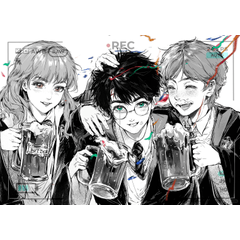
 我用這把畫筆來草圖所有東西。這可以搭配筆或觸控筆使用。我建議用34號刷子,效果最好。刷子是軟硬交織的混合。我想做一把手感柔軟、不需要太大力氣就能用的刷子。(給像我這樣用輕壓畫畫的人)這款刷子適合傾斜,傾斜時會變得更粗更軟。如果想要更硬的線條,就用更大的力氣往下壓。如果你想要較柔和或較細的線條,可以用輕壓。你不必傾斜刷子,邊緣才會軟。請注意,我的壓力設定是預設的,因為我不知道刷子在其他壓力設定下會怎麼運作或看起來如何。這支畫筆可以用來繪製漫畫和插畫。如果你想,也可以用這把刷子渲染,但要注意顏色混合是沒開啟的,所以渲染會比較方塊感,因為這刷子本來是用來草圖的,但我有時候懶的時候也會用它來渲染。
I use this brush to sketch everything. This can be used with and without a pen or stylus. I recommend using the brush at size 34 for the best results. The brush it a mix between soft and hard. I wanted to make a brush that's soft on the hands and doesn't need a lot of pressure to work. (For the people who draw with light pressure like me) This brush works with tilt and will become thicker and softer when it's tilted. Press down with more force if you want harder lines. If you want softer/ thinner lines use light pressure. You don't have to tilt the brush only for it to have a soft edge. Please keep in mind that my pressure settings are default as I don't know how the brush will work/ look like with other pressure settings. This brush can be used to sketch manga and illustration. You can render with this brush if you wanted to but keep in mind that the color mixing IS NOT on so the rendering will be more blocky as this brush is meant to be used for sketching but I sometimes use it to render when I'm lazy.
我用這把畫筆來草圖所有東西。這可以搭配筆或觸控筆使用。我建議用34號刷子,效果最好。刷子是軟硬交織的混合。我想做一把手感柔軟、不需要太大力氣就能用的刷子。(給像我這樣用輕壓畫畫的人)這款刷子適合傾斜,傾斜時會變得更粗更軟。如果想要更硬的線條,就用更大的力氣往下壓。如果你想要較柔和或較細的線條,可以用輕壓。你不必傾斜刷子,邊緣才會軟。請注意,我的壓力設定是預設的,因為我不知道刷子在其他壓力設定下會怎麼運作或看起來如何。這支畫筆可以用來繪製漫畫和插畫。如果你想,也可以用這把刷子渲染,但要注意顏色混合是沒開啟的,所以渲染會比較方塊感,因為這刷子本來是用來草圖的,但我有時候懶的時候也會用它來渲染。
I use this brush to sketch everything. This can be used with and without a pen or stylus. I recommend using the brush at size 34 for the best results. The brush it a mix between soft and hard. I wanted to make a brush that's soft on the hands and doesn't need a lot of pressure to work. (For the people who draw with light pressure like me) This brush works with tilt and will become thicker and softer when it's tilted. Press down with more force if you want harder lines. If you want softer/ thinner lines use light pressure. You don't have to tilt the brush only for it to have a soft edge. Please keep in mind that my pressure settings are default as I don't know how the brush will work/ look like with other pressure settings. This brush can be used to sketch manga and illustration. You can render with this brush if you wanted to but keep in mind that the color mixing IS NOT on so the rendering will be more blocky as this brush is meant to be used for sketching but I sometimes use it to render when I'm lazy.
過去版本


「Lalafloopsie」的其他素材

「筆刷」的人氣素材





最新素材






徽章
-
 MVP ◆針對問題投稿了眾多適切的回答,對社群有顯著貢獻的用戶。每3個月一次,會依據期間內獲得的點數選出MVP用戶,並進行表揚。
 -
 NVP(New Valuable Player) ◆繼MVP後,對社群營運做出良好貢獻的用戶。將從不曾獲選為MVP的用戶中,依據獲得的點數進行評選、表揚。
 -
 官方推廣大使 ◆從被證明為優良回答用戶的MVP獲獎者中選出社群中最優異的回答者。並經審查後由本社委託就任。※舊名稱為「Evangelist」
 -
 CELSYS公認Moderator ◆Moderator為會使用日文及其他語言的CELSYS公認工作人員。由於並非軟體或創作的專業人士,Moderator無法直接為用戶解決疑問,但能在語言、交流方面提供支援,幫助用戶們順利地進行溝通。
 -
 CELSYS官方為與營運相關的官方帳號。