




[3D] 廚房刀具組(3 個變體)
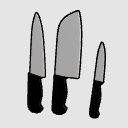
這是一套三把必備的廚房刀具,適合你的漫畫、漫畫或網路漫畫場景!包括:主廚刀、三德刀和削皮刀。
特色:
- 包含 4 種配置選項,方便切換可見性(All、Chef、Santoku 或 Paring)。
- 低多邊形且輕量化,帶來流暢的效能。
享受這三種版本的經濟實惠組合!如果你喜歡,我會非常感激給我正面的評論。
[3D] Kitchen Knife Set (3 variants)
A set of 3 essential kitchen knives for your comic, manga, or webtoon scenes! Includes: Chef Knife, Santoku Knife, and Paring Knife.
Features:
- Includes 4 Layout options to toggle visibility easily (All, Chef, Santoku, or Paring).
- Low poly and lightweight for smooth performance.
Enjoy all 3 variants in one economical package! If you like it, I would greatly appreciate a positive review.
材料 Material
-
預設素材 Default material

分配 Allocate
-
預設配置 Default layout
-
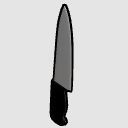
刀師 Chef Knife
-
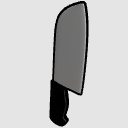
三德刀 Santoku Knife
-
削皮刀 Paring Knife
-
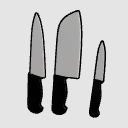
完整套 Complete set




-
 MVP ◆針對問題投稿了眾多適切的回答,對社群有顯著貢獻的用戶。每3個月一次,會依據期間內獲得的點數選出MVP用戶,並進行表揚。
 -
 NVP(New Valuable Player) ◆繼MVP後,對社群營運做出良好貢獻的用戶。將從不曾獲選為MVP的用戶中,依據獲得的點數進行評選、表揚。
 -
 官方推廣大使 ◆從被證明為優良回答用戶的MVP獲獎者中選出社群中最優異的回答者。並經審查後由本社委託就任。※舊名稱為「Evangelist」
 -
 CELSYS公認Moderator ◆Moderator為會使用日文及其他語言的CELSYS公認工作人員。由於並非軟體或創作的專業人士,Moderator無法直接為用戶解決疑問,但能在語言、交流方面提供支援,幫助用戶們順利地進行溝通。
 -
 CELSYS官方為與營運相關的官方帳號。