



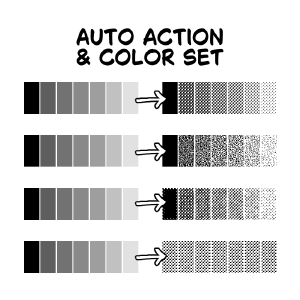
我用來繪製手稿的色彩集和自動動作集的材料目錄。 Material catalog for the color set and auto action set I use for drawing manuscripts.

除了垃圾搖滾的調子外,這些都是預設的。這只是為了方便使用。
我不建議把純黑色和色調放在同一層。我個人會做一層單色來呈現純黑色陰影。
也建議依顏色分開色調。

「音色層」與「音色層(鮭魚)」
這兩個人做的都是一樣的事。它們都會在灰色圖層中為色調新增圖層,所以如果你有單色圖層會很有幫助。這是設計來綁定到快捷鍵的。唯一的差別是「Tone Layer (Salmon)」會套用鮭魚色的層色。當你套用其他自動動作時,圖層顏色會自動關閉。
調色盤顏色是「紅色」,所以你可以看到它是否還沒轉換成色調。
「使用自訂音色」/「自訂音調(無資料夾)」的說明:
它會取出音色層並做出選擇。動作完成後,只要拖放一個影像材質即可。第一個會建立一個帶有圖層遮罩的資料夾,但第二個不會。
With the exception of the grunge tone, these are default. This is just for ease of use.
I don’t recommend putting pure black on the same layer as tones. I personally make a monochrome layer for pure black shading.
It is also recommended to separate your tones by color.
"Tone Layer" and "Tone Layer (Salmon)"
These two do the same thing. They both make new layers for your tones in a Gray layer, so it’s helpful if you have monochrome layers. This is meant to be binded to a shortcut key. The only difference is that "Tone Layer (Salmon)” applies a salmon-colored layer color. When you apply the other auto actions, the layer color will be turned off automatically.
The palette color is “red” so you can see if it hasn’t been converted to tones yet.
Explanation for “Use Custom Tones”/“Custom Tones (no folder)":
It takes the tone layer and makes a selection. After the action is done, just drag and drop an image material. The first one makes a folder with a layer mask, but the second doesn’t.
設定 SET






「kaaaal」的其他素材


「素材集」的人氣素材


最新素材



徽章
-
 MVP ◆針對問題投稿了眾多適切的回答,對社群有顯著貢獻的用戶。每3個月一次,會依據期間內獲得的點數選出MVP用戶,並進行表揚。
 -
 NVP(New Valuable Player) ◆繼MVP後,對社群營運做出良好貢獻的用戶。將從不曾獲選為MVP的用戶中,依據獲得的點數進行評選、表揚。
 -
 官方推廣大使 ◆從被證明為優良回答用戶的MVP獲獎者中選出社群中最優異的回答者。並經審查後由本社委託就任。※舊名稱為「Evangelist」
 -
 CELSYS公認Moderator ◆Moderator為會使用日文及其他語言的CELSYS公認工作人員。由於並非軟體或創作的專業人士,Moderator無法直接為用戶解決疑問,但能在語言、交流方面提供支援,幫助用戶們順利地進行溝通。
 -
 CELSYS官方為與營運相關的官方帳號。