


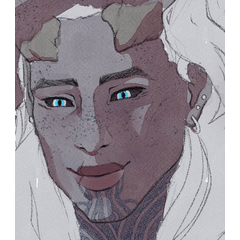

我做了這些磁性填充工具,快速塗抹插畫的底色。磁性功能需要半乾淨的線條圖才能運作。 I made these magnetic filling tools to quickly lay down the base colors for my illustrations. They require semi clean lineart for the magnetic feature to work.


我最喜歡的兩個快速著色♡工具
魔法套索填充:

首先,確保將每個線稿圖層或包含它們的資料夾設為參考圖層。 (要做到這點,請在選取圖層/資料夾時,點擊「圖層」視窗上排的小燈塔圖示)
選擇「Magic Lasso Fill by Elorian」這個工具,然後選擇你想要填滿的顏色。然後選擇區域,可以畫一條連續的線,或點擊你想連接的點。如果有參考線稿,游標會自動吸附到該線稿,並以此作為指引,當游標靠近時。
_________________________________________________________________________
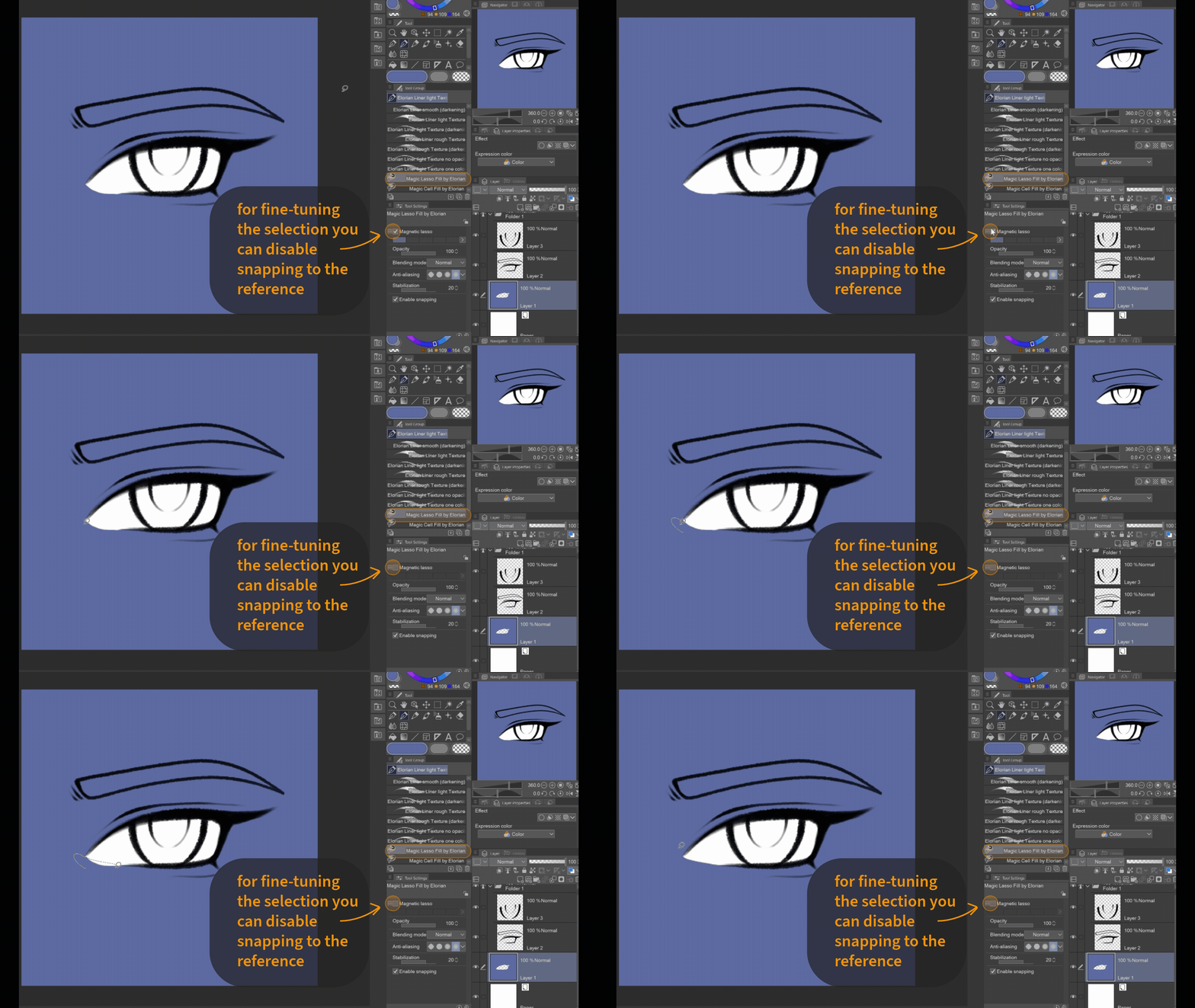
你也可以在工具設定中啟用「磁性套索」,把磁性填充工具變成一般的套索填充。當參考線有空隙時,這會很有用。 (對於不想一直開啟工具屬性視窗的人,我會新增一個非磁性套索填充工具。)
_________________________________________________________________________

如果你不想用顏色填滿某個區域,但想抹去,那就用「透明」作為顏色。
_________________________________________________________________________

要充分利用磁性設定的全部潛力,你不必描繪線條,只要在多個點點擊,選取就會自動沿著參考線條移動。
_________________________________________________________________________
魔法電池填充:
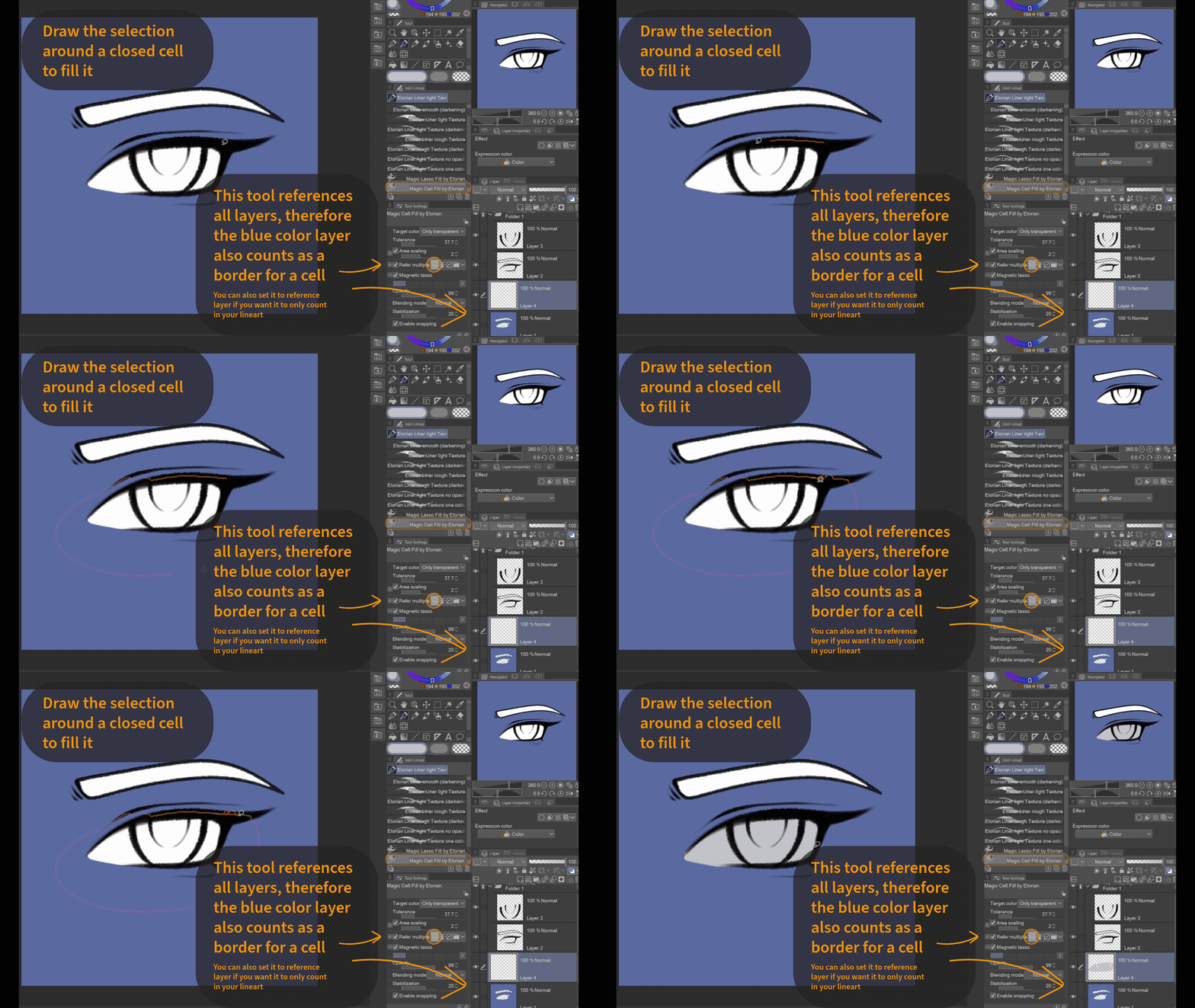
此工具能辨識封閉格(= 被其他顏色完全包圍的區域)以及線條畫,並可用作快速填充工具。
你可能要根據你使用的線稿工具調整公差。預設設定應該能很好地搭配 Elorian 的動態線稿筆刷使用。(一旦找到適合你的公差設定,請在工具設定中將其設為標準)
你可能要根據你使用的線稿工具調整公差。預設設定應該能很好地搭配 Elorian 的動態線稿筆刷使用。(一旦找到適合你的公差設定,請在工具設定中將其設為標準)
選擇任何封閉式格子,並大致在周圍塗色,確保整個格子都在該範圍內。
_________________________________________________________________________
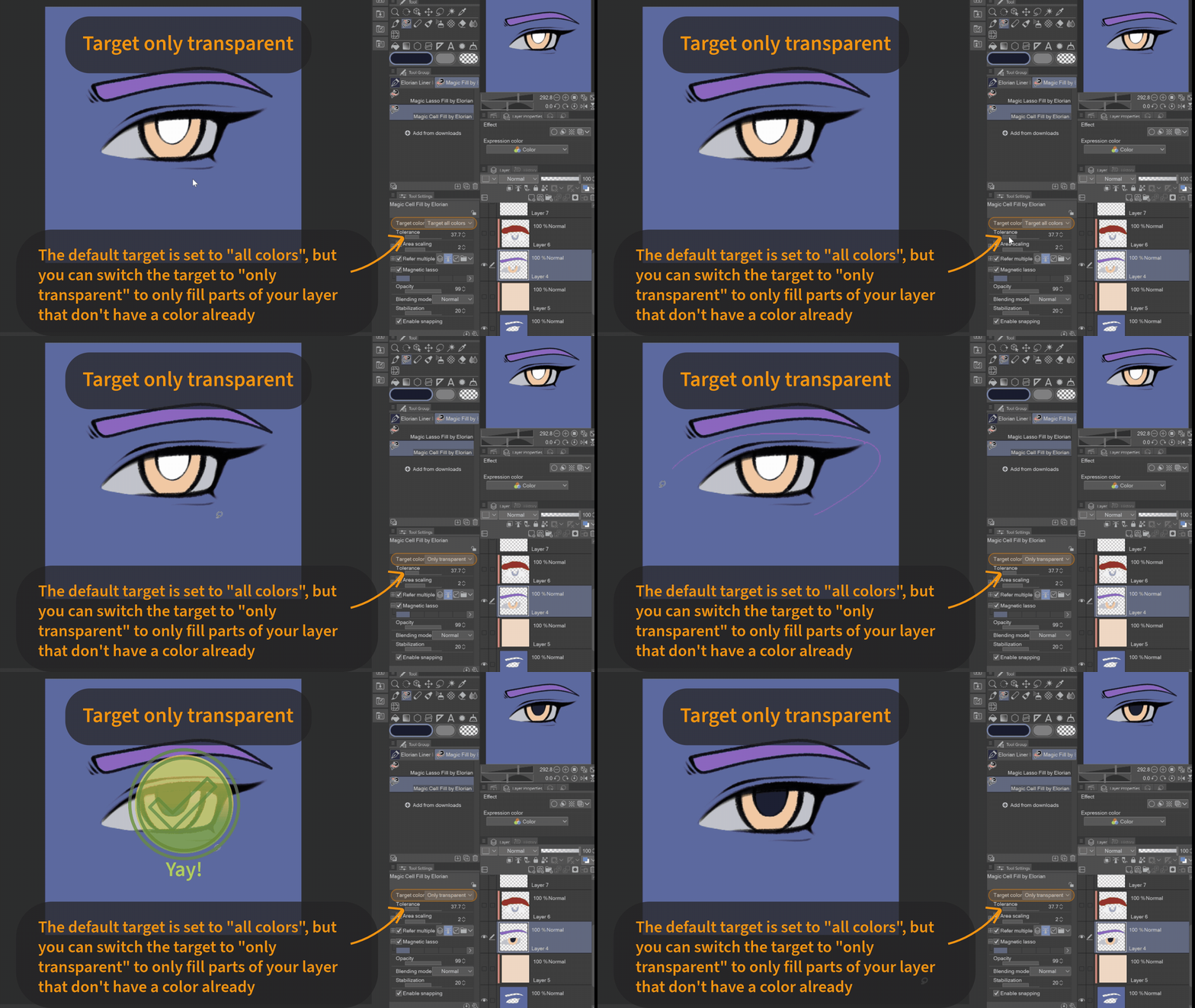
它會填滿你正在繪製圖層上某一類型的所有像素。預設設定為「所有顏色」(透明度也算作顏色)。
但有時你可能只想鎖定跨層像素,避免覆蓋同圖層已著色區域。你可以在設定裡把目標顏色改成「僅透明」。 (對於不想一直開啟工具屬性視窗的人,我會新增一個只透明的單元填充工具。)
但有時你可能只想鎖定跨層像素,避免覆蓋同圖層已著色區域。你可以在設定裡把目標顏色改成「僅透明」。 (對於不想一直開啟工具屬性視窗的人,我會新增一個只透明的單元填充工具。)
摘自此文:

對此而言:
_________________________________________________________________________
玩得開心!♡
My two favourite tools for quick coloring ♡
Magic Lasso Fill:
First make sure to set each of your lineart layers or a folder containing them, as reference layer. (To do that click on the small lighthouse icon in the upper row of the "Layers"-window while the layers/folder are selected)
Choose the Tool "Magic Lasso Fill by Elorian" and select the color you want to fill with. Then select the area either by drawing one continuous line or tapping points you want to connect. If there is a referenced lineart, the cursor will automatically snap to it and use it as a guideline once the cursor comes near it.
_________________________________________________________________________
You can also turn the magnetic filling tool into a regular lasso fill by enabling "magnetic lasso" in the tool settings. This can come in handy when the reference lines have gaps. (For those of you who don't want to have the tool property window open all the time, I will add an additional non-magnetic Lasso Fill Tool.)
_________________________________________________________________________
If you don't want to fill an area with color, but to erase, then just use "transparent" as a color.
_________________________________________________________________________
To use the full potential of the magnetic setting, you dont have to trace the line but can simply click on it on multiple points and the selection will automatically go along the reference lineart.
_________________________________________________________________________
Magic Cell Fill:
This tool recognizes closed cells (= areas that are fully enclosed by other colors) as well as lineart and can be used as a quick filling tool.
You might want to adjust the tolerance based on the lineart tool you use. The default settings should work just fine with Elorian's Dynamic Lineart Brushes. (Once you've found a tolerance setting that works for you, set it as standard in the tool settings)
You might want to adjust the tolerance based on the lineart tool you use. The default settings should work just fine with Elorian's Dynamic Lineart Brushes. (Once you've found a tolerance setting that works for you, set it as standard in the tool settings)
Choose any closed cell and roughly paint around it, make sure the whole cell is within the selection.
_________________________________________________________________________
It will fill all pixels of a certain type on the layer youre painting on. The default is set to "all colors" (transparency counts as color).
But sometimes you might want to only target transaprent pixels to not overpaint already colored areas on the same layer. For that you can switch the target color in the settings to "only transparent". (For those of you who don't want to have the tool property window open all the time, I will add an additional only transparent Cell Fill Tool.)
But sometimes you might want to only target transaprent pixels to not overpaint already colored areas on the same layer. For that you can switch the target color in the settings to "only transparent". (For those of you who don't want to have the tool property window open all the time, I will add an additional only transparent Cell Fill Tool.)
From this:
To this:
_________________________________________________________________________
Have Fun! ♡
Elorian 的魔法填充工具 Magic Fill Tools by Elorian




過去版本





「Elorian_art」的其他素材


「素材集」的人氣素材


最新素材



徽章
-
 MVP ◆針對問題投稿了眾多適切的回答,對社群有顯著貢獻的用戶。每3個月一次,會依據期間內獲得的點數選出MVP用戶,並進行表揚。
 -
 NVP(New Valuable Player) ◆繼MVP後,對社群營運做出良好貢獻的用戶。將從不曾獲選為MVP的用戶中,依據獲得的點數進行評選、表揚。
 -
 官方推廣大使 ◆從被證明為優良回答用戶的MVP獲獎者中選出社群中最優異的回答者。並經審查後由本社委託就任。※舊名稱為「Evangelist」
 -
 CELSYS公認Moderator ◆Moderator為會使用日文及其他語言的CELSYS公認工作人員。由於並非軟體或創作的專業人士,Moderator無法直接為用戶解決疑問,但能在語言、交流方面提供支援,幫助用戶們順利地進行溝通。
 -
 CELSYS官方為與營運相關的官方帳號。