



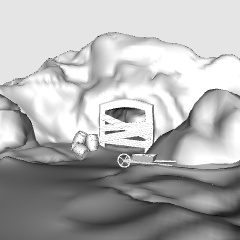
一個多功能的礦坑與洞穴入口3D模型,非常適合漫畫、網路漫畫和插畫。Clip Studio 設計極具彈性,所有人造結構與道具都能輕鬆隱藏或展示。這讓你能立即自訂資產,以符合故事情境——無論你需要純天然洞穴、繁忙礦坑,或是詭異的廢棄入口。 A versatile 3D model of a mine and cave entrance perfect for manga, webtoons, and illustrations. Designed with maximum flexibility, all man-made structures and props can be easily hidden or shown in Clip Studio. This allows you to instantly customize the asset to fit your story's context—whether you need a pure natural cave, an active bustling mine, or a spooky abandoned entrance.


背景 Background


「Janlibell」的其他素材


「素材集」的人氣素材


最新素材





-
 MVP ◆針對問題投稿了眾多適切的回答,對社群有顯著貢獻的用戶。每3個月一次,會依據期間內獲得的點數選出MVP用戶,並進行表揚。
 -
 NVP(New Valuable Player) ◆繼MVP後,對社群營運做出良好貢獻的用戶。將從不曾獲選為MVP的用戶中,依據獲得的點數進行評選、表揚。
 -
 官方推廣大使 ◆從被證明為優良回答用戶的MVP獲獎者中選出社群中最優異的回答者。並經審查後由本社委託就任。※舊名稱為「Evangelist」
 -
 CELSYS公認Moderator ◆Moderator為會使用日文及其他語言的CELSYS公認工作人員。由於並非軟體或創作的專業人士,Moderator無法直接為用戶解決疑問,但能在語言、交流方面提供支援,幫助用戶們順利地進行溝通。
 -
 CELSYS官方為與營運相關的官方帳號。