




這是一個簡單的著色器漸層貼圖,我喜歡用它,基於 AzizDraws 在他們影片中製作的那張:https://www.youtube.com/watch?v=R022uQR2akA&t=2s。
第一個就是他在影片中使用的那個,第二個是我偏好的剪輯版本。
This is a simple shader gradient map that I like to use based on the one AzizDraws made in their video here: https://www.youtube.com/watch?v=R022uQR2akA&t=2s.
The first one is the exact one he uses in the video, the second one is my preferred edit.
你可以用最適合你風格和工作流程的方式來做,這是我用的方式。
首先,我設置了我的平面色:

接著,我建立一個著色資料夾(設為法線),並用白色底層、灰色中間層和黑色層來著色:


完成後,我會把圖層資料夾設定為暗色、倍增或疊加,這就看你和你的圖片了。這張我設定成暗色。
接著我會到頂欄,選擇「新修正圖層>層」>漸層貼圖,然後選擇我想用的那個,這個是用 Shader 2 的。
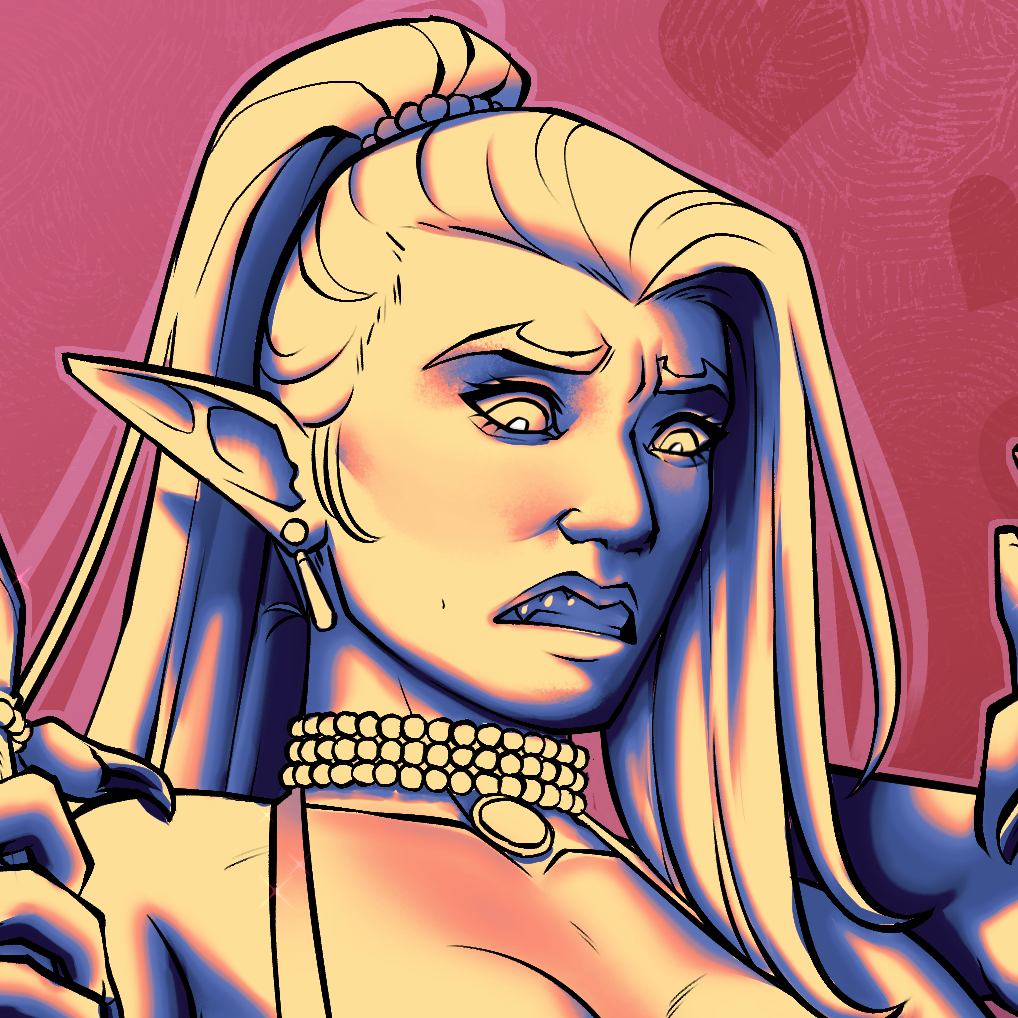
之後我會調整灰黑色層的不透明度,直到我喜歡它為止。

完成後,我會過濾並挑染,直到我喜歡為止
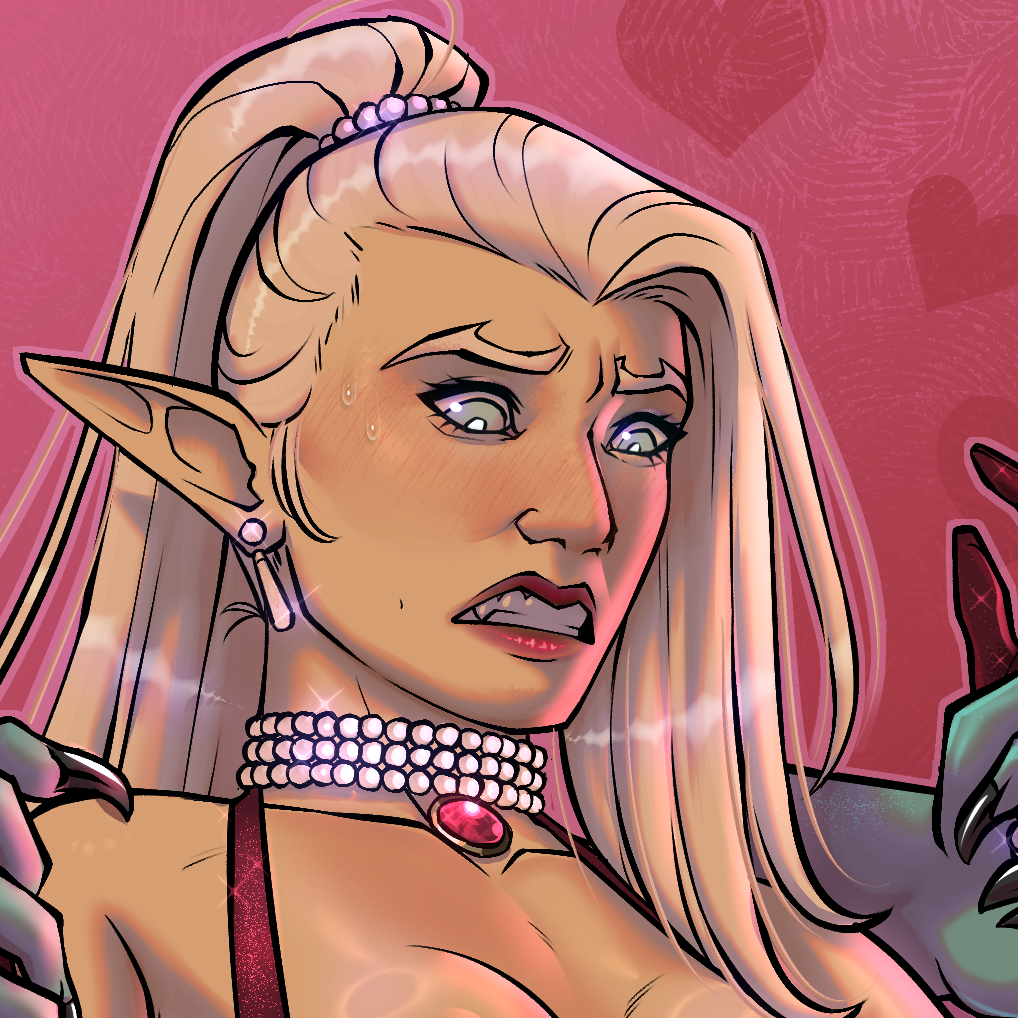
輕而易舉:)
首先,我設置了我的平面色:

接著,我建立一個著色資料夾(設為法線),並用白色底層、灰色中間層和黑色層來著色:


完成後,我會把圖層資料夾設定為暗色、倍增或疊加,這就看你和你的圖片了。這張我設定成暗色。
接著我會到頂欄,選擇「新修正圖層>層」>漸層貼圖,然後選擇我想用的那個,這個是用 Shader 2 的。
之後我會調整灰黑色層的不透明度,直到我喜歡它為止。

完成後,我會過濾並挑染,直到我喜歡為止
輕而易舉:)
You can do this in any way that best fits your style and work flow, this is the way that I use it.
First, I set up my flat colors:
Then, I make a shading folder (set to normal) and shade with a white base layer, a grey mid layer, and a black layer:
Once I've done that, I set my layer folder to either Darken, Multiply, or Overlay, its up to you and your image. This one, I set to darken.
I then make a gradient map layer by going to the top bar and selecting Layer > New Correction Layer > Gradient Map and then selecting the one I wish to use, this one used Shader 2.
After that I mess with the grey and black layer's opacities until I Like how it looks.
When that's done, I filter and highlight until I like how it looks
Easy Peasy :)
First, I set up my flat colors:
Then, I make a shading folder (set to normal) and shade with a white base layer, a grey mid layer, and a black layer:
Once I've done that, I set my layer folder to either Darken, Multiply, or Overlay, its up to you and your image. This one, I set to darken.
I then make a gradient map layer by going to the top bar and selecting Layer > New Correction Layer > Gradient Map and then selecting the one I wish to use, this one used Shader 2.
After that I mess with the grey and black layer's opacities until I Like how it looks.
When that's done, I filter and highlight until I like how it looks
Easy Peasy :)




「BigMFRat」的其他素材


「漸層組」的人氣素材


最新素材





徽章
-
 MVP ◆針對問題投稿了眾多適切的回答,對社群有顯著貢獻的用戶。每3個月一次,會依據期間內獲得的點數選出MVP用戶,並進行表揚。
 -
 NVP(New Valuable Player) ◆繼MVP後,對社群營運做出良好貢獻的用戶。將從不曾獲選為MVP的用戶中,依據獲得的點數進行評選、表揚。
 -
 官方推廣大使 ◆從被證明為優良回答用戶的MVP獲獎者中選出社群中最優異的回答者。並經審查後由本社委託就任。※舊名稱為「Evangelist」
 -
 CELSYS公認Moderator ◆Moderator為會使用日文及其他語言的CELSYS公認工作人員。由於並非軟體或創作的專業人士,Moderator無法直接為用戶解決疑問,但能在語言、交流方面提供支援,幫助用戶們順利地進行溝通。
 -
 CELSYS官方為與營運相關的官方帳號。