


VTuber Fodelr - 資料夾範本 (VTuber Fodelr - Folder Template) VTuber Fodelr - Folder Template
素材ID:2278465
-
15,178


如何使用範本
- 建立一個新檔案。設定大小為 3000 px x 4500 px,解析度為 300 dpi。
- 啟用紙張顏色下的 「範本」 選項。
- 搜尋 「VTuber 模型資料夾範本」 ,雙擊選取該檔案。
- 點擊 確定,範本就會套用並準備使用。
歡迎隨意調整或新增任何符合你工作流程的內容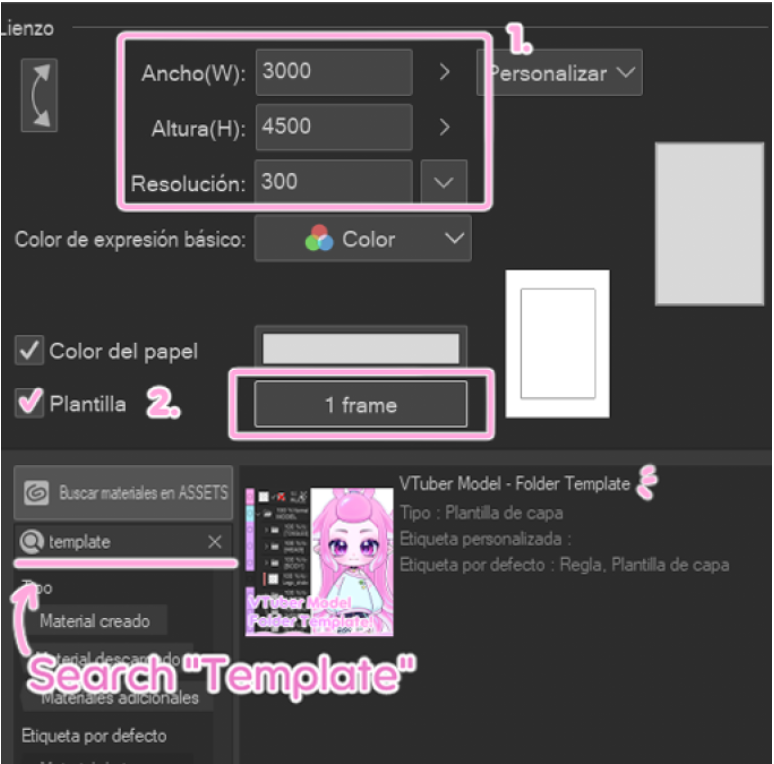
更新:範例模型已被移除,以符合指引
How to use the template
- Create a new file. Set the size to 3000 px x 4500 px at 300 dpi.
- Enable the "Template" option located under paper color.
- Search "VTuber model folder template" and select the file with a double click.
- Click OK, and the template will be applied and ready to use.
Feel free to rearrange or add anything to fit your workflow
Update: The example model has been removed so that the assets align with the guidelines
過去版本







「Zovvi」的其他素材

「圖層範本」的人氣素材


最新素材



徽章
-
 MVP ◆針對問題投稿了眾多適切的回答,對社群有顯著貢獻的用戶。每3個月一次,會依據期間內獲得的點數選出MVP用戶,並進行表揚。
 -
 NVP(New Valuable Player) ◆繼MVP後,對社群營運做出良好貢獻的用戶。將從不曾獲選為MVP的用戶中,依據獲得的點數進行評選、表揚。
 -
 官方推廣大使 ◆從被證明為優良回答用戶的MVP獲獎者中選出社群中最優異的回答者。並經審查後由本社委託就任。※舊名稱為「Evangelist」
 -
 CELSYS公認Moderator ◆Moderator為會使用日文及其他語言的CELSYS公認工作人員。由於並非軟體或創作的專業人士,Moderator無法直接為用戶解決疑問,但能在語言、交流方面提供支援,幫助用戶們順利地進行溝通。
 -
 CELSYS官方為與營運相關的官方帳號。