




這是基於朋友在另一個程式中配置的非常簡陋的配置。
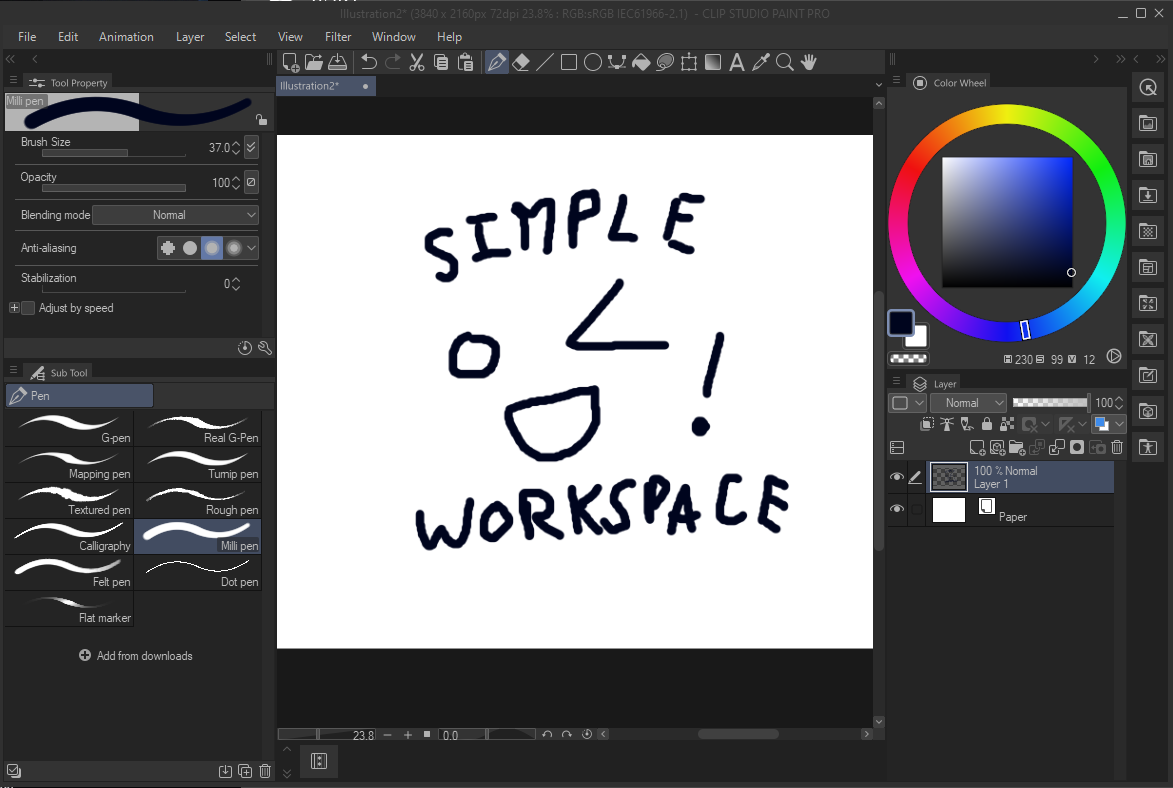
另一個程式的版面是工具列在螢幕頂端。因為無法將 CSP 工具列水平吸附到螢幕頂端,我用指令列重新建立。若要新增更多快捷鍵(例如,如果你把畫筆分成多個獨立工具),請右鍵點擊指令列,然後點「command bar settings」->「menu commands」->「tools」,這樣一般工具列上的所有功能都可以新增。
a very barebones setup based off of a friend's layout in another program.
the layout in the other program had the toolbar at the top of the screen. since there's no way to snap the CSP toolbar to the top of the screen horizontally, i recreated it using the command bar. in order to add additional shortcuts (for example, if you have your brushes sorted into multiple separate tools), right click the command bar, then press "command bar settings" -> "menu commands" -> "tools" and everything that would be on the normal toolbar is available to add.


「工作區」的人氣素材





最新素材






徽章
-
 MVP ◆針對問題投稿了眾多適切的回答,對社群有顯著貢獻的用戶。每3個月一次,會依據期間內獲得的點數選出MVP用戶,並進行表揚。
 -
 NVP(New Valuable Player) ◆繼MVP後,對社群營運做出良好貢獻的用戶。將從不曾獲選為MVP的用戶中,依據獲得的點數進行評選、表揚。
 -
 官方推廣大使 ◆從被證明為優良回答用戶的MVP獲獎者中選出社群中最優異的回答者。並經審查後由本社委託就任。※舊名稱為「Evangelist」
 -
 CELSYS公認Moderator ◆Moderator為會使用日文及其他語言的CELSYS公認工作人員。由於並非軟體或創作的專業人士,Moderator無法直接為用戶解決疑問,但能在語言、交流方面提供支援,幫助用戶們順利地進行溝通。
 -
 CELSYS官方為與營運相關的官方帳號。