



一個用來標記你所選標誌的水印的記號筆!我覺得這是用來製造噪音來干擾 AI,但同時也適用於傳送你不想被偷的樣本。 A marker to make watermarks out of your logo of choice! Saw this as a suggestion to make noise to mess up AI, but also works for sending samples that you don't want stolen.
我多年前在直播中示範過這樣做,並說我會做一個教學。


我從來沒有。
我想我現在是吧!
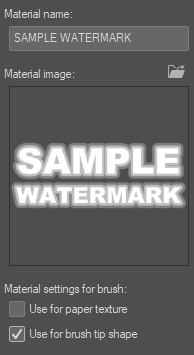
這是一支能留下浮水印的標記!提供的筆型只是範例,可以輕鬆替換成你喜歡的標誌或形狀。
只要把你想要的標誌或形狀放到圖層上,拖到材質上,當它進入時,設定為筆尖形狀的使用。
進入筆刷設定,在筆尖下方選擇你想要的材質形狀。如果你有很多形狀,記得要找個好找的名字!

之後,直接用刷子把整塊畫布都刷完,應該不會太卡頓。

然後設定為覆蓋,並設定你選擇的不透明度設定。

完成!你現在擁有一張到處都有浮水印的圖片集。
我不知道這對 AI 是否還適用,但現在它上滿是你的浮水印,根據標誌或形狀可以做出有趣的貼圖。為了更安全起見,我的浮水印其實就在這上面,我建議你也這麼做。

希望這對你有幫助。祝你創作愉快!
I showed doing this on stream many moons ago and said I would make a tutorial.
I never did.
I am now I suppose!
This is a marker that makes watermarks! The provided brush shape is just a sample and can be swapped out easily with your logo or shape of choice.
Simply take the logo or shape you want on a layer, drag it over to your materials, and when it is in there, set as use for brush tip shape.
Go into the brush settings and under brush tip, select the material shape you would like. Make sure it is an easy name to find if you have a lot of shapes!
Afterwards, simply blast the whole canvas with the brush, shouldn't lag too bad or anything.
Then set to overlay with the opacity setting of your choice.
And done! You now have an image set with watermarks EVERYWHERE.
I do not know if this still holds up against AI, but it does now have your watermark all over it, and can make interesting textures depending on the logo or shape. Just to be extra safe, my watermark is actually on this, and I would suggest the same.
Hope this helps. Have a happy time making art!


「TheHamWarrior」的其他素材

「筆刷」的人氣素材


最新素材




徽章
-
 MVP ◆針對問題投稿了眾多適切的回答,對社群有顯著貢獻的用戶。每3個月一次,會依據期間內獲得的點數選出MVP用戶,並進行表揚。
 -
 NVP(New Valuable Player) ◆繼MVP後,對社群營運做出良好貢獻的用戶。將從不曾獲選為MVP的用戶中,依據獲得的點數進行評選、表揚。
 -
 官方推廣大使 ◆從被證明為優良回答用戶的MVP獲獎者中選出社群中最優異的回答者。並經審查後由本社委託就任。※舊名稱為「Evangelist」
 -
 CELSYS公認Moderator ◆Moderator為會使用日文及其他語言的CELSYS公認工作人員。由於並非軟體或創作的專業人士,Moderator無法直接為用戶解決疑問,但能在語言、交流方面提供支援,幫助用戶們順利地進行溝通。
 -
 CELSYS官方為與營運相關的官方帳號。