



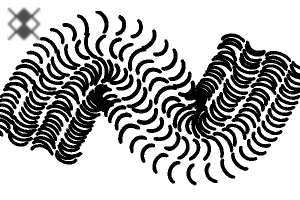
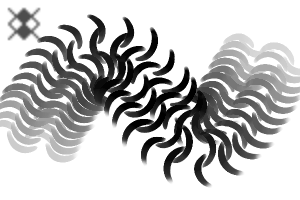
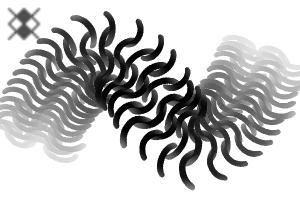
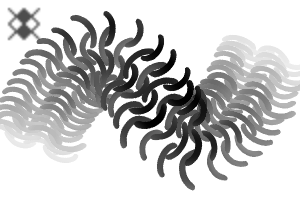
基於不同簡化風格的鎖子甲細節刷子。 Brushes for chainmail details based on some different simplified styles.
- 「鎖子甲」1 和「鎖子甲 2」的間隙大小會依壓力而變。在彎曲物體邊緣施加較少壓力,讓視覺效果更立體。
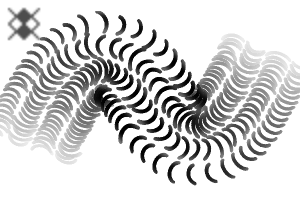
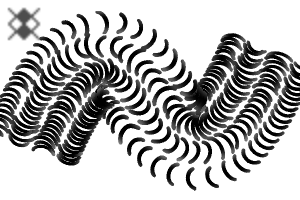
- 「Chainmail 2 透明」是「Chainmail 2」的變體,帶有部分透明效果。
- 「鎖子甲1 Cloudy」和「Chainmail 2 Cloudy」是不透明度較高的變體。
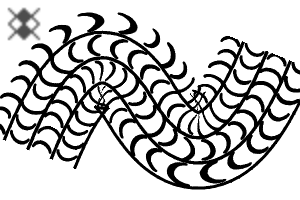
- 「鎖子甲3」在淺色底色上,用於墨水/線條藝術風格的鎖子甲。
- 「Chainmail 4」用於自由形式鏈條圖案。
- 「2-C」變體則包含次色。

- "Chainmail" 1 & "Chainmail 2" have variable gap size based on pressure. Use less pressure at the edges of curved objects for a more 3D look.
- "Chainmail 2 Transparent" is a variant of "Chainmail 2" with partial transparency effect.
- "Chainmail 1 Cloudy" and "Chainmail 2 Cloudy" are variants with more opacity contrast.
- "Chainmail 3" use with a dark colour on light base for ink/line art style chainmail.
- "Chainmail 4" for freeform chain link patterns.
- "2-C" variants include sub colour.
第一類 Category 1
-
鏈甲 1 Chainmail 1
-
鏈甲 1 雲霧 Chainmail 1 Cloudy
-
鎖子甲2 Chainmail 2
-
鏈甲2 透明 Chainmail 2 Transparent
-
鏈甲2 雲霧 Chainmail 2 Cloudy
-
鏈甲 2 2-C Chainmail 2 2-C
-
鎖子甲3 Chainmail 3
-
鎖子甲互鎖 1 Chainmail Interlocked 1
-
鎖子甲互鎖 2 Chainmail Interlocked 2
-
鎖子甲互鎖3 Chainmail Interlocked 3
-
鎖子甲互鎖 2-C Chainmail Interlocked 2-C
-
鏈甲4 Chainmail 4





更新歷史記錄
2026/07/04 新增帶有子色的「2-C」變體。
在部分透明的畫筆上,筆刷密度會逐漸淡出到筆劃的開始和結束。你可以關閉這個功能來恢復之前的版本。
07/04/2026 Added "2-C" variants with sub colour.
Added brush density fade to starting and ending of stroke on brushes with partial transparency. You can turn this off to restore the previous version.
過去版本


「Zelamir」的其他素材


「素材集」的人氣素材


最新素材



-
 MVP ◆針對問題投稿了眾多適切的回答,對社群有顯著貢獻的用戶。每3個月一次,會依據期間內獲得的點數選出MVP用戶,並進行表揚。
 -
 NVP(New Valuable Player) ◆繼MVP後,對社群營運做出良好貢獻的用戶。將從不曾獲選為MVP的用戶中,依據獲得的點數進行評選、表揚。
 -
 官方推廣大使 ◆從被證明為優良回答用戶的MVP獲獎者中選出社群中最優異的回答者。並經審查後由本社委託就任。※舊名稱為「Evangelist」
 -
 CELSYS公認Moderator ◆Moderator為會使用日文及其他語言的CELSYS公認工作人員。由於並非軟體或創作的專業人士,Moderator無法直接為用戶解決疑問,但能在語言、交流方面提供支援,幫助用戶們順利地進行溝通。
 -
 CELSYS官方為與營運相關的官方帳號。