



一張貓咪造型的沙發!為你想營造的景觀增添有趣又放鬆的元素~ :3 A couch in a shape of a cat! A fun and relaxing addition to whatever scenery you want to create~ :3
載入 3D 模型後,你可以調整比例、透視、陽光方向等,來調整你喜歡的方式。
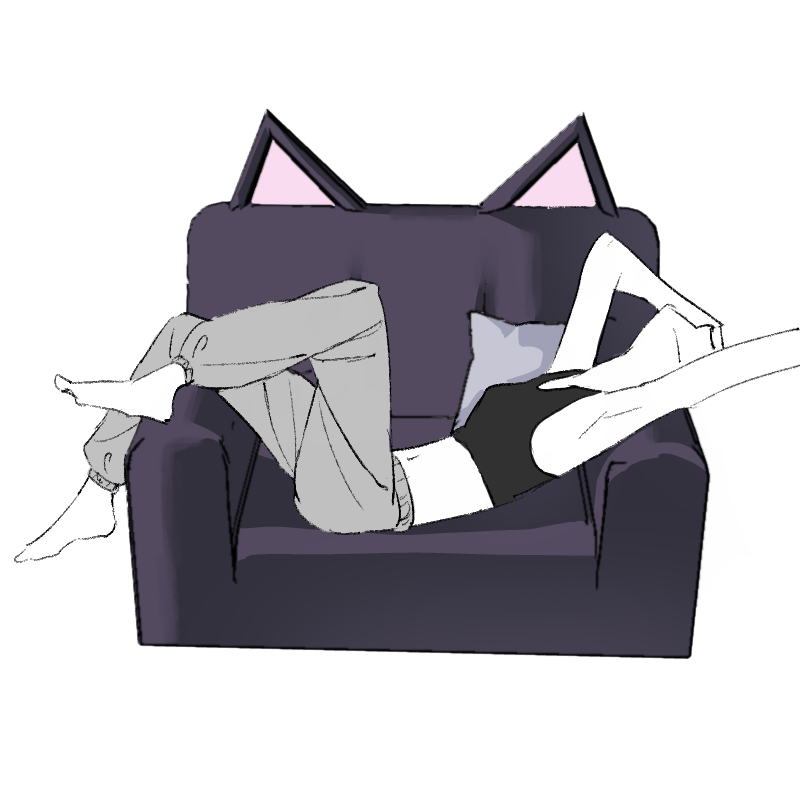
當你對 3D 模型的效果滿意時,可以點擊篩選中的下拉選單,點選快速效果>套用到目前圖層,接著會跳出兩個線條畫選項。隨你調整設定,你就能擁有自己的貓咪沙發。
使用範例:
讓你的創意隨心所欲地發揮。這是我的第一台模型,如果看起來怪怪的或尺寸不夠,先跟大家說聲抱歉!
After you load in the 3d model, you can configure the way that you like by messing around with scale, perspective, direction of sunlight, etc.
Whenever you are satisfied with the way the 3d model looks, you can click on the dropdown menu in filter, click on Quick Effects > Apply to current layer, and then 2 options of line art will pop up. Mess around with the settings as you'll like and you'll have your own cat couch.
Usage Example:
Allow your creativity to do whatever you'd like. This is my first model, so I apologize in advance if it happens to look weird or lacks in dimensions!
材料 Material
-
預設素材 Default material

分配 Allocate
-
預設配置 Default layout

可動部件 Movable parts
-
可移動性 Movability



「kreel008」的其他素材

「3D物件」的人氣素材


最新素材




徽章
-
 MVP ◆針對問題投稿了眾多適切的回答,對社群有顯著貢獻的用戶。每3個月一次,會依據期間內獲得的點數選出MVP用戶,並進行表揚。
 -
 NVP(New Valuable Player) ◆繼MVP後,對社群營運做出良好貢獻的用戶。將從不曾獲選為MVP的用戶中,依據獲得的點數進行評選、表揚。
 -
 官方推廣大使 ◆從被證明為優良回答用戶的MVP獲獎者中選出社群中最優異的回答者。並經審查後由本社委託就任。※舊名稱為「Evangelist」
 -
 CELSYS公認Moderator ◆Moderator為會使用日文及其他語言的CELSYS公認工作人員。由於並非軟體或創作的專業人士,Moderator無法直接為用戶解決疑問,但能在語言、交流方面提供支援,幫助用戶們順利地進行溝通。
 -
 CELSYS官方為與營運相關的官方帳號。