



圖層模板方便製作魔法陣。 Layer template for easily making magic circles.
這是我在設計視覺小說魔法陣時設置的一組層次和尺子。統治者在可能的情況下被保留。一開始除了圓圈外,所有層都拆掉。只要開啟你想要的效果,合併到新圖層,然後使用你想要的效果。如果想增加更多有趣的元素,可以加圓形文字、有圖案的筆刷等等。「Smart Shape」非常適合畫出更多細節。
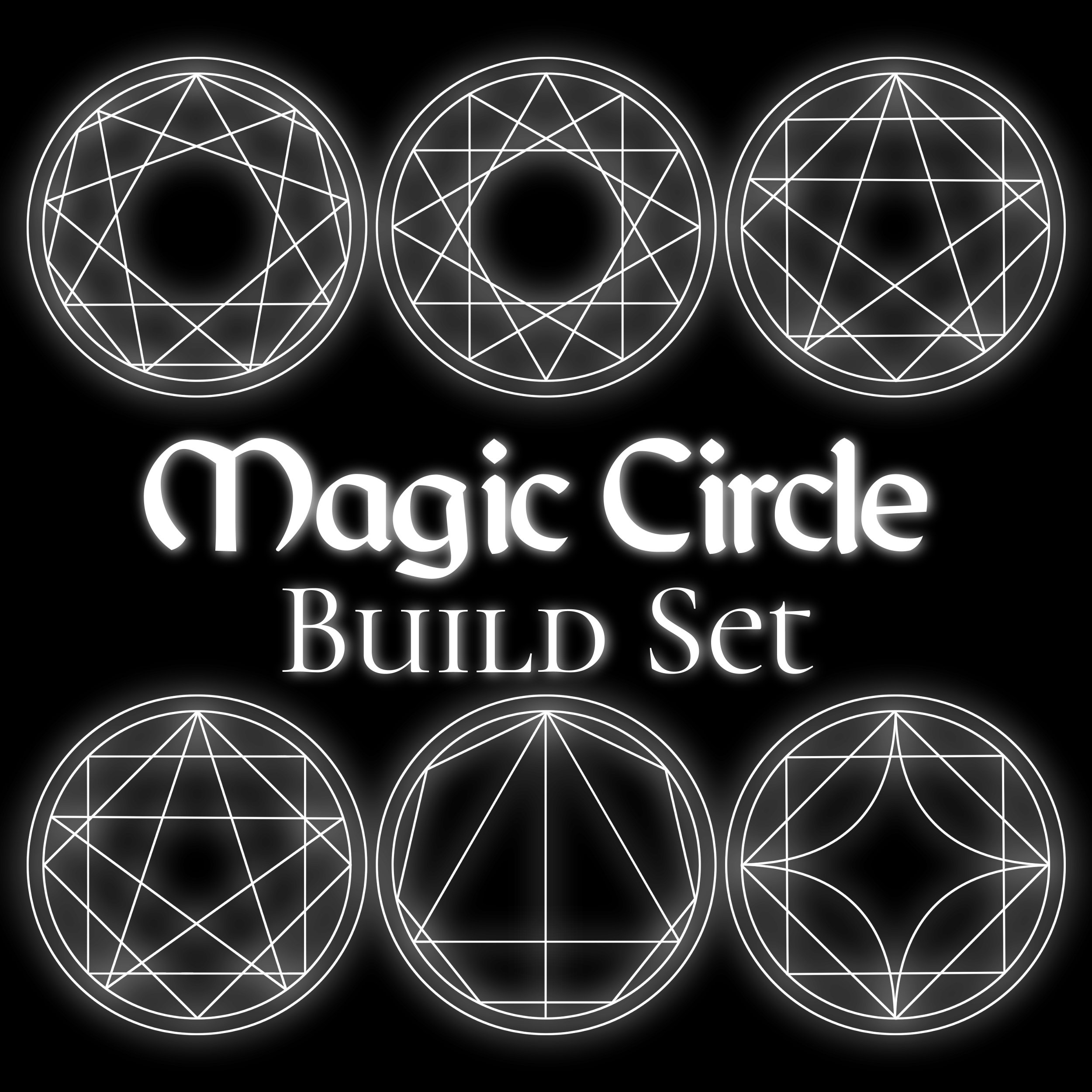

我試著保持整潔,但這些數字並不完美。有些形狀組合一開始可能會稍微錯位,但所有東西都是向量圖層,應該很容易調整。專業建議:使用「垂直/水平中心對齊」來幫助整齊排列。
要加光,複製你的魔法陣並模糊它。高斯模糊和徑向模糊效果很好。
包含的形狀(如下圖):
圓形、三角形、方塊與正方形
5到12個尖角星形多邊形
5到12個尖多邊形
圓形、三角形、方塊與正方形
5到12個尖角星形多邊形
5到12個尖多邊形
玩得開心!希望對你有幫助。:)

It's a set of layers and rulers I set up while designing magic circles for my visual novel. Rulers are preserved where possible. It starts with all the layers off except the circles. Just turn on the ones you want, merge to a new layer, and then use whatever effects you'd like. To add more fun elements, you could add circular text, patterned brushes, etc. "Smart Shape" is great for drawing in more details.
I tried to be tidy, but these are not mathematically perfect. Some combinations of shapes might come out slightly mis-aligned at first, but everything is vector layers so it should be easy to adjust. Pro tip: Use "Align Vertical/Horizontal Centers" to help line things up neatly.
To add a glow, duplicate your magic circle and blur it. Gaussian and radial blurs work well.
Shapes included (pictured below):
Circles, triangles, diamonds and squares
5 to 12 pointed star polygons
5 to 12 pointed polygons
Circles, triangles, diamonds and squares
5 to 12 pointed star polygons
5 to 12 pointed polygons
Have fun! I hope it's useful. :)






「doodlemancy」的其他素材


「圖層範本」的人氣素材


最新素材










徽章
-
 MVP ◆針對問題投稿了眾多適切的回答,對社群有顯著貢獻的用戶。每3個月一次,會依據期間內獲得的點數選出MVP用戶,並進行表揚。
 -
 NVP(New Valuable Player) ◆繼MVP後,對社群營運做出良好貢獻的用戶。將從不曾獲選為MVP的用戶中,依據獲得的點數進行評選、表揚。
 -
 官方推廣大使 ◆從被證明為優良回答用戶的MVP獲獎者中選出社群中最優異的回答者。並經審查後由本社委託就任。※舊名稱為「Evangelist」
 -
 CELSYS公認Moderator ◆Moderator為會使用日文及其他語言的CELSYS公認工作人員。由於並非軟體或創作的專業人士,Moderator無法直接為用戶解決疑問,但能在語言、交流方面提供支援,幫助用戶們順利地進行溝通。
 -
 CELSYS官方為與營運相關的官方帳號。