



CMYK 圖層設置與粗糙重複的 screentone 圖案材質 CMYK layer setup and gritty repeating screentone pattern materials
好,我從故障排除礦坑回來,帶回了我之前上傳的圖層新版本。這個資料夾被重新組織,將資料夾按顏色分組,而不是依照螢幕色調密度分組,方便用來準備 Riso 印刷的檔案,或是用來做成品,呈現類比印刷媒體的效果。

跟上次一樣,打開資料夾,在圖層上畫出 10%、20%、50%、70% 和 100% 的填充,分別是青色、洋紅色、黃色和黑色調。
要更改螢幕色調貼圖的縮放,請選擇物件編輯器,然後到工具屬性視窗更改「縮放比例」。這樣點會變大或變小。

當你有喜歡的顏色後,如果你想要這些版面的平面黑白版本用於列印,可以關閉色彩層效應,讓點點重新變黑。

如果你想清理這些圖層,當點是黑白時,你可以選擇整個資料夾,然後點到「合併選取的圖層」,將它們攤平成一個圖層,這個圖層應該會自動成為標籤的顏色。(如果要這麼做,點必須是黑白的,否則壓平後會變淺)。我把資料夾名稱改成黃色、洋紅色和青色的十六進位代碼,如果顏色因某些原因無法使用,需要手動更改。

有很多方法可以調整這些設計,讓它們看起來更傳統,但不會讓它們變平,這只是如果你覺得層次多讓你壓力大,想要簡化。
現在你可以錯置層次,加入紋理和髒污,丟紙張貼圖,隨你喜歡怎麼做都行

最後一個故障排除,你可能會注意到 CMYK 圖層中畫的東西在資料夾下方的圖層上看起來很不透明(例如,如果你底部是紙張材質而不是上方,點點看起來會像白色填充,而不是相乘)。我是故意這麼做的,這樣如果底部有顏色參考圖層,我看不到我工作時會透過填充,但如果你不想這樣,可以把資料夾的圖層模式從「法線」改成「通過」。
除此之外,我放了一大堆重複音,你可以盡情玩弄。大多數都有不同版本,因為它們的雜訊和顆粒感不同,所以你可以有變化,而不是每張照片都有同樣的小刮痕和刮痕。

Okay, I have returned from the troubleshooting mines with a new version of the layer setup I uploaded earlier. This one is reorganized so the folders are grouped by colour rather than by screentone density to make it easier to use for things like prepping files for Riso printing, or scuffing up the images to make finished pieces with an analogue print media appearance.
Same drill as last time, open the folder and draw on the layers to create fills at 10%, 20%, 50%, 70%, and 100% tone density on the Cyan, Magenta, Yellow, and Black tones.
To change the scale of the screentone texture, select the object editor and go to the Tool Properties window to change “scale ratio”. This will make the dots bigger or smaller.
Once you have the colours how you like them, if you want flat black and white versions of these plates for something like printing you can turn off the colour layer effect to make the dots black again.
If you want to clean up these layers, while the dots are in black and white, you can select an entire folder and go to “merge selected layer’ to flatten them into one layer that should automatically be the color of the label. (dots need to be black and white if you do this, or they’ll get lighter when you flatten them). I made the folder name the hex codes for Yellow, Magenta, and Cyan if the colours aren’t working for whatever reason and you need to manually change them.
There are a whole bunch of ways to mess with these and make them look more traditional without flattening, this is just if it stresses you out to have a lot of layers and want to simplify.
Now you can offset the layers and add texture and grime, throw a paper texture, whatever you want to make it look how you want
One last troubleshooting thing, you might notice that things you draw in the cmyk layers look opaque on top of any layers under the folder (as in, if you have a paper texture at the bottom rather than on top, the dots will look like they have a white fill around them rather than multiply) I did this on purpose so if I have a reference layer for colours at the bottom I can’t see it through the fills while I work, but if you don’t want it to do that you can change the layer mode of the folder from “normal” to “through”.
Other than that, I put a whole pile of repeating tones in there you can play with to your heart’s content. There are different variants of most of them because they all have different noise and grit on them, so you can have some variety and not the same little nicks and scuffs in every image.
音調 Tones
-
Grungetone90A Grungetone90A
-
Grungetone75B Grungetone75B
-
Grungetone75A Grungetone75A
-
Grungetone75C Grungetone75C
-
Grungetone70A Grungetone70A
-
Grungetone70B Grungetone70B
-
Grungetone70C Grungetone70C
-
Grungetone40A Grungetone40A
-
Grungetone40B Grungetone40B
-
Grungetone40C Grungetone40C
-
Grungetone25A Grungetone25A
-
Grungetone25B Grungetone25B
-
Grungetone25C Grungetone25C
-
Grungetone20A Grungetone20A
-
Grungetone20B Grungetone20B
-
Grungetone20C Grungetone20C
-
垃圾搖滾10A GrungeTone10A
-
Grungetone10B Grungetone10B
-
Grungetone10C Grungetone10C






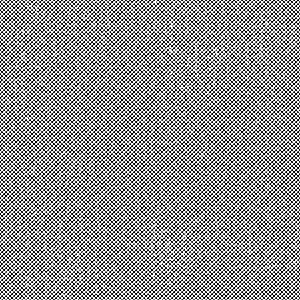




圖層設置 Layer Setup
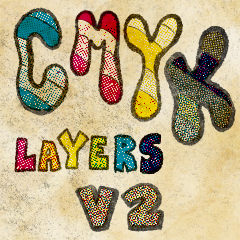






「Coelasquid」的其他素材


「素材集」的人氣素材


最新素材


徽章
-
 MVP ◆針對問題投稿了眾多適切的回答,對社群有顯著貢獻的用戶。每3個月一次,會依據期間內獲得的點數選出MVP用戶,並進行表揚。
 -
 NVP(New Valuable Player) ◆繼MVP後,對社群營運做出良好貢獻的用戶。將從不曾獲選為MVP的用戶中,依據獲得的點數進行評選、表揚。
 -
 官方推廣大使 ◆從被證明為優良回答用戶的MVP獲獎者中選出社群中最優異的回答者。並經審查後由本社委託就任。※舊名稱為「Evangelist」
 -
 CELSYS公認Moderator ◆Moderator為會使用日文及其他語言的CELSYS公認工作人員。由於並非軟體或創作的專業人士,Moderator無法直接為用戶解決疑問,但能在語言、交流方面提供支援,幫助用戶們順利地進行溝通。
 -
 CELSYS官方為與營運相關的官方帳號。