


Elise 藝術家標記器(版本 1.0) (Elise Artist Marker (Version 1.0)) Elise Artist Marker (Version 1.0)
素材ID:2247296
-
9,377


藝術家標記組,具有類比傳統媒介品質。由伊莉絲製作。 Artist marker set that has an analogue traditional media quality. Made by Elise.
藝術家筆組 (前版本 1.0)

我想要一把容易上手的畫筆,能模擬用美術筆在紙上畫畫的感覺!
它的外觀介於乾麥克筆和酒精墨水筆之間。

== 筆刷類型 ==

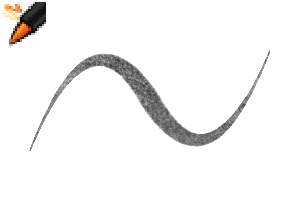
1. 藝術家標記: 原版的記號筆!
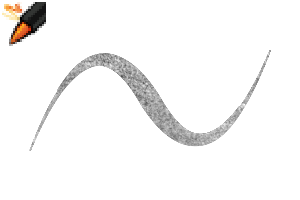
2. 重點標記: 不透明的彩色筆版本。這支筆很適合描繪白色或淺色。
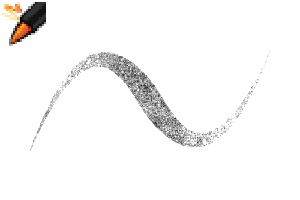
3. Blender: 一款能混合顏色,呈現平滑但仍具質感的混合筆。
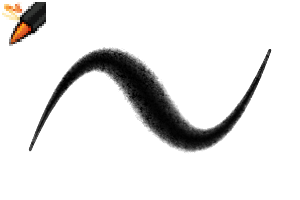
4. 橡皮擦: 一款有紋理的橡皮擦,搭配馬克筆效果很好。
== 縮時攝影範例 ==

這張範例圖片完全是用這套藝術家標記器上色的!
* 底下有一層底紙。
* 我用單一透明圖層在上面繪製了插畫。
* 我像用真正的麥克筆畫畫一樣,堆疊顏色。我用螢光筆在結尾加了幾個細節!
== 材質設定 ==
專為 600dpi 高解析度數位藝術設計。(約4000像素畫布。)
如果你用的是較小或較大的畫布,可能需要調整材質大小!
你的紋理應該會像下面中間的方格一樣平衡!
如有需要,請調整材質大小,直到畫筆變得美觀。^^

翻譯如下:
最上面的文字寫著「材質密度」,設定為 40。(你不需要更改這個號碼。)
第二行文字寫著「比例」。這是你想調整的數字,以改變貼圖大小!
你可以在「工具屬性」選單中找到這個設定。
.: 謝謝你 :.
- 伊莉絲 -
這裡展示的所有材料、插圖和角色都是我自己的原創創作。
【註】我不常上線,無法閱讀留言。如果需要幫助:請查看官方教學和論壇,或聯絡 Clip Studio 客服團隊。謝謝你的理解!
這裡展示的所有材料、插圖和角色都是我自己的原創創作。
【註】我不常上線,無法閱讀留言。如果需要幫助:請查看官方教學和論壇,或聯絡 Clip Studio 客服團隊。謝謝你的理解!
Artist marker pen set (previous version 1.0)
I wanted an easy-to-use brush that would mimic the feeling of drawing with an artist marker on paper!
Its appearance is somewhere between a dry marker and an alcohol ink pen.
== Brush Types ==
1. Artist Marker: The original marker pen!
2. Highlight Marker: An opaque version of the marker pen. This pen is good for illustrating white or pale colors.
3. Blender: A blender pen that mixes colors for a smooth but still textured look.
4. Eraser: A textured eraser that works well with the markers.
== Timelapse Example ==
This example image is colored entirely using this artist marker set!
* There is a base paper layer underneath.
* I illustrated the artwork in a single transparent layer overtop.
* I built up the colors as if drawing with a real marker. I used the highlight marker to add a few details at the end!
== Texture Settings ==
Designed for 600dpi high resolution digital art. (Approximately 4000px canvas.)
If you use a smaller or larger canvas, you may need to adjust the texture size!
Your texture should look nicely balanced like the center square below!
If needed, please adjust the texture size until the brush is beautiful. ^^
For translation:
The top line of text says "texture density" and is set to 40. (You do not need to change this number.)
The second line of text says "scale ratio." This is the number you want to adjust to change the texture size!
You can find this setting in the "tool property" menu.
.: Thank You :.
- Elise -
All materials, illustrations, and characters shown here are my own original creations.
【Note】 I am not online often and cannot read comments. If you need help: check official tutorials and forums, or contact Clip Studio support team. Thank you for understanding!
All materials, illustrations, and characters shown here are my own original creations.
【Note】 I am not online often and cannot read comments. If you need help: check official tutorials and forums, or contact Clip Studio support team. Thank you for understanding!
藝術家標記 Artist Markers





「mh.elise」的其他素材


「素材集」的人氣素材


最新素材




徽章
-
 MVP ◆針對問題投稿了眾多適切的回答,對社群有顯著貢獻的用戶。每3個月一次,會依據期間內獲得的點數選出MVP用戶,並進行表揚。
 -
 NVP(New Valuable Player) ◆繼MVP後,對社群營運做出良好貢獻的用戶。將從不曾獲選為MVP的用戶中,依據獲得的點數進行評選、表揚。
 -
 官方推廣大使 ◆從被證明為優良回答用戶的MVP獲獎者中選出社群中最優異的回答者。並經審查後由本社委託就任。※舊名稱為「Evangelist」
 -
 CELSYS公認Moderator ◆Moderator為會使用日文及其他語言的CELSYS公認工作人員。由於並非軟體或創作的專業人士,Moderator無法直接為用戶解決疑問,但能在語言、交流方面提供支援,幫助用戶們順利地進行溝通。
 -
 CELSYS官方為與營運相關的官方帳號。