



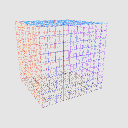
線框模型用於以透視方式繪製都市環境與景觀。
Wireframe model for sketching urban environments and landscapes with perspective.

* 將模型加入檔案。
* 選擇透視角度與變形程度。
* 將該圖層複製兩次,使模型有三層。
* 建立圖層用於速寫。
* 將帶有模型的透視尺從一個圖層轉移到草圖圖層,並刪除沒有尺的 3D 圖層。

* 在最後一層有模型時,只保留邊界資料夾,並且可以關閉其中一面牆、天花板或地板。

* 在模型圖層中,保持包含 X-Y-Z 軸的資料夾可見。

* 使用可移動零件滑桿移動 X-Y-Z 軸並開始草圖。

工具使用的範例。

* Add the model to the file.
* Choose the angle and degree of distortion in the perspective.
* Duplicate the layer twice so that you have 3 layers of the model.
* Create a layer for sketching.
* Transfer the perspective rulers from one layer with the model to the sketch layer and delete the 3D layer that is left without the ruler.
* On the last layer with the model, leave only the Boundaries folder visible, and you can also disable one of the walls, ceiling, or floor.
* On one of the layers with the model, keep the folder with the X-Y-Z axes visible.
* Use the movable part sliders to move the X-Y-Z axes and start sketching.
Example of tool use.
材料 Material
-
預設素材 Default material

分配 Allocate
-
預設配置 Default layout
可動部件 Movable parts
-
X X
-
Y Y
-
Z Z







「zerostrifex」的其他素材


「3D物件」的人氣素材


最新素材









徽章
-
 MVP ◆針對問題投稿了眾多適切的回答,對社群有顯著貢獻的用戶。每3個月一次,會依據期間內獲得的點數選出MVP用戶,並進行表揚。
 -
 NVP(New Valuable Player) ◆繼MVP後,對社群營運做出良好貢獻的用戶。將從不曾獲選為MVP的用戶中,依據獲得的點數進行評選、表揚。
 -
 官方推廣大使 ◆從被證明為優良回答用戶的MVP獲獎者中選出社群中最優異的回答者。並經審查後由本社委託就任。※舊名稱為「Evangelist」
 -
 CELSYS公認Moderator ◆Moderator為會使用日文及其他語言的CELSYS公認工作人員。由於並非軟體或創作的專業人士,Moderator無法直接為用戶解決疑問,但能在語言、交流方面提供支援,幫助用戶們順利地進行溝通。
 -
 CELSYS官方為與營運相關的官方帳號。