


[免費] 5_FRAMES 模板 / 漫畫條紋 ([FREE] 5_FRAMES TEMPLATE / COMIC STRIPE) [FREE] 5_FRAMES TEMPLATE / COMIC STRIPE
素材ID:2239975
-
214


框架範本,資料夾與圖層分開,方便使用漫畫條紋或構圖。 Framing Template with folders and layers separated for convenience, easy use for Comic Stripes or Compositions.
框架範本,資料夾和圖層分開,方便且易於使用。 [用於漫畫條紋或構圖]
*(因應發文指引重新發文)
1. 選擇你的 畫布專案 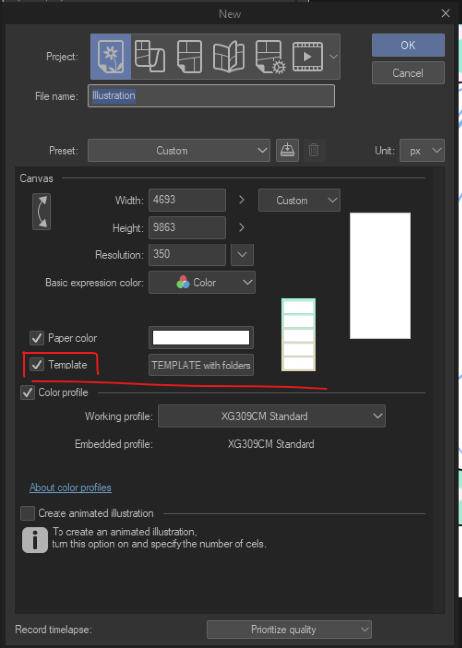
在「範本」 裡檢查你的範本是否被標記,如果有,就繼續搜尋。
2. 搜尋「5_frames」標籤或「模板」。
3. 有5個框架,每個框架都有對應的資料夾和推薦信。
每個資料夾都有框架邊框、框架背景和一個線稿資料夾。

4. 在最後一個資料夾(紫色那個)裡,你可以進入相應的漸層地圖圖層,並依照喜好更改背景顏色。
>>免責聲明:如果你已經下載了前一個版本,抱歉造成不便......因為發文規範,這些內容現在 已經被刪除了。 所以我修改過,現在又重新發佈一次,不確定版主會不會也把這篇刪掉(不管什麼原因),但我擁有以下這些作品。所以如果他們再下架,抱歉:((我真的希望他們不要下架。<<<
**你可以如何使用的範例**


>>你可以用它來做構圖學習、有趣的漫畫條紋或其他你想用的。
我可能不夠完善,但希望你會喜歡,也能對你有幫助。:)<<
我可能不夠完善,但希望你會喜歡,也能對你有幫助。:)<<
Framing Template with folders and layers separated for convenience and easy use. [For Comic Stripes or Compositions]
*(reposting because of posting guidelines)
1. Select your Canvas Project
In "Template" check if yours is marked, if so then proceed to search.
2. Search for "5_frames"tag or "template".
3. There are 5 frames and each of them have their respective folders with colors.
Each folder has the frame border, the frame background and a folder for Lineart.
4. In the last folder (the purple one) you can go in the respective Gradient Map layer and change the background colors to your liking.
>>Disclaimer: If tou already download the previous one, Im sorry for the inconvenience... they are deleted now because of posting guidelines. So I revised and im reposting it again, im not sure if the moderator will take this one down too (for whatever reason) but I OWN these arts below. So if they take down again, I'm sorry :(( I really hope they won't.<<<
**Examples of how you can use**
>>You can Use it for Compositions Studies, Fun Comics Stripes or whatever you feel like it.
I may be lacking, but I hope you like it and it can be helpful to you as well. :) <<
I may be lacking, but I hope you like it and it can be helpful to you as well. :) <<





「圖層範本」的人氣素材


最新素材




徽章
-
 MVP ◆針對問題投稿了眾多適切的回答,對社群有顯著貢獻的用戶。每3個月一次,會依據期間內獲得的點數選出MVP用戶,並進行表揚。
 -
 NVP(New Valuable Player) ◆繼MVP後,對社群營運做出良好貢獻的用戶。將從不曾獲選為MVP的用戶中,依據獲得的點數進行評選、表揚。
 -
 官方推廣大使 ◆從被證明為優良回答用戶的MVP獲獎者中選出社群中最優異的回答者。並經審查後由本社委託就任。※舊名稱為「Evangelist」
 -
 CELSYS公認Moderator ◆Moderator為會使用日文及其他語言的CELSYS公認工作人員。由於並非軟體或創作的專業人士,Moderator無法直接為用戶解決疑問,但能在語言、交流方面提供支援,幫助用戶們順利地進行溝通。
 -
 CELSYS官方為與營運相關的官方帳號。