



我是飛天熊貓
(摘要:最後)

Pands 資料夾表單
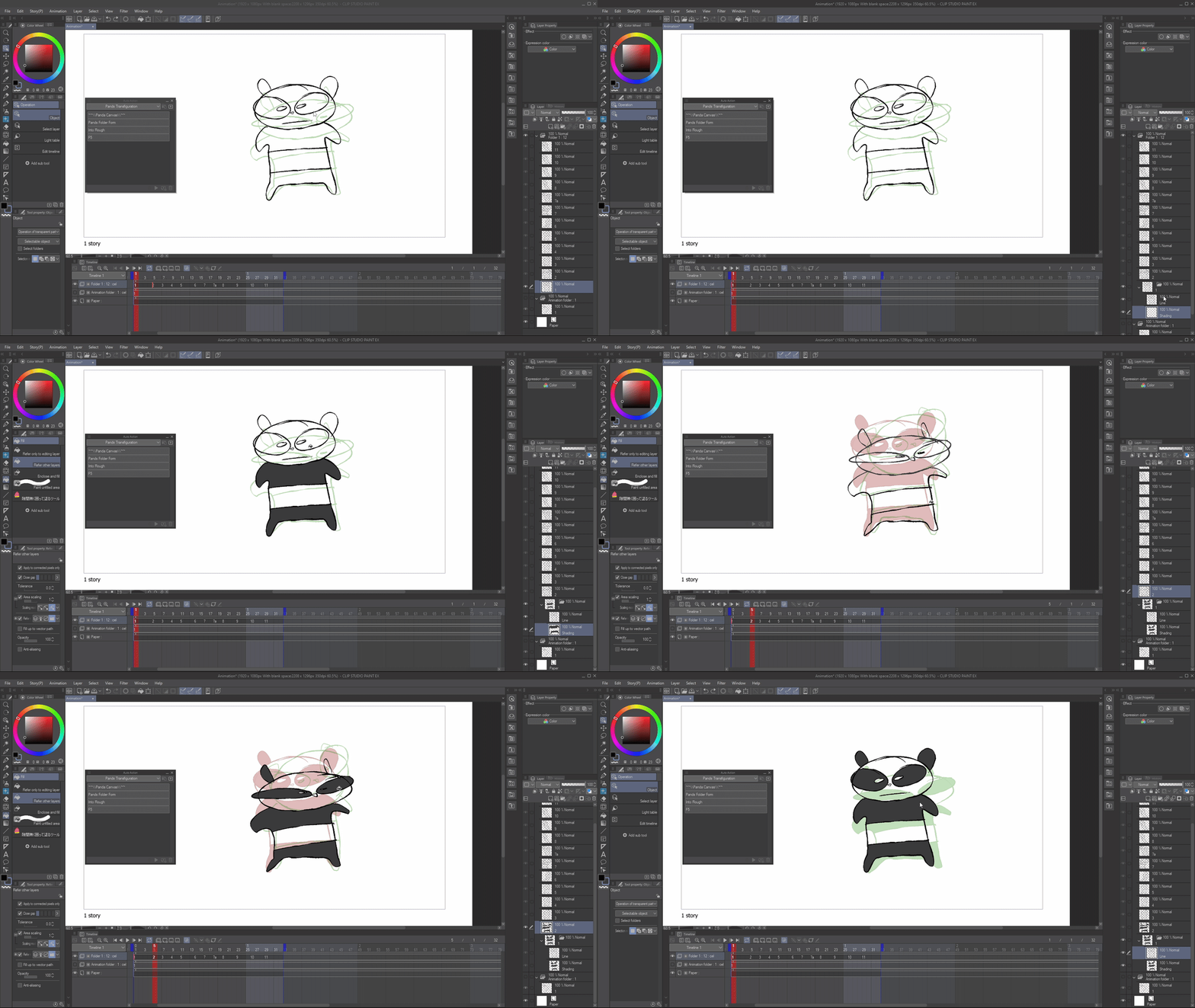
進入粗獷
- 我用這個自動動作,是把它設成鍵盤快捷鍵,然後調成 F5。我通常會用 「F5 全層」 而不是單層,但這取決於你自己。
- 它就是「插入框架」,但沒有那些複雜的功能。只要按個按鈕。

*為什麼是資料夾?

感謝你使用這個包:D
我是為自己做這些自動操作的,過了一陣子我才意識到......既然他們幫了我這麼多,為什麼不把它們送給你們呢!
我是為自己做這些自動操作的,過了一陣子我才意識到......既然他們幫了我這麼多,為什麼不把它們送給你們呢!
以下是這些工具的功能簡介:
熊貓帆布
熊貓帆布
- 動畫開始時,我會用這個來設置我的畫布。
(我其實不太常用這個,只是為了好玩而設。)
Pands 資料夾表單
- 我的麵包和奶油。
- 我有時會直接在一層上做直線粗糙動畫。「 Pands 資料夾表單」,它會立刻將單一框架變成一個資料夾*,分別命名為「線條」 和「陰影」。
- 非常適合快速製作動畫、粗剪和動畫分鏡。如果我忘了設定資料夾,我會用這個自動動作。
(我很喜歡搭配冰淇淋填充工具(Content ID:1759448)來使用 )
進入粗獷
- 資料夾表單,但不是線條,而是變成粗略圖,如果你想畫線也可以。我其實不太用這個,只是個實驗。
F5 + F5 全層
- F5 是 Adobe Animate 常見的快捷鍵,用來增加幀數。
- 我用這個自動動作,是把它設成鍵盤快捷鍵,然後調成 F5。我通常會用 「F5 全層」 而不是單層,但這取決於你自己。
- 它就是「插入框架」,但沒有那些複雜的功能。只要按個按鈕。

*為什麼是資料夾?
動畫經常使用資料夾,養成使用資料夾的習慣是件好事。
重點摘要:
我最常用的是「Pands Folder Form」和「F5 All Layers」。
我最常用的是「Pands Folder Form」和「F5 All Layers」。
其他的只是為了好玩。
希望這能激勵你嘗試自己做自動動作,並享受動畫:D
THEFLYINGPANDA HERE
(tldr: at the end)
Pands Folder Form
Into Rough
- I use this auto action by setting it to a keyboard shortcut, and making it F5. I tend to use "F5 ALL LAYER" more than single layer but, it's up to you.
- It is simply "Insert Frame" but without all the finicky stuff. Just press a button.
*Why folders?
Thanks for using this pack :D
I made these auto actions for myself, and after a while I realised... why not give them out to you guys since they've helped me so much!
I made these auto actions for myself, and after a while I realised... why not give them out to you guys since they've helped me so much!
Here's a run down of what these do:
PANDA CANVAS
PANDA CANVAS
- At the beginning of an animation, I use this just to set up my canvas.
(I don't really use this much, it's just here for fun.)
Pands Folder Form
- My Bread and Butter.
- I sometimes just animate straight ahead roughs on 1 layer. "Pands Folder Form", and it instantly makes the Single Frame into a Folder* named: 'Line' and 'Shading'.
- GREAT for quick anims, roughs and animatics. If I forget to set up folders, I use this auto action.
(I really like to use this with the Ice Cream Fill Tool (Content ID:1759448))
Into Rough
- Folder Form but instead of line, it turns it into a rough, incase you wanted to line it. I don't really use this, it's just an experiment.
F5 + F5 All Layer
- F5 is a common Adobe Animate keyboard shortcut to increase frames.
- I use this auto action by setting it to a keyboard shortcut, and making it F5. I tend to use "F5 ALL LAYER" more than single layer but, it's up to you.
- It is simply "Insert Frame" but without all the finicky stuff. Just press a button.
*Why folders?
Anime often uses Folders and it's good to get into the habit of using folders.
TLDR:
I use 'Pands Folder Form' and 'F5 All Layers' the most.
I use 'Pands Folder Form' and 'F5 All Layers' the most.
The others are just for fun.
I hope this inspired you to try making your own auto actions and having fun with animation :D







「TheFlyingPanda」的其他素材

「自動動作」的人氣素材


最新素材



徽章
-
 MVP ◆針對問題投稿了眾多適切的回答,對社群有顯著貢獻的用戶。每3個月一次,會依據期間內獲得的點數選出MVP用戶,並進行表揚。
 -
 NVP(New Valuable Player) ◆繼MVP後,對社群營運做出良好貢獻的用戶。將從不曾獲選為MVP的用戶中,依據獲得的點數進行評選、表揚。
 -
 官方推廣大使 ◆從被證明為優良回答用戶的MVP獲獎者中選出社群中最優異的回答者。並經審查後由本社委託就任。※舊名稱為「Evangelist」
 -
 CELSYS公認Moderator ◆Moderator為會使用日文及其他語言的CELSYS公認工作人員。由於並非軟體或創作的專業人士,Moderator無法直接為用戶解決疑問,但能在語言、交流方面提供支援,幫助用戶們順利地進行溝通。
 -
 CELSYS官方為與營運相關的官方帳號。