



我重新設計了我以前為網路漫畫設計的複雜圖層模板,因為看到有些東西讓人困惑或運作不像我預期的那樣。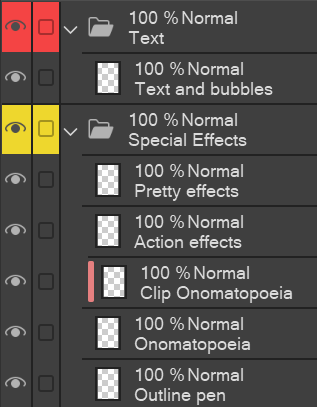
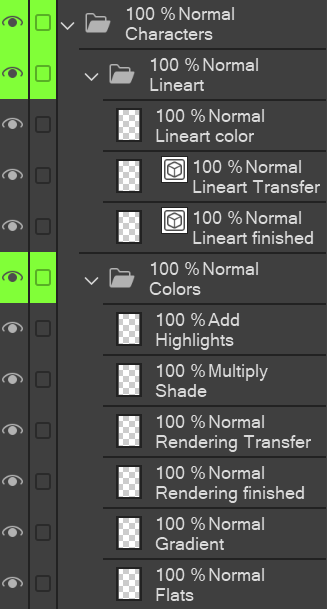

如果你想要非常精緻的圖層模板,可以搜尋「Layer Template: Webtoon (very elaborate)」或點我個人檔案的第一篇貼文:)
使用方法:
- 把所有幀圖層都拉到「Frames (3D in here)」資料夾裡。用智慧選取工具在框架內繪圖(但要在其他圖層,這樣就不用每個面板都貼模板)。由於 3D 模型無法停留在選定區域,你必須把它們拉進畫面。
- 在「Sketch」資料夾裡,我喜歡先在「非常粗略的草圖」圖層做分鏡,先思考數值,再開始做更複雜的草圖。
- 我使用的系統是「X 完成」和「X 轉錄」(分別在 草圖、 背景和 角色 資料夾中)。我會先在「轉印」圖層畫畫,滿意後,使用「轉印到下層」功能(在「圖層」下)將畫轉到「完成」圖層。這樣我可以先專注於畫頭髮線條,不用擔心擦掉臉部線條的部分。[我比較喜歡用「轉移」功能勝過「合併圖層」,因為這樣我就不用每次都新增圖層。
- 特 效 圖層的說明:「輪廓筆」適用於我會用輪廓筆處理的所有效果,例如聊天/笑聲、惱怒、動作線條、像是竊笑 等聲音詞 。「擬聲詞」是用於像 BOOM! 這種大型音效 ,而「剪輯」版本則是用來做漸層或圖案。
- 畫布黑 是為了那些畫布應該是黑色,但你無法讓紙張變黑,因為不是整頁的場景;直接用桶子工具就好。
- 在 文字模式中,我會把所有文字和對話框合併成一層,避免內容太複雜;你仍然可以分別移動每個零件。

I´ve reworked my old elaborate layer template for webtoons after seeing how some things were confusing/ not working how I thought they would.
If you want a veeeery elaborate layer template, search for "Layer Template: Webtoon (very elaborate)" or go to the first post on my profile :)
How to use:
- Pull all your frame layers into the "Frames (3D in here)" folder. Use the Smart selection tool to draw inside the Frames (but on the other layers, so you don´t need to paste the template for every panel). Since 3D models can´t stay in the selected area, you have to pull those into the frame.
- In the "Sketch" folder, I like to first do the storyboard on the "very rough sketch" layer, and think the values through, before I move on to the more elaborate sketch.
- I work with a system of "X finished" and "X Transfer" (to be found in Sketch, Background, and Characters folders). I draw on the "Transfer" layer first, and once I´m satisfied, I use the "Transfer to lower layer" function (under "Layer") to transfer it onto the "finished" layer. This way, I can focus on drawing e.g. only the hair lineart first and not worry about erasing parts of the face lineart. [I prefer the "transfer" function to the "merge layers" function, because this way, I don´t need to create a new layer every time.
- Explanations to the Special Effects layers: "Outline pen" is for every effect I would use the outline pen for, e.g. chatter/ laughing, annoyed, movement lines, sound words like snicker etc. "Onomatopoeia" is for the big sound effects like BOOM! and the "clip" version is in case you want to do gradients or patterns inside.
- Canvas black is for those scenes where your canvas should be black but you can´t make the paper black because it´s not the entire page; just use the bucket tool.
- in Text, I merge all my texts and speech bubbles into one layer so it doesn´t get overwhelming; you can still move each part separately anyway.


「Arifryer」的其他素材

「圖層範本」的人氣素材


最新素材


徽章
-
 MVP ◆針對問題投稿了眾多適切的回答,對社群有顯著貢獻的用戶。每3個月一次,會依據期間內獲得的點數選出MVP用戶,並進行表揚。
 -
 NVP(New Valuable Player) ◆繼MVP後,對社群營運做出良好貢獻的用戶。將從不曾獲選為MVP的用戶中,依據獲得的點數進行評選、表揚。
 -
 官方推廣大使 ◆從被證明為優良回答用戶的MVP獲獎者中選出社群中最優異的回答者。並經審查後由本社委託就任。※舊名稱為「Evangelist」
 -
 CELSYS公認Moderator ◆Moderator為會使用日文及其他語言的CELSYS公認工作人員。由於並非軟體或創作的專業人士,Moderator無法直接為用戶解決疑問,但能在語言、交流方面提供支援,幫助用戶們順利地進行溝通。
 -
 CELSYS官方為與營運相關的官方帳號。