


[限時免費]骨架基地 ([Free for limited time] Skeleton Base) [Free for limited time] Skeleton Base


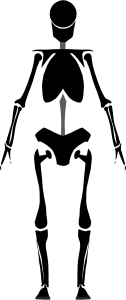
可擺姿勢骨骼底座設計,適合快速擺姿勢、解剖規劃與人物構建。 Poseable Skeleton Base designed for fast posing, anatomy planning, and figure construction.
骨架保持 簡潔且易讀,方便調整比例和角度,避免視覺雜亂。 你可以自由調整大小、旋轉和重新上色骨架,以符合你的藝術風格。
使用方法
-
從 Clip Studio Assets 下載該資產
-
拖放到你的畫布上
-
打開包含骨架零件的圖層資料夾
-
選擇一個身體部位 (手臂、腿、軀幹、頭部等)
-
用 Transform / Move Tool 來調整姿勢。

The skeleton is kept simple and readable, making it easy to adjust proportions and angles without visual clutter. You can freely resize, rotate, and recolor the skeleton to match your art style.
HOW TO USE
-
Download the asset from Clip Studio Assets
-
Drag & drop it onto your canvas
-
Open the layer folder containing the skeleton parts
-
Select a body part (arms, legs, torso, head, etc.)
-
Use Transform / Move Tool to adjust the pose.
第一類 Category 1


 檢舉問題素材

 取得完成。
 了解素材保存位置
 了解讀取方法


公開日期 : 10 months ago
更新日期 : 10 months ago





-
 MVP ◆針對問題投稿了眾多適切的回答,對社群有顯著貢獻的用戶。每3個月一次,會依據期間內獲得的點數選出MVP用戶,並進行表揚。
-
 NVP(New Valuable Player) ◆繼MVP後,對社群營運做出良好貢獻的用戶。將從不曾獲選為MVP的用戶中,依據獲得的點數進行評選、表揚。
-
 官方推廣大使 ◆從被證明為優良回答用戶的MVP獲獎者中選出社群中最優異的回答者。並經審查後由本社委託就任。※舊名稱為「Evangelist」
-
 CELSYS公認Moderator ◆Moderator為會使用日文及其他語言的CELSYS公認工作人員。由於並非軟體或創作的專業人士,Moderator無法直接為用戶解決疑問,但能在語言、交流方面提供支援,幫助用戶們順利地進行溝通。
-
 CELSYS官方為與營運相關的官方帳號。